

The module <WebVision> of subsystems “User Interfaces”
| Module: | WebVision |
| Name: | Operation user interface (WEB) |
| Type: | User interfaces |
| Source: | ui_WebVision.so |
| Version: | 0.9.1 |
| Author: | Roman Savochenko |
| Developers: | Roman Savochenko, Maxim Lysenko, Ksenia Yashina |
| Translated: | Maxim Lysenko |
| Description: | Web visual user interface for the project execution of visual control area (VCA). |
| License: | GPL |
Introduction
WebVision module provides a mechanism of the final visualization of the visual control area (VCA) in the OpenSCADA system. The module is based on WEB technologies (XHTML, JavaScript, CSS, AJAX). In its work, the module uses the data from the VCA engine ( module VCAEngine ).
Visual control area (VCA) is an integral part of the SCADA system. It applies to the client stations with a view to providing accessible information about the object and to for the the issuance of the control actions to the object. In various practical situations and conditions the VCA, based on different principles of visualization may by applied. For example, this may be the library of widgets QT, GTK+, ~ wxWidgets or hypertext mechanisms based technologies HTML, XHTML, XML, CSS, and JavaScript, or third-party applications of visualization, realized in various programming languages Java, Python, etc. Any of these principles has its advantages and disadvantages, the combination of which could become an insurmountable obstacle to the use of VCA in a practical case. For example, technologies like the QT library can create highly-reactive VCA, which will undoubtedly important for the operator station for control of technological processes (TP). However, the need for installation of that client software in some cases may make using of it impossible. On the other hand, Web-technology does not require installation on client systems and is extremely multi-platform (it is enough to create a link to the Web-server at any Web-browser) that is most important for various engineering and administrative stations, but the responsiveness and reliability of such interfaces is lower that actually eliminates the using of them at the operator of the TP stations.
OpenSCADA system has extremely flexible architecture that allows you to create external interfaces, including user and in any manner and for any taste. For example, the system configuration OpenSCADA as now available as by means of the QT library, and also the Web-based.
At the same time creation of an independent implementation of the VCA in different basis may cause the inability to use the configuration of one VCA into another one. That is inconvenient and limited from the user side, as well as costly in terms of implementation and follow-up support. In order to avoid these problems, as well as to create as soon as possible the full spectrum of different types of VCA ïðîåêò ñîçäàíèÿ êîíöåïöèè ÑÂÓ? is established. The result of this project - the direct visualization module based on the WEB technologies, the direct visualization module Vision and VCA engine VCAEngine.
1. Purpose
This module of the direct visualization of the VCA serves only for the execution of interfaces of the VCA in the area of WEB-technologies.
The user interface is formed in the WEB-browser, by reference to the WEB-server and receiving from it XHTML-document over HTTP. In this case, the WEB-server - OpenSCADA system, which supports standard communication mechanisms of the TCP-networks (module Transport.Sockets), hypertext transfer protocol (module Protocol.HTTP), as well as encryption of traffic between the browser and the server (Transport.SSL). On this basis, to gain access to the user interface provided by this module, you need to configure the transport in the OpenSCADA (Transport.Sockets or Transport.SSL) in conjunction with the protocol HTTP (Protocol.HTTP). In the delivery of the OpenSCADA system there are configuration files containing settings of the Transport.Sockets for ports 10002 and 10004. Consequently, the interface of the module in the default configuration of the OpenSCADA will be available at URL:  http://localhost:10002 or http://localhost:10004.
The final version of the VCA module, built on the basis of this module, will provide:
- three levels of complexity in the formation of visualization interface which let organically to develop and apply the tools of the methodology from simple to complex:
- formation from the template frames through the appointment of the dynamics (without the graphical configuration);
- graphical formation of new frames through the use of already made visualization elements from the library (mimic panel);
- formation of new frames, template frames of the visualization elements in the libraries.
- building of the visualization interfaces of various complexity, ranging from simple flat interfaces of the monitoring and finishing with the full-fledged hierarchical interface used in SCADA systems;
- providing of the different ways of formation and configuration of the user interface, based on different graphical interfaces (QT, Web, Java ...) and also through the standard management interface of OpenSCADA system;
- change of dynamics in the process of execution;
- building of the new template frames on the user level and the formation of the frames libraries, specialized for the area of application (eg the inclusion of frames of parameters, graphs and other items linking them to each other) in accordance with the theory of secondary using and accumulation;
- building of the new user elements of the visualization and the formation of the libraries of frames,specialized for the area of application in accordance with the theory of secondary using and accumulation;
- description of the logic of new template frames and user visualization elements as with the simple links, and also with the laconic, a full-fledged programming language;
- the possibility of the inclusion of the functions(or frames of computing of the functions) of the object model of OpenSCADA to the user elements of the visualization, actually linking the presentation of the algorithm of computing (for example, by visualizing the library of models of devices of TP for following visual modeling TP);
- separation of user interfaces and interfaces of visualization of data provides building the user interface in a single environment, and performance of it in many others (QT, Web, Java ...);
- the possibility to connect to the performing interface for monitoring and corrective actions (for example, while operator training and control in real time for his actions);
- Visual building of various schemes with the superposition of the logical links and the subsequent centralized execution in the background (visual construction and performance of mathematical models, logic circuits, relay circuits and other proceedings);
- providing of the the functions of the object API to the OpenSCADA system, it can be used to control the properties of the visualization interface from the user procedures;
- building of the servers of frames, of elements of the visualization and of the project of the interfaces of the visualization with the possibility to serve the great number of the client connections;
- simple organization of client stations in different basis (QT, Web, Java ...) with the connection to the central server;
- full mechanism of separation of privileges between the users which allows to create and execute projects with the various rights of access to its components;
- adaptive formation of alarms and notifications, with the support of different ways of notification;
- support of the user formation of the palettes and font preferences for the visualization of the interface;
- support of the user formation of maps of the events under the various items of equipment management and user preferences;
- support for user profiles, allowing to define various properties of the visualization interface (colors, font characteristics, the preferred maps of events);
- flexible storage and distribution of libraries of widgets, frames, and projects of the visualization interfaces in the databases, supported by OpenSCADA; actually users need only to register the database with data.
2. Execution of the VCA interfaces
Execution of the VCA interface is to run a new project session or connect to the existing one on the level of VCA engine (Fig.2). Before the connection request to the session the authentication of the user request is done . Then the module of direct visualization represents and manages the data of the session. The main window of the execution mode of this module has the form presented at Fig.3.
The interface of the execution window is fully dynamically built by the JavaScript script on the basis of the contents of the session of the project through direct XML requests to the server.
Update of the contents of the open pages of the visualization interface with the frequency of 1 second. In the updating process it is performed:
- request a list of opened pages, with a sign of page modification, at the model and consistency checking of the actually opened pages to that list;
- request of the branch of the modified pages;
- update of the contents of the modified pages and their widgets, in accordance with the received modified data.
The mechanism of the request of the only modified data is based on an absolute counter of the session execution. If you want to make real changes in the attributes of widgets the memorizing of the value of this counter is done, which allows the identification of modified attributes. This approach can increase productivity and reduce the load on network sharing in the case of access to the VCA engine via network.
Hierarchically the module provides an opportunity to accommodate the project pages in the main execution window of the WEB-browser (Fig.3), as well as putting them inside of the container widgets.
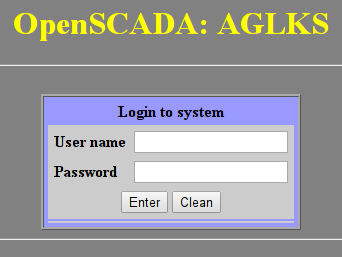
Fig.1.Authentication page.
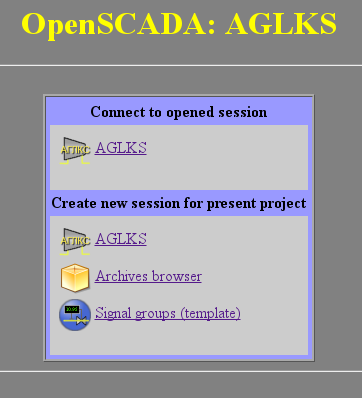
Fig.2. Connection or the creation of a new session of the project's execution of the VCA.
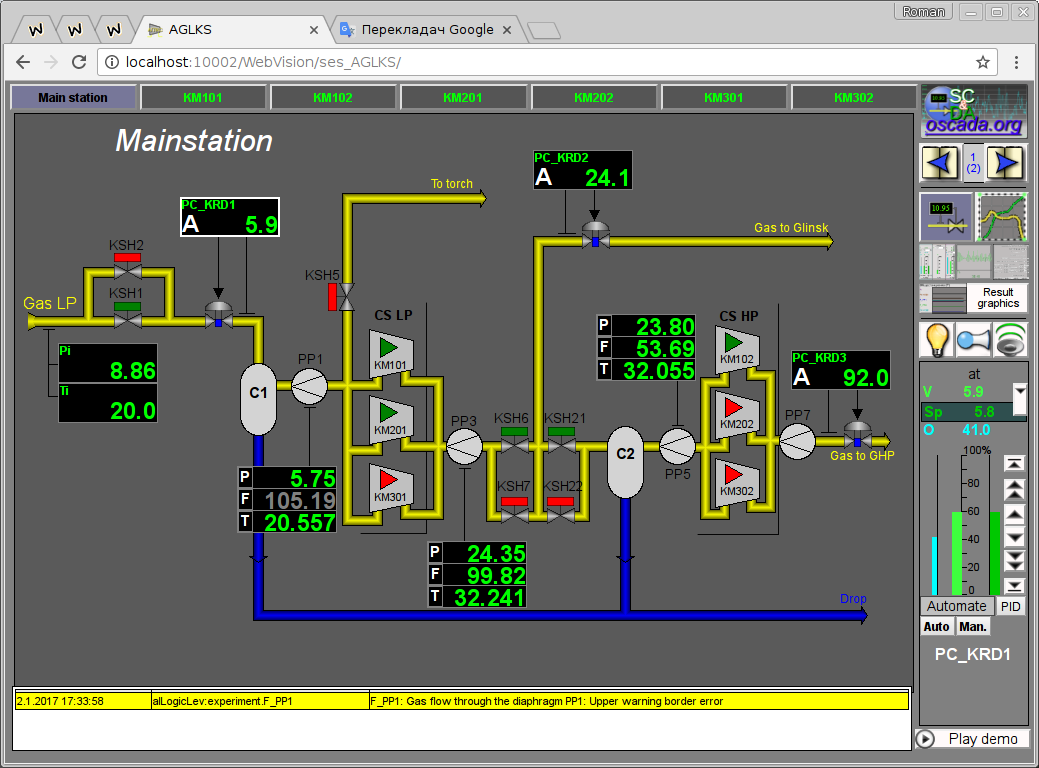
Fig.3. The main execution window.
3. Ñonception of basic elements (primitives)
In this version of that module not all the primitives' images of this project are implemented. In general the project provides the following primitives:
Lets examine the implementation of each primitive.
3.1. Elementary figure primitive (ElFigure)
Support of the elementary figures is provided: lines, elliptical arcs, Bézier curves and fill of the enclosed space with the color and/or image. For the elementary figures the following operations are provided:
- creation/deleting of the figures;
- copying of the figure;
- moving and resizing of the figures by mouse and keyboard;
- possibility to connect the elementary figures to each other, getting more complex figures, for which all the properties of the source elementary figures are available;
- possibility of simultaneous movement of several figures;
- fill of the enclosed space with the color and/or image;
- generation of mouse key events at the time of the mouse-click on the filled spaces;
- scaling;
- rotation.
Fig. 4 shows a part of the screen with a frame containing the elementary figures.
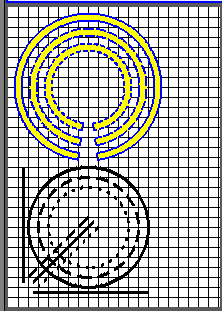
Fig.4 Realization of elementary figures in the WebVision.
3.2. Text primitive (Text)
Support of the text element with the following properties is provided:
- Font with the properties: type/class of the font, size, bold, italic, strikeout and underline.
- Text color.
- Text orientation.
- Automatic word wrap.
- Alignment of the text horizontally and vertically with all options..
- Displaying the background as the color and/or image.
- Display the border around the text, with the specified color, width and style.
- Formation of the text from the attributes of different types and properties.
Fig. 5 represents a part of the screen with the frame containing the text examples using various parameters.
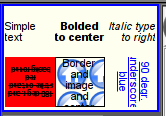
Fig.5. Realization of the basic text element in the WebVision.
3.3. Primitive of the form element (FormEl)
Support of the form elements on the VCA frames is provided. The following form elements are included:
Text edit - It is the flat-text editor with the confirmation or denial of entry.
Check box - Provides a field of binary flag.
Button - Provides the button with the support of: the color of the button, the image of the button, and mode of fixation.
Combo box - Provides the selection field of the element from the list of the items.
List - Provides the list box with the control of the current element.
Slider - Slider element(Not done).
Scroll bar - Strip of the scroll bar(Not done).
The following modes are realized: «Enabled» and «Active», as well as transfer of changes and events to the data model of the VCA (engine). For all realized representations the active mode is supported, ie elements can be used to create the forms of user input.
Fig. 6 represents a part of the screen with the frame containing the above-listed elements of the form.
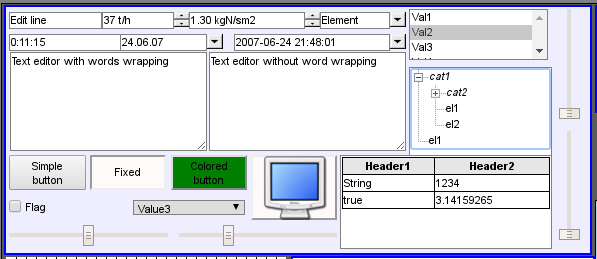
Fig.6. Realization of the form elements in the WebVision.
3.4. Primitive of the displaying the media materials (Media)
Support of the element of the displaying of media materials with the following properties is provided:
- The indication of the source of media data (images or video material).
- View of the images of most well-known formats with the possibility of inscribing of it in the size of the widget.
- Playback of the simple animated images and video formats with the possibility to control the playback speed.
- Displaying of the the background as a color and/or image.
- Display the border around the text, with the specified color, width and style.
- Formation of the active areas and generating the events when they are activated.
Fig. 7 represents a part of the screen with the frame containing examples of viewing/playback of media data.
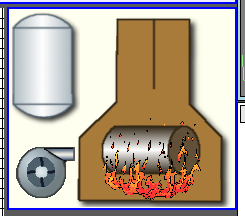
Fig.7. Realization of the basic element of the displaying of media materials in the WebVision.
3.5. Primitive of the construction of diagrams/graphs (Diagram)
Support of the element of the construction of diagrams/graphs with the following properties is provided:
- Construction of graphs/trends:
- Construction graph for: archive data, current data and the formation of an intermediate buffer for the display of the parameters without archive.
- Construction of a single graphs with the value of the parameter on the ordinate axis, and the combined graphs of up to 10 parameters, with the percentage scale.
- Ability to adapt the parameter's graph to the value, the regrowth of scale.
- Wide range of scalability and adaptation of the horizontal scale, with automatic averaging at the server level and the primitive itself.
- Ability to display the size grid and markers on the horizontal and vertical, with adaptation to the displaying range.
- Ability to set the cursor in the trend by mousea.
Fig. 8 represents a part of the screen with the frame containing examples of the trend-diagrams.
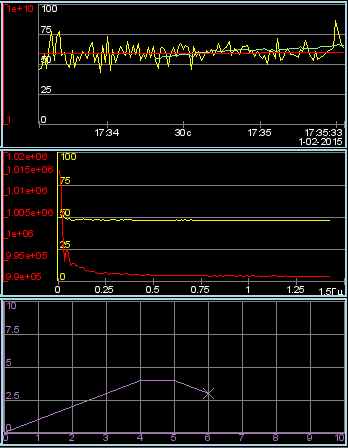
Fig.8. Realization of the basic element of a diagram-trend displaying in the WebVision.
3.6. Primitive of the protocol formation (Protocol)
Support of the element of the formation of the protocol with the following properties is provided:
- Formation of the protocol from the archive of messages for the specified time and depth.
- Request of the data from the messages archivers.
- Selection of data from the archives by the level of importance and the category of messages template.
- Support the tracking mode for the appearance of messages in the archive of messages.
Fig. 9 represents a part of the screen with the frame containing an example of the protocol.
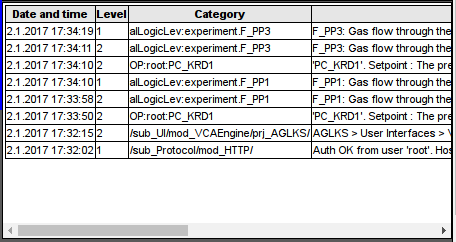
Fig.9. Realization of the basic element of a protocol displaying in the WebVision.
3.7. Primitive of the report formation(Document)
Support element of the report formation with the following properties is provided:
- Adaptive formation of a document structure based on Hypertext Markup Language. This provides support for the broad features of formatting of the documents.
- Formation of the documents on command or on schedule. It is necessary for creation of reports into the archive and then view the archive.
- Formation of a document in real time mode. It is necessary to form documents completely dynamically, and based on the archives for the specified time.
- Using of the the attributes of the widget for transmission of values and addresses to the archives in the report. It allows you to use the widget of the document as a template when generating reports with other input data.
The basis of any document is XHTML-template. XHTML-template is the tag "body" of the WEB-page which contains the document's static in the standard XHTML 1.0 and elements of the executable instructions in one of the languages of the user programming of OpenSCADA in the form of <?dp <procedure> ?>. The resulting document is formed by the execution of procedures and insert of their result into the document.
The source for values of the executable instructions are the attributes of the widget of the primitive, as well as all the mechanisms of the user programming language. Attributes may be added by the user and they can be linked to the actual attributes or parameters or they can be autonomous, values of which will be formed in the script of the widget. In the case of linked attributes the values can be extracted from the history, archive.
Fig. 10 shows the frame containing a sample of the document.
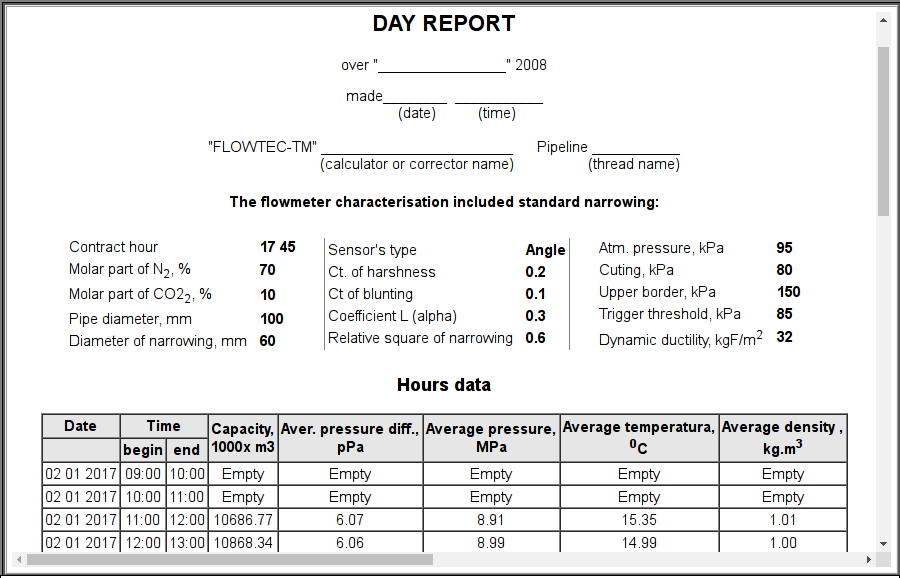
Fig.10 Implementation of the basic visualization element of the report documentation in the WebVision.
3.8. Primitive of the box container (Box)
Support of the primitive of the container concurrently serves as the project pages is provided. This primitive is the only element-container, which may include links to frames from the library, thereby creating the user elements of desired configuration. Primitive implements the provided by the project properties. The properties of this primitive are:
Page - Elements constructed on the basis of the primitive may serve as a page of user interface.
Container of pages - Property of substitution of its own contents by another page in the execution process. Used to create frames on the pages of user interface. For example, the main page of traditional SCADA system with alarm objects is constructed in this way.
Background - Supports ability to specify the background as color or image.
Border - Supports the displaying of the border, with the specified color, width and style.
4. The overall configuration of the module
To adjust your own behavior in not obviou situations the module provides the ability to customize individual settings through the management interface of the OpenSCADA (Fig. 11). These settings are:
- The lifetime of the authentication session.
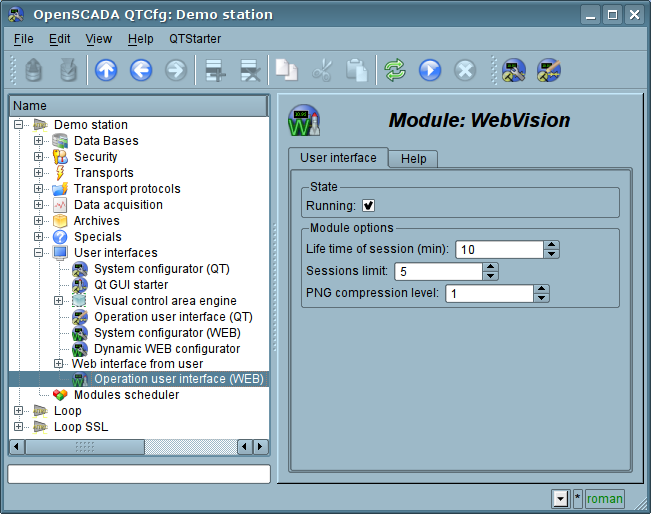
Fig.11. The configuration page of the module.
Conclusion
At this stage, the module may be used to build a real user interfaces that support core functions. However, some problems may arise due to the differences between browsers. For now it is guaranteed stable work on browsers: FireFox, Konqueror, Opera and Google Chromium.