

 This page is frozen,
  actual one here
Module "VCAEngine" of the subsystem "User Interfaces"
| Module: | VCAEngine |
| Name: | Visual control area engine |
| Type: | User Interfaces |
| Source: | ui_VCAEngine.so |
| Version: | 4.1 |
| Author: | Roman Savochenko, Maxim Lysenko (2011-2012) |
| Description: | The main visual control area engine. |
| License: | GPL |
Introduction
The VCAEngine module provides visual control area engine (VCA) in OpenSCADA system. The module same does not implement the visualization of the VCA, and contains data in accordance with the ideology of "Model/data — Interface". Data visualization of that module is implemented by the visualization modules of VCA, such as Vision and WebVision.
Visual control area (VCA) is an integral part of the SCADA system. It applies to the client stations with a view to providing accessible information about the object and to for the the issuance of the control actions to the object. In various practical situations and conditions the VCA based on different principles of visualization may by applied. For example, this may be the library of widgets Qt, GTK+, WxWidgets or hypertext mechanisms based technologies HTML, XHTML, XML, CSS, and JavaScript, or third-party applications of visualization, realized in various programming languages Java, Python, etc. Any of these principles has its advantages and disadvantages, the combination of which could become an insurmountable obstacle to the use of VCA in a practical case. For example, technologies like the Qt library can create highly-reactive VCA, which will undoubtedly important for the operator station for control of technological processes (TP). However, the need for installation of that client software in some cases may make using of it impossible. On the other hand, Web-technology does not require installation on client systems and is extremely multi-platform (it is enough to create a link to the Web-server at any Web-browser) that is most important for various engineering and administrative stations, but the responsiveness and reliability of such interfaces is lower that actually eliminates the using of them at the operator of the TP stations.
OpenSCADA system has extremely flexible architecture that allows you to create external interfaces, including user and in any manner and for any taste. For example, the system configuration OpenSCADA as now available as by means of the Qt library, and also the Web-based.
At the same time creation of an independent implementation of the VCA in different basis may cause the inability to use the configuration of one VCA into another one. That is inconvenient and limited from the user side, as well as costly in terms of implementation and follow-up support. In order to avoid these problems, as well as to create as soon as possible the full spectrum of different types of VCA project of the creation of the conception of the VCA is established. The result of this project — the engine module(data model) of the VCA, as well as direct visualization modules Vision and WebVision.
1. Purpose
This module of the engine (data model) of the VCA is aimed to create the logical structure of the VCA and the execution of sessions of individual instances of the VCA projects. Also, the module provides all the necessary data to the final visualizers of the VCA, both through local mechanisms of interaction of OpenSCADA, and through the management Interface of OpenSCADA for remote access.
The final version of the VCA module will provide:
- three levels of complexity in the formation of visualization interface which let organically to develop and apply the tools of the methodology from simple to complex:
- formation from the template frames through the appointment of the dynamics (without the graphical configuration);
- graphical formation of new frames through the use of already made visualization elements from the library (mimic panel);
- formation of new frames, template frames of the visualization elements in the libraries.
- building of the visualization interfaces of various complexity, ranging from simple flat interfaces of the monitoring and finishing with the full-fledged hierarchical interface used in SCADA systems;
- providing of the different ways of formation and configuration of the user interface, based on different graphical interfaces (Qt, Web, Java ...) and also through the standard management interface of OpenSCADA system;
- change of dynamics in the process of execution;
- building of the new template frames on the user level and the formation of the frames libraries, specialized for the area of application (eg. the inclusion of frames of parameters, graphs and other items linking them to each other) in accordance with the theory of secondary using and accumulation;
- building of the new user elements of the visualization and the formation of the libraries of frames, specialized for the area of application in accordance with the theory of secondary using and accumulation;
- description of the logic of new template frames and user visualization elements as with the simple links, and also with the laconic, a full-featured programming language;
- the possibility of the inclusion of the functions (or frames of computing of the functions) of the object model of OpenSCADA to the user elements of the visualization, actually linking the presentation of the algorithm of computing (for example, by visualizing the library of models of devices of TP for following visual modeling TP);
- separation of user interfaces and interfaces of visualization of data provides building the user interface in a single environment, and performance of it in many others (Qt, Web, Java ...);
- the possibility to connect to the performing interface for monitoring and corrective actions (for example, while operator training and control in real time for his actions);
- visual building of various schemes with the superposition of the logical links and the subsequent centralized execution in the background (visual construction and performance of mathematical models, logic circuits, relay circuits and other proceedings);
- providing of the functions of the object API to the OpenSCADA system, it can be used to control the properties of the visualization interface from the user procedures;
- building of the servers of frames, of elements of the visualization and of the project of the interfaces of the visualization with the possibility to serve the set number of the client connections;
- simple organization of client stations in different basis (Qt, Web, Java ...) with the connection to the central server;
- full mechanism of separation of privileges between the users which allows to create and execute projects with the various rights of access to its components;
- adaptive formation of alarms and notifications, with the support of arbitrary ways of notification;
- support of the user formation of the palettes and font preferences, into styles, for the visualization of the interfaces;
- support of the user formation of maps of the events under the various items of equipment management and user preferences;
- support for user profiles, allowing to define various properties of the visualization interface (colors, font characteristics - styles, the preferred maps of events);
- flexible storage and distribution of libraries of widgets, frames, and projects of the visualization interfaces in the databases, supported by OpenSCADA; actually users need only to register the database with data.
2. The configuration and the formation of interfaces of the VCA
Module itself does not contain mechanisms for visual creating interfaces of VCA, such tools can be given by the final visualization modules of the VCA, for example such a tool provides by the module Vision.
Although the mechanisms for the visual formation of the VCA the module doesn't provide the interface, implemented on the basis of the management interface of the OpenSCADA, to manage the logical structure is provided, and thus it is available for use in any system configurator of the OpenSCADA. Dialogues of this interface are considered further in the context of the architecture of the module and its data.
3. Architecture
Any VCA can operate in two modes — the development and running. In the development mode the VCA interface and its components are formed, the mechanisms of interaction are identified. While the running it is carried out the formation of VCA interface based on the developed VCA with the final user interaction is made.
VCA interface is formed of the frames, each of which, in its turn, formed from elements of the primitives, or user interface elements. In doing so, the user interface elements are also formed from the primitives or other user elements. That gives us a hierarchy and reuse of already developed components.
Frames and user elements are placed in the libraries of widgets. The projects of the interfaces of the final visualization of the VCA are formed from these libraries' elements. Based on these projects the visualization sessions are formed.
The structure of VCA is shown in Fig. 3.
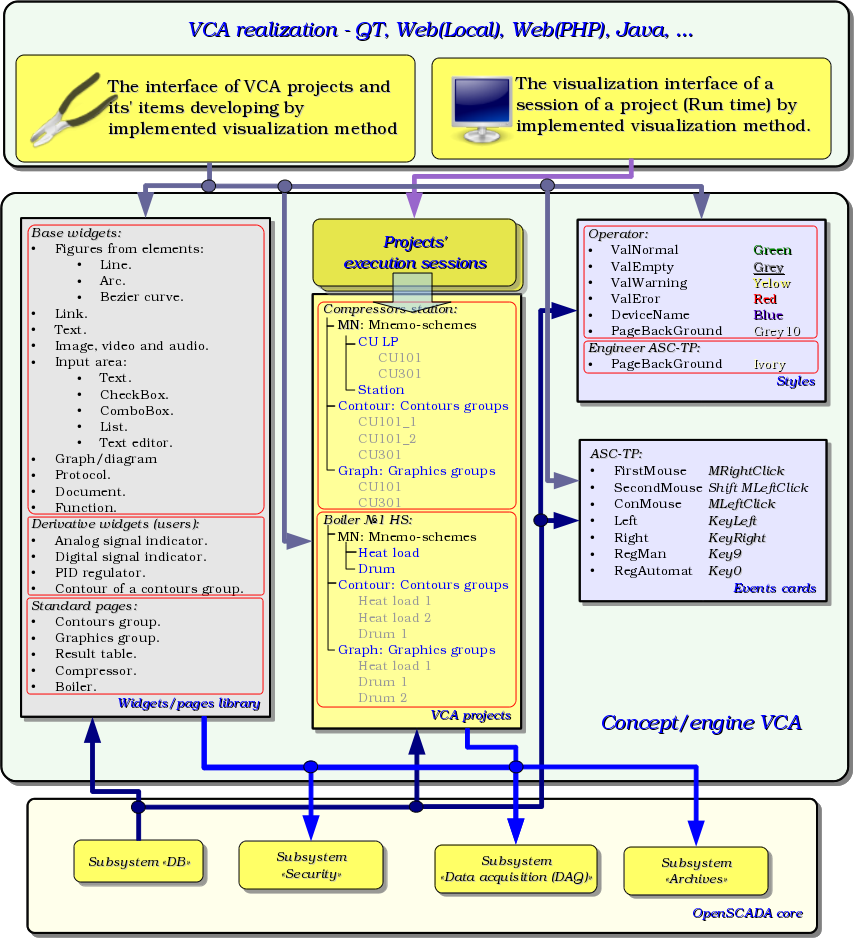
Fig.3 Generalized structure of the VCA.
This architecture of the VCA allows the support of three levels of complexity of the developing process of the management interface:
- Forming of the VC interface (visualization and control) using the library of template frames by placing the templates of the frames in the project and by the assignment of the dynamics.
- In addition to the first level the own creation of frames based on the library of derivatives and basic widgets is to be done. Perhaps as a direct appointment of the dynamics in the widget, and the subsequent appointment of it in the project.
- In addition to the second level is performed the independently forming of derivatives widgets, new template frames and also the frames with the use of mechanism of describing the logic of interaction and handling of events in one of the languages of a user programming of OpenSCADA system.
3.1. Frames and elements of visualization (widgets)
Frame is the window which directly provides information to the user in a graphical or text form. The group of interconnected frames creates whole user interface of VC.
Contents of the frame is forming from the elements of visualization (widgets). Widgets may be the basic primitives (different elementary shapes, text, trend, etc.) and derivatives (formed from the basic or other derivatives of widgets). All the widgets are grouped into the libraries. In the process, you can build your own library of derivative widgets.
Actually the frame is also a widget that is used as a final element of visualization. This means that the widget libraries can store the blanks of frames and the templates of the resulting pages of the user interface.
Frames and widgets are passive elements that do not normally contain links to the dynamics and other frames, but only provide information about the properties of the widget and the nature of the dynamics (configuration), connected to the properties of the frame. Activated frames, ie containing links to the dynamics and active connections, form the user interface and are stored in the projects. In some cases, it is possible the direct appointment of the dynamics in the blanks of frames.
Derivative frames/widgets can contain other widgets (attached), which can be glued (associated) with the logic of one another by one of the languages of programming available in the OpenSCADA system.
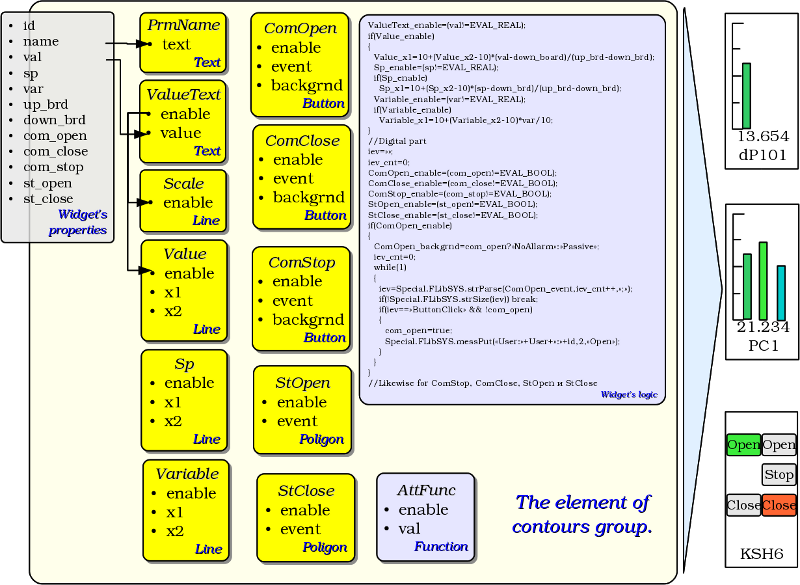
The widget is an element, by means of which it is provided:
- visualization of operational and archive information about TP;
- alarm about a violation of conduction of TP;
- switching between the frames of TP;
- management of technological equipment and the parameters of conduction of TP.
Tuning and linkage of the widgets is done through their properties. Parent widget and the widgets it contains, can be complemented by user properties. Then the user and static attributes are associated with the properties of embedded widget by internal logic. To show the dynamics (ie, current and archived data), properties of widgets are dynamized, that is linked with the attributes of the parameters of OpenSCADA or properties of other widgets. Using to link of the nested widgets by means of the internal logic with the available programming language of the OpenSCADA system eliminates the question of the implementation of complex logic of visualization, thus providing high flexibility. Practically, you can create fully dynamized frames with complex interactions at the level of the user.
3.2. Project
Direct configuration and properties of the final visualization interface are contained in the project of the visualization interface of the VCA, which may be created lot ones.
Each project includes pages from the libraries of the frames/widgets. In some modes the page allowed to include into nested pages as independent from the parent and in using the parent as template. The template's page-widget allows to extremely simplify the process of creating the same type of the frames by the ACS-TP engineer or by the user of OpenSCADA for easy monitoring. An example of such one-type frames may be: groups of contours, groups of graphs, reports and various tables. Mnemonic schemes of technological processes rarely come under this scheme and will be formed directly in the description of the frame.
Page like to a widget on which it is based provides a possibility for bind the dynamics to described into properties, which links at all can be set to dynamic or resolved as constants. Besides, links to the dynamics on the project's page level is preferable to the widget of libraries level.
Example of hierarchical representations of components of the project of the classical interface of VC of the technological process with the description of standard call expressions is given in Figure.
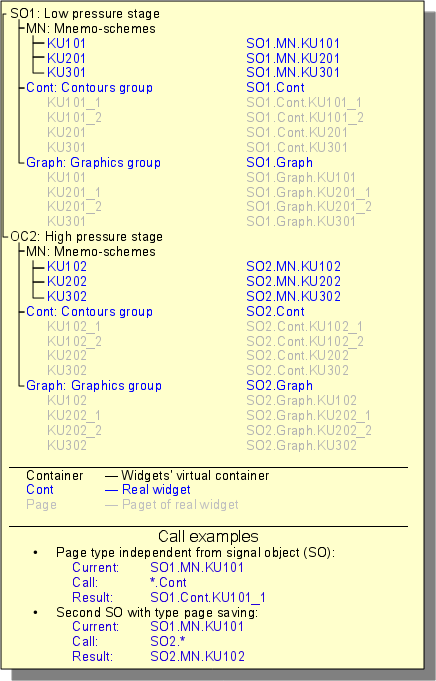
Reserved next the special properties of pages:
- Container — page is a container for the underlying pages.
- Template — page is a template for the underlying pages.
- Empty — empty and inactive page. This property is used in conjunction with the property Container for logical containers organization.
Based on these properties combinations the following types of pages are realized:
- Standard — the standard page (none property is set), it is the full final page.
- Container — the full-featured page with the property of the container (Container).
- Logical container — the logical container is actually not a page (Container|Empty), but it performs property of the intermediate and bunching element in the tree of pages.
- Template — the template page (Template). Pure template page is used to describe the common properties and expand them definitions in privately order in nested pages.
- Container and template — the template and a container page (Template|Container), combines the functions of the template and the container.
On the side of the visualization (RunTime), on the following attributes of the basic element "Box", there is the logic regulating how to open the pages:
- pgOpen — sign "The page is opened";
- pgNoOpenProc — sign "Execute the page, even if it is not opened";
- pgOpenSrc — contains the address of the widget or of the page which has opened the current; in the case of the nested container widget here it is contained the address of the included page; to open the pages from the script here it is enough to indicate the address of the widget-source of the opening;
- pgGrp — group of pages, used for conjunction of the containers of the pages with the pages in accordance with the general group.
The logic of the method of the opening the pages works in the following way:
- if the page has the group "main" or coincides with a group of the page in the main window or there is no page on the main window, then open the page in the main window;
- if the page has a group which coincides with the group one of the containers of the current page, then open it in the container;
- if the source of the opening of the page coincides with the current page, then open it as an additional window over the current page;
- transmit a call for request for the opening to the additional windows with the processing in each of the first three paragraphs;
- if any one of the relative windows doesn't open a new page, then open it as a related window of the main window.
3.3. Session of the project execution
The project's session is expanded tree of the project for direct it execution, which includes an individual task of hierarchical the widget's procedures execution. For each project can be opened many sessions. The end-user visual interface forming performs by the visualizers from data of the project's session, after the session creation by the request.
Between widgets at the different levels of hierarchy complex inheritance relations are arranged, which are defined by the possibility of using some widgets by other ones, beginning with the library widget, and finishing with the widget to the session. To clarify these features of the interaction in Figure comprehensive map of "uses" inheritance is shown.
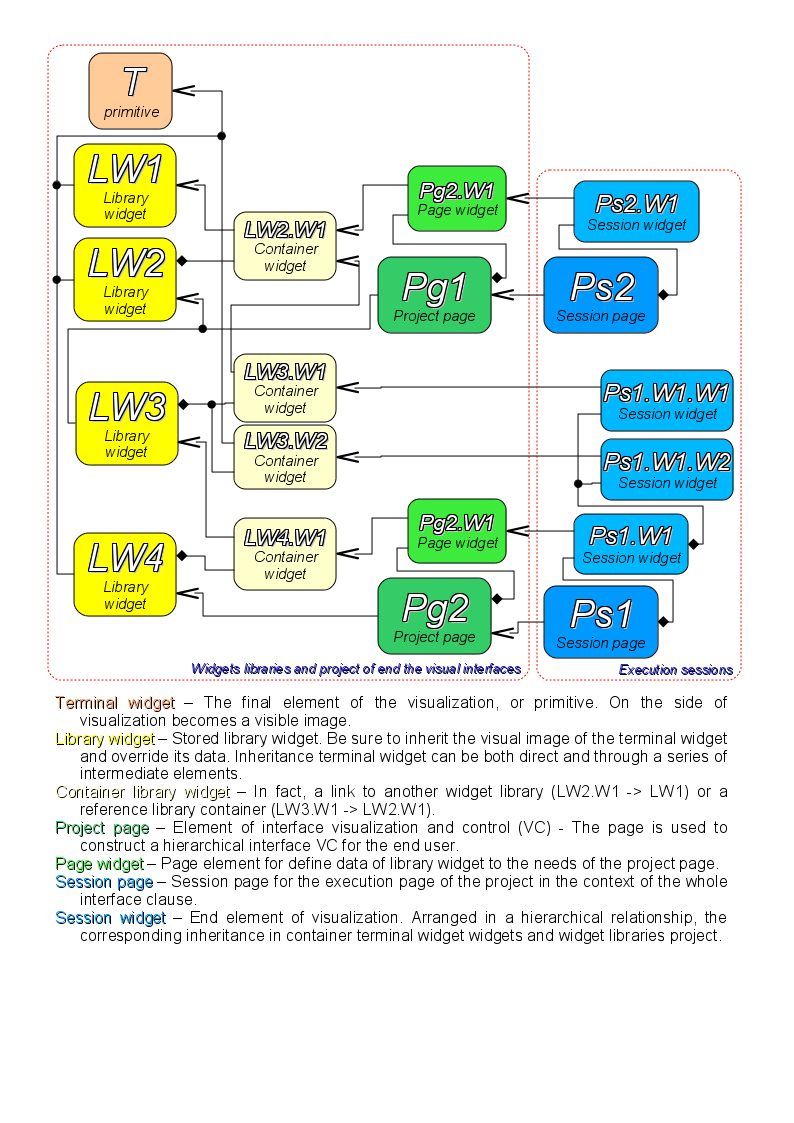
At the session level widget contains a object of values of calculation procedure. This object is initiated and used in the case of presence of the calculation procedure. At the time of the initialization the list of parameters of the procedure is created and a compilation of procedure is performed with these parameters in the module, implementing the selected programming language and encoded with the full name of the widget. A compiled function is connected to the object of values of the calculation procedure. Further the calculation is performed with the frequency of the session.
Calculation and processing of the widget on the whole runs in the following sequence:
- the events, which are available at the time of computation, are selected from the attribute "event" of the widget;
- events are loaded into the parameter "event" of the object of computation;
- values of the input connections are loaded into the object of calculation;
- values of special variables are loaded into the computation object (f_frq, f_start and f_stop);
- values of selected parameters of the widget are loaded into the object of computation;
- computation;
- uploading of the computation object's values to the selected parameters of the widget;
- uploading of the event from the parameter "event" of the computation object;
- processing the events and transfer the unprocessed events at the level above.
The objects of the session of the project inherit from an abstract object "Widget" and use the appropriate objects of the project. Thus, the session ("Session") uses the project ("Project") and forms expand tree on its basis. Project page "Page" is directly used by the session page "SessPage". The remaining objects ("SessWdg") are deployed in accordance with the hierarchy of page elements (Fig.3.1.2).
In addition to the standard properties of an abstract widget ("Widget") elements of the pages of session themselves get the following properties: storage of the object of values of computational procedure, calculation of the procedures and mechanism for processing of the events. Pages of the session, in addition, contain a container of the following by the hierarchy pages. The session generally is computed with the frequency and in the consistency:
- "Page of the top level" -> "Page of the lower level"
- "Widget of the lower level" -> "Widget of the top level"
This policy allows you to circumvention the pages in accordance with the hierarchy, and to rise on the top during the one iteration for the widget events.
Sessions at the level of the control interface of OpenSCADA supports multi-language depended from values of the generic attributes "lang" and next "user" and which visualizer can set in proper way of self language. This function enabled for dynamic messages translation of OpenSCADA.
3.4. Styles
It knows that people can have individual characteristics in the perception of graphical information. If these features are not taken into account, it is possible to obtain the rejection and abruption of the user to the interface of VC. This rejection and abruption can lead to fatal errors in the management of TP, as well as traumatize the human by the continuous work with the interface. In SCADA systems the agreements are adopted, which regulate the requirements for creating a unified interface of VC normally perceived by most people. This is practically eliminates the features of people with some deviations.
In order to take this into account and allow centralized and easy to change the visual properties of the interface module is implementing a theme manager of the visualization interface.
User can create many themes, each of which will keep the color, font and other properties of the elements of the frame. Simple changing of the theme will allow you to change the interface of VC, and the possibility of appointing an individual theme in the user's profile allows to take into account his individual characteristics.
To realize this opportunity, when you create a frame, it is necessary for the properties of color, font and others set the "Config" (of the table in the "Process" tab) in the value of "From style". And in the parameter "Config template" to specify the identifier of the style field. Further, this field will automatically appear in the Style Manager and will be there to change. Style Manager is available on the project configuration page in the tab "Styles". On this tab you can create new styles, delete old ones, change the field of the style and delete unnecessary.
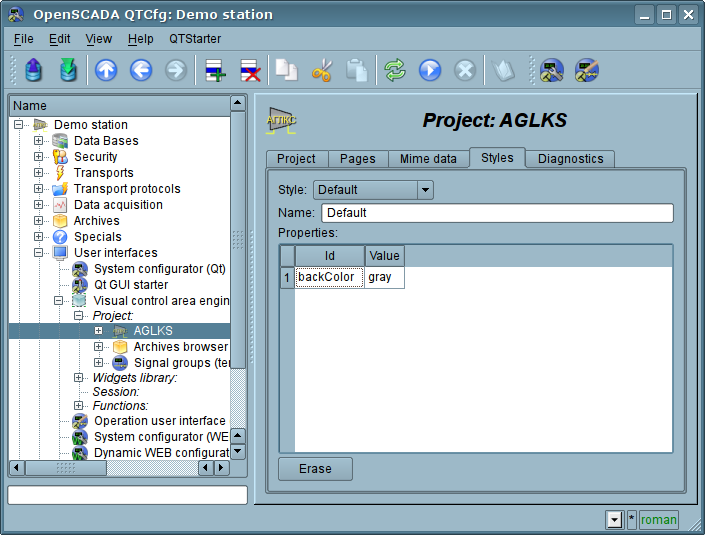
Figure. "Styles" tab of the configuration page of the project.
In general the styles are available from the project level. At the level of libraries of widgets you can only define styles fields of widgets. At the project level, at the choice of style, it is started the work with styles, which includes access to the fields of styles instead of direct attribute values. In fact, this means that when reading or writing a widget attribute these operations will be carried out with the corresponding field of the chosen style.
When you run the project execution it will be used the set in the project style. Subsequently, the user can select a style from the list of available ones. The user's style will be saved and used next time you run the project.
3.5. Events, their processing and the events' maps
Given the range of tasks for which the OpenSCADA system may be used, it is necessary to provide a tool for management of interactive user events. This is due to the fact that in dealing with individual tasks of embedded systems, input and control devices can greatly vary. But it is enough to look at the regular office keyboard and notebook one, that would remove any doubt about the necessity for the manager of events.
The events manager must work using the maps of events. Map of the events — is the list of named events, indicating their origin. The origin of the events can be a keyboard, mouse, paddle, joystick, etc. At an event emerge the events manager is looking for it in the active map and compares with the name of the event. A comparison name of the event is placed in the queue for processing. Widgets in this case must process the given queue of events.
The active map of events is specified in the profile of each user or it is set by default (in planes).
In general, four types of events are provided:
- events of the shapes-primitives of VCA (prefix: ws_), for example, pressing of the display button event — "ws_BtPress";
- keyboard events (prefix: key_) — all events from mouse and keyboard in the form of — "key_presAlt1";
- user events (prefix: usr_) are generated by the user in the procedures of the calculation of widgets;
- mapping of the event (prefix: map_) — events from the map of events, in planes.
Event itself represents deficiently information, especially if its processing occurs at higher level. For the unequivocal identification of the event and its source in the whole the event is recorded as follows: "ws_BtPress:/curtime". Where:
/curtime — the path to the child element that has generated the event.
Table 3.5 provides a list of standard events, the support of which should be provided in visualizers of VCA.
Table 3.5. Standard events
| Id | Description |
| Keyboard events: key_[pres|rels][Ctrl|Alt|Shift]{Key} | |
| *SC#3b | Scan-code of the key. |
| *#2cd5 | Code of the unnamed key. |
| *Esc | "Esc". |
| *BackSpace | Removing of the previous character — "<--". |
| *Return, *Enter | Enter — "Enter". |
| *Insert | Insertion — "Insert". |
| *Delete | Deleting — "Delete". |
| *Pause | Pause — "Pause". |
| Print of the screen — "Print Screen". | |
| *Home | Home — "Home". |
| *End | End — "End". |
| *Left | Left — "<-". |
| *Up | Up — '^'. |
| *Right | Right — "->". |
| *Down | Down — '\/'. |
| *PageUp | Page up — "PageUp". |
| *PageDown | Page down — "PageDown". |
| *F1 ... *F35 | Function key from "F1" to "F35". |
| *Space | Space — ' '. |
| *Apostrophe | Apostrophe — '`'. |
| *Asterisk | Asterisk on an additional field of the keyboard — '*'. |
| *Plus | Plus on an additional field of the keyboard — '+'. |
| *Comma | Comma — ','. |
| *Minus | Minus — '-'. |
| *Period | Period — '.'. |
| *Slash | Slash — '\'. |
| *0 ... *9 | Number from '0' to '9'. |
| *Semicolon | Semicolon — ';'. |
| *Equal | Equal — '='. |
| *A ... *Z | Keys of Latin alphabet from 'A' to 'Z'. |
| *BracketLeft | Left square bracket - '['. |
| *BackSlash | Backslash — '/'. |
| *BracketRight | Right square bracket — ']'. |
| *QuoteLeft | Left quote — '''. |
| Keyboard focus events. | |
| ws_FocusIn | Focus is obtained by a widget. |
| ws_FocusOut | Focus is lost by a widget. |
| Mouse events: | |
| key_mouse[Pres|Rels][Left|Right|Midle] | Pressed/released the mouse button. |
| key_mouseDblClick | Double-click the left mouse button. |
| Events of quittance on the side of the visualizer. | |
| ws_alarmLev | Quittance of all violations by all notices methods and types. |
| ws_alarmNtf{N} | Quittance of all violations by the type {N} (0...7). |
| Events of the primitive of elemental figure ElFigure: | |
| ws_Fig[Left|Right|Midle|DblClick] | Activating of the figures (fills) by the mouse button. |
| ws_Fig{N}[Left|Right|Midle|DblClick] | Activating of the figure (fill) N by the mouse button. |
| Events of the primitive of form elements FormEl: | |
| ws_LnAccept | A new value in the input line is set. |
| ws_TxtAccept | The value of the text editor is changed. |
| ws_ChkChange | The state of the flag is changed. |
| ws_BtPress | The button is pressed. |
| ws_BtRelease | The button is released. |
| ws_BtToggleChange | The button toggle is changed. |
| ws_BtMenu={Item} | Selection of the menu Item. |
| ws_BtLoad | The selected file loaded. |
| ws_CombChange | The value of the combo box is changed. |
| ws_ListChange | The current list item is changed. |
| ws_TreeChange | The current tree item is changed. |
| ws_TableChangeSel | The table's item selection changed. |
| ws_TableEdit_{colN}_{rowN} | The table's cell ({colN}:{rowN}) edited. |
| ws_SliderChange | The slider position changed. |
| Events of the primitive of media content Media: | |
| ws_MapAct{N}[Left|Right|Midle] | Media area with the number N is activated by the mouse button. |
| ws_MediaFinished | Media-stream play is finished. |
Events are the main mechanism of notification and is actively used for user interaction. For the event processing there are two mechanisms:
- Primary — the script uses to control the opening of the pages.
- Secondary — the computational procedure of the widget.
The mechanism "Scripts for the control the opening of pages" based on the basic attribute of the widget "evProc", which can be used for switching, opening, substitution and navigation through the pages. The scenario of this attribute is stored as a list of commands with the syntax: "{event}:{evSrc}:{com}:{prm}". Where:
- event — the expected event;
- evSrc — the path of the nested widget-source of the event;
- com — the session command;
- prm — the parameter of the command.
The following commands are implemented:
- open — opening page; page to open is specified in the parameter prm both in direct way and as a template (example: /pg_so/1/*/*);
- next — opening of the next page; page to open is specified in the parameter prm as a template (example: /pg_so/*/*/$);
- prev — opening of the previous page; page to open is specified in the parameter prm as a template (example: /pg_so/*/*/$).
Special characters of the template are deciphered as follows:
- pg_so — direct name of the desired-static page (with the prefix), requires the compulsory accordance and is used to identify the last open page;
- 1 — name of a new page in a general way (without a prefix);
- * — the page is taken from the name of a previous opened page or the first available page is substituted, if the previous opened page is missing;
- $ — points the place of the opened page relative to which you are to go to the next or to the previous one.
To more and true the mechanism of the templates understanding lets cite some real examples:
- Changing the signal object:
Initially: /pg_so/pg_1/pg_mn/pg_1
Command: open:/pg_so/2/*/*
Result: /pg_so/pg_2/pg_mn/pg_1
- Switching of the type:
Initially: /pg_so/pg_1/pg_mn/pg_1
Command: open:/pg_so/*/gkadr/*
Result: /pg_so/pg_1/pg_gkadr/pg_1
- Next/previous page of the type:
Initially: /pg_so/pg_1/pg_mn/pg_1
Command: next:/pg_so/*/*/$
Result: /pg_so/pg_1/pg_mn/pg_2
As an example lets cite the scenario of operation of the main page of the user interface:
ws_BtPress:/prev:prev:/pg_so/*/*/$
ws_BtPress:/next:next:/pg_so/*/*/$
ws_BtPress:/go_mn:open:/pg_so/*/mn/*
ws_BtPress:/go_graph:open:/pg_so/*/ggraph/*
ws_BtPress:/go_cadr:open:/pg_so/*/gcadr/*
ws_BtPress:/go_view:open:/pg_so/*/gview/*
ws_BtPress:/go_doc:open:/pg_so/*/doc/*
ws_BtPress:/go_resg:open:/pg_so/rg/rg/*
ws_BtPress:/so1:open:/pg_so/1/*/*
ws_BtPress:/so2:open:/pg_so/2/*/*
ws_BtPress:/so3:open:/pg_so/3/*/*
ws_BtPress:/so4:open:/pg_so/4/*/*
ws_BtPress:/so5:open:/pg_so/5/*/*
ws_BtPress:/so6:open:/pg_so/6/*/*
ws_BtPress:/so7:open:/pg_so/7/*/*
ws_BtPress:/so8:open:/pg_so/8/*/*
ws_BtPress:/so9:open:/pg_so/9/*/*
ws_BtPress:*:open:/pg_control/pg_terminator
The mechanism "Processing the events with the help of computational procedure of the widget" is based on the attribute "event" and the user procedure of calculating written with the help of the programming language of OpenSCADA. The events, in process of receipt, are accumulated in the attribute "event" till the moment of call of the computational procedure. The computational procedure is called with the specified frequency of calculating the widget and receives a value for the attribute "event" as the list of events. In the calculation procedure the user can: analyze, process and delete the processed events from the list, and add to the list new events. The remaining, after the procedure execution, and new events are analyzed for compliance with the conditions of the call by means of script of the primary mechanism, after which the remaining events are transmitted to the upper by the hierarchy widget to be processed by it, with the correction of the path of events in accordance with the hierarchy of the penetration of the event.
The content of the attribute "event" is a list of events in the format "{event}:{evSrc}", with the event on the separate line. Here is an example of processing events in the Java-like programming language of the OpenSCADA:
3.6. Signaling (Alarms)
An important element of any visualization interface is the user notification about the violation — alarming. To simplify the perception, but also in mind the close connectivity of visualization and notification (typically notification is amplified with the visualization) it is decided to integrate the interface of a notification in the visualization interface. To do this, all the widget provides two additional attributes (of the session level): "alarm" and "alarmSt". Attribute "alarm" is used to form the signal by the widget, according to his logic, and attribute "alarmSt" is used to control the signaling fact of the branch of the tree of the session of the project.
Attribute "alarm" is a line and has the following format: "{lev}|{categ}|{message}|{type}|{tp_arg}"
Where:
- lev — signaling (alarm) level; number from 0 to 255;
- categ — alarm category; parameter of the acquisition subsystem, object, path, or their combination;
- message — signaling (alarm) message;
- type — type of notification, is formed as a the integer number (0...7), which contains the flags of notification methods; typical notification methods:
- 1 — visual;
- 2 — beep tone, is frequently made through the PC-speaker;
- 4 — sound signal from the sound file or the speech synthesis, and if in the tp_arg the name of the resource of the sound file is specified, then play it, or in other case the speech synthesis from the text specified in message is made.
- tp_arg — argument of the type; it is used in the case of the audible signal to indicate the resource of the sound alarm (file of the sound format).
Attribute "alarmSt" is an integer number that represents the maximum alarm level and the fact of the quittance of the branch of the tree of the session of the project. Format of the number is as follows:
- first bite (0...255) characterizes the level of the alarm of the branch;
- the second byte indicates the type of notification (as well as in the attribute "alarm");
- the third byte indicates the type of notification without quittance (as well as in the attribute "alarm");
- the four byte has special appointment, assigns different bites
- bit 0 — indicates, by sets, to quittance fact of notification into first byte;
- bit 1 — indicates, by sets it and the bit 0, to the quittance return — enable back the quittance.
Alarm formation and receipt of it by the visualizer.
The alarm formation is performed by the widget by setting its own attribute "alarm" in appropriate way and in accordance with it the attribute "alarmSt" of current and the parent widget is set. Visualizers receive notification of the alarm using a standard mechanism for notifications of the changes of attributes of widgets.
Taking into account that the processing of conditions of the signaling is made in the widgets, the pages containing the objects of signaling should be performed in the background, regardless of their openness to the moment. This is done by setting a flag of the background execution of the page.
Although the mechanism of signaling is built in the visualization area the possibility of formation of visual signaling elements remains, for example by creating the page that will never be opened.
Quittance
Quittance is process of accepting the violation(s) to mind, disabling the notification and action to remove the violation(s). In the display of user's interface the quittance assume only the notification disable.
Quittance performs by specifying the root of the branch of the widgets and the types of notification. This allows to make quittance on the side of visualizer both as by groups, for example by the signaling objects as well as individually by the objects. It is possible to independently quittance different types of alarms. Setting of the quittance is made by the simple modification of the attribute "alarmSt".
Example of the script to work with the signals gives below:
External notification methods
A first and a typical method of notifications is display's light notification by alarm colors and its dynamic about proper visual elements, which always presents and does not require of specific configuration. But often we need for an external type notification, for example: external lamp, PC buzzer or "howler", arbitrary sound, synthesized speech and etc.
For the possibility of implements the external notification methods and the accorded notification types are free described for the visualization server and same visualizers. On the visualization server side describes for forming/getting the notification resource and same notification. On the visualizers side describes a notification by the resources from the visualization server.
The external notifications describes on main page by attributes of text type:
Description of rules and scenarios of notifications performs with user attributes of text type for pages of the visualization project, which applies at the page open. That is potentially for each opening page there possible describe self rules of notifications but typically here enough to describe a generic rules of notification on the main project's page, which open once and doesn't close in work:
- For the visualization server/engine by the attribute "notify{N}" into the format:
- For a visualizer by the attribute "notifyVis[Vision|WebVision]{N}" into the format:
Flags:
- notify[{DL}] — enables notification with repeat by time DL, if the set; for DL = 0 the repeat made once.
- resource — request-form (force) the notification resource from the visualization server, can be an audio file, a text or other data for the notification produce.
- queue — the notification resources appoint not only by global alarming sign and the quittance but follow to the priority queue of sources of the notification-resources. The queue forms on the visualization server side and for the visualizers set need of working with it at the resources request.
- qMergeMess — merging the notifications into the queue by equality its messages.
- quittanceRet — possibility of a visualizer for a quittance recall-return ie in fact the notification enable back.
The exchanging variables:
- en[0,1] — the notification enable (1) or disable (0);
- doNtf[0,1] — call the script for the notification;
- doRes[0,1] — call the script for the resource form;
- res — the content or the content's file name (for external scripts) of the resource;
- mess — the message-parameters for the resource and the notification form.
- lang — the language of current user or system.
The examples and comments to work of typical notification methods:
- Beep (buzzer) on a visualizer or the visualization server side:
- alarm = "10|Prm||0x02"
- notifyVisVision1 | notify1 =
- notifyVisVision1 | notify1 =
- Repeating play for ready audio file, one common, on a visualizer or the visualization server side:
- alarm = "10|Prm||0x04"
- notify2 | notifyVisVision2 =
- notify2 | notifyVisVision2 =
- Play an individual audio file for the source, on the visualization server side:
- alarm = "10|Prm||0x04|res:al_prm1"
- notify2 =
- notifyVisVision2 =
- notifyVisVision2 =
- Speech synth for an individual message for the source, on a visualizer side:
- alarm = "10|Prm|Text message for the speech synth|0x04"
- notify2 =
- notifyVisVision2 =
- notifyVisVision2 =
- Once audio file prepare and playing that on a visualizer or the visualization server side:
- alarm = "10|Prm||0x04"
- notify2 =
- notify2 =
- notifyVisVision2 =
- notifyVisVision2 =
- Prepare an individual audio file for the source of notification through the speech synth, on a visualizer or the visualization server side:
- alarm = "10|Prm|Text message for the speech synth|0x04"
- notify2 =
- notify2 =
- notifyVisVision2 =
- notifyVisVision2 =
3.7. Rights management
For the separation of access to the interface of VC and its components every widget contains information about the owner, about its group and access rights. Access rights are recorded as is the convention in the OpenSCADA system, in the form of a triad: "{user}{groups}{rest}" where each element consists of three attributes of access. Groups list writes through symbol ','. For the elements of the VCA the following interpretation is taken:
- 'r' — the right to review the widget;
- 'w' — the right to control over the widget.
In the development mode a simple scheme of access "root.UI:RWRWR_" is used, which means — all users can open and view the libraries, their components and projects, and all users of group "UI" user interfaces) can edit.
In the running mode the right described in the components of interface work, which provide possibility for inheritance the owner and the permissions from top to bottom. Wherein by default the inheritance enabled for each widget, then they get the owner and the permissions of the project. Into that time, the permissions direct setting will propagate they to all components of the widget.
3.8. Linkage with the dynamics
To provide relevant data in the visualization interface the data of subsystems "Data acquisition (DAQ)" must be used. The nature of these data as follows:
- parameters that contain some number of attributes;
- attributes of the parameter can provide information of five types: Boolean, Integer, Real, String and Object;
- attributes of the parameter can have their history (archive);
- attributes of the parameter can be set to read, write, and with full access.
Considering the first list item it is necessary to allow the possibility of the group of destination links. To do this we use the conception of of the logic level.
In accordance with the list item 2, the links provide transparent conversion of connection types and do not require special configuration here.
To satisfy the opportunities for access to archives, in accordance with the list item 3, links make check of the type of the attribute, and in the case of connection to the "Address", the address of linkage is put into the value.
In terms of the VCA, the dynamic links and configuration of the dynamics are the one process, to describe a configuration of which the tab "Processing" of the widgets is provided. The tab contains a table of configuration of the properties of the attributes of the widget and the text of calculation procedure of the widget.
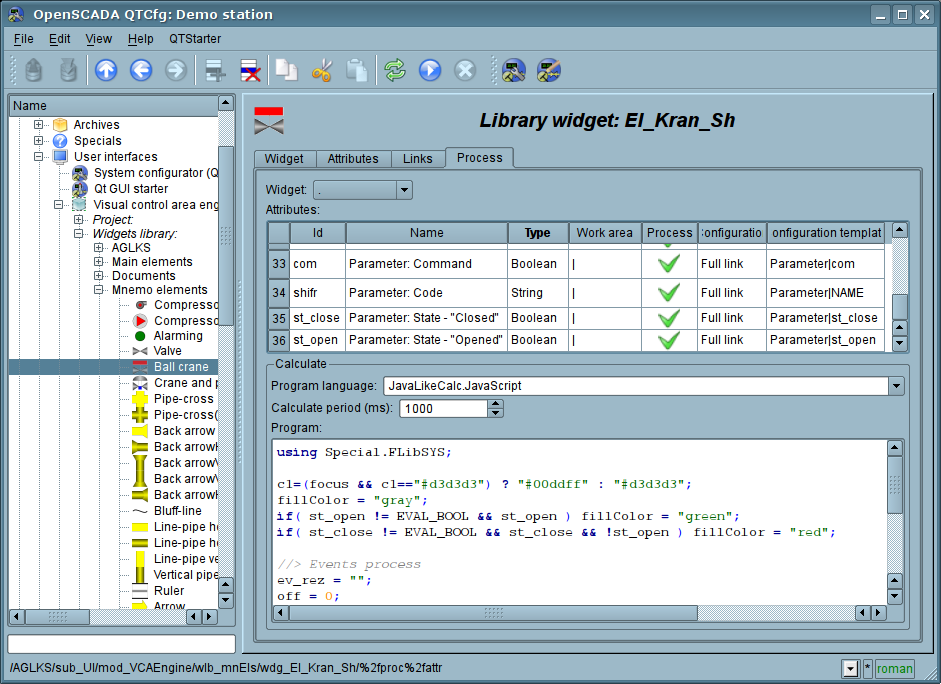
Figure. The tab "Processing" of the configuration page of the widget.
In addition to configuration fields of the attributes the column "Processing" in the table provides, for selective using of the attributes of the widgets in the computational procedure of the widget, and the columns "Configuration", "Configuration template", to describe the configuration of links.
The column "Configuration" allows you to specify the linkage type for the attribute of the widget:
- Constant — in the tab of widget links the field for indication of a constant appears, for example of the special color or header for the template frames.
- Input link — linkage with the dynamics for a read-only.
- Output link — linkage with the dynamics just for a writing.
- Full link — complete linkage with dynamic (read/write).
- From style — take the value from the project's style.
The column "Configuration template" makes it possible to describe the groups of dynamic attributes. For example, it may be different types of parameters of subsystem "DAQ" and other widgets of the interface. Furthermore, in the case of correct formation of this field, the mechanism of automatically assign of the attributes with the only indication of the parameter of subsystem "DAQ" or the widget is working, which simplifies and accelerates the configuration process. The value of this column has the following format:
- For constant: direct the attribute value.
- For link: "{parameter}|{identifier}", where:
- parameter — the group of the attribute;
- identifier — identifier of the attribute; same the value is compared with the attributes of the DAQ parameters with automatic linkage, after the group link indication.
- For style: identifier-name of the style field.
Installation of the links may be of several types, which are determined by the prefix:
- val: — Direct download of the value through the links mechanism. For example, link: "val:100" loads in the attribute of the widget the value of the 100. It is often used in the case of absence of end point of the link, in order to direct value indicating.
- prm: — Link to the attribute of the parameter or the parameter, in general, for a group of attributes, of subsystem "Data acquisition". For example, the link "prm:/LogicLev/experiment/Pi/var" implements the access of the attribute of the widget to the attribute of the parameter of subsystem "Data acquisition". Sign "(+)" at the end of the address indicate about successful linking and presence of the target. For object's type attributes allowed hierarchical access to the object concrete property by set the path through symbol '#', for example: "prm:/LogicLev/experiment/Pi/var#pr1/pr2".
- wdg: — Link to an attribute of another widget or the widget, in general, for a group of attributes. For example, the link "wdg:/ses_AGLKS/pg_so/pg_1/pg_ggraph/pg_1/a_bordColor" performs the access of the attribute of one widget to the attribute of another one. Supported absolute and relative link's path. Start point of absolute point is root object of module "VCAEngine", then the first item of absolute address is a session or a project identifier. On session side first item is passed then set into a project links there work. For relative links by start point used a widget with the link set. The item ".." of parent node is a special item of the relative links.
- arh: — A special type of link is only available for a particular attribute such as "Address", which allows you to connect directly to the archive values ("arh:CPU_load"). It may be useful to specify the archive as a source of data for primitive "Diagram".
Processing of the links occurs at a frequency of calculating the widget in the following order:
- receiving of the data from input links;
- perform of calculating of the script;
- transmission of the values by the output links.
In the Figure the tab of links with the group assignment of the attributes by the only specifying the parameter is presented, and in next Figure — with the individual appointment of the attributes.
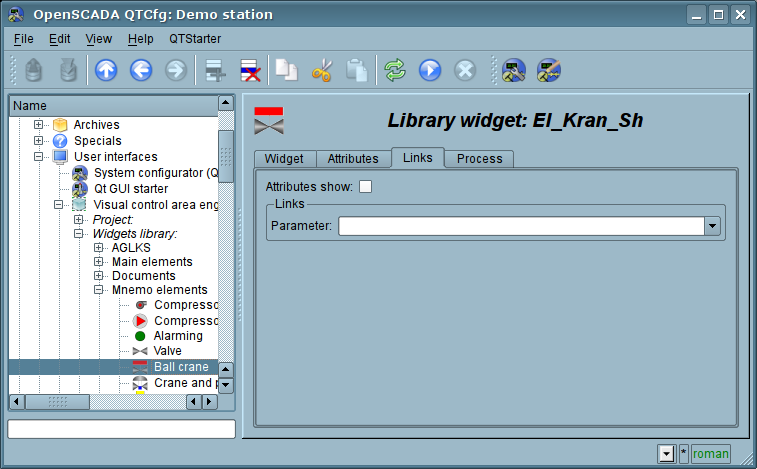
Figure. Tab "Links" of the page of configuration of the widget with the group assignment of the attributes by the only specifying of the parameter.
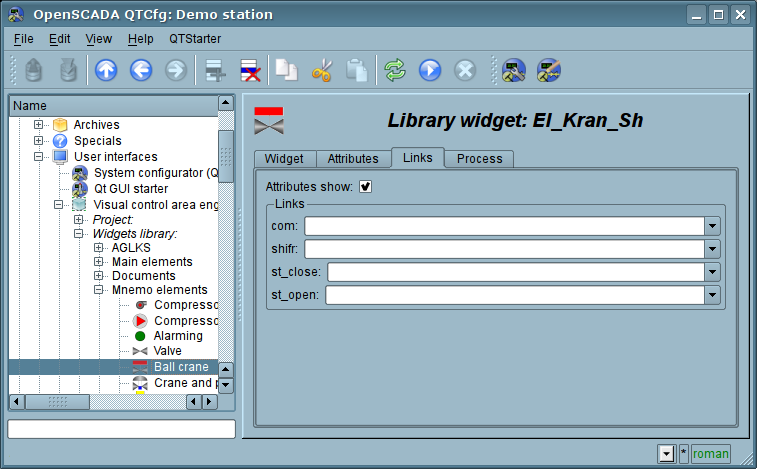
Figure. Tab "Links" of the page of configuration of the widget with the individual appointment of the attributes.
When the widget that contains the configuration of links is placed to the container of widgets, all links of the source widget is added to the list of resulting links of the widgets' container, but only to a depth of one level of nesting.
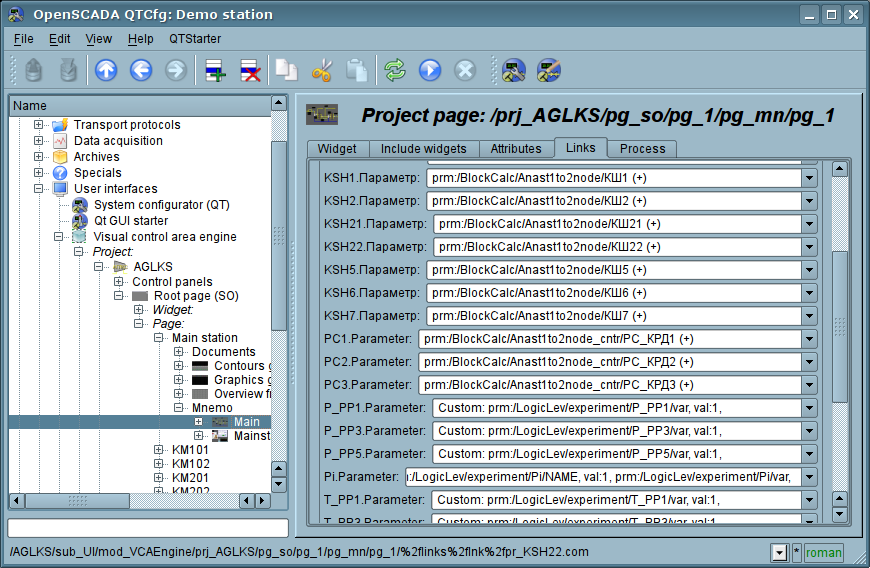
Figure. Tab "Links" of the page of configuration of the container of widgets, including widgets with links.
The above shows that the links are set by the user in the configuration interface. However, for the possibility of creation of the frames for general use, with the function of providing detailed data of various sources of the same type, a dynamic linkage mechanism is necessary. Such mechanism is provided through a reserved key identifier "<page>" of the group of attributes of links in the frames of general purpose and dynamic linkage with the identifier "<page>" in the process of opening of the frame of general purpose by means of the signal from another widget.
Lets examine the example when we have the frame of general-purpose "Control panel of graph" and a lot of "Graphs" in different tabs. "Control panel of graph" has links with the templates:
- tSek -> "<page>|tSek"
- tSize -> "<page>|tSize"
- trcPer -> "<page>|trcPer"
- valArch -> "<page>|valArch"
At the same time, each widget "Graph" has the attributes tSek, tSize, trcPer and valArch. In the case of a calling of the opening signal of "Control panel of graph" from any widget "Graph" it is happening the linkage of the attributes of the "Control panel of graph" in accordance with the attribute specified in the template with the attribute of the widget "Graph". As a result, all changes in the "Control panel of graph" will be displayed on the graph by means of the link.
In the case of presence of external links to the parameters of subsystem "Data acquisition" in the widget "Graph", the links of "Control panel of graph" will be set on an external source. In addition, if in the "Control panel of graph" will be declared the links to the missing attributes directly in the widget "Graph", it will be made the search for the availability of such attributes from the external source, the first to which the link is directed, performing, thus, the addition of missing links.
To visualize this mechanism the table is cited.
Table. The mechanism of the dynamic linkage.
| Attributes of the "Control panel of graph" (the template of dynamic linkage) | "Graph" attributes | Attributes of an external "Parameter" | The resulting link or an value of the linking attribute |
| tSek (<page>|tSek) | tSek | - | "Graph".tSek |
| tSize (<page>|tSize) | tSize | - | "Graph".tSize |
| trcPer (<page>|trcPer) | trcPer | - | "Graph".trcPer |
| valArch (<page>|valArch) | valArch | - | "Graph".valArch |
| var (<page>|var) | var | var | "Parameter".var |
| ed (<page>|ed) | - | ed | "Parameter".ed |
| max (<page>|max) | - | - | EVAL |
| min (<page>|min) | - | - | EVAL |
3.9. The primitives of the widget
Any newly created widget is based on one of several primitives (end element of the visualization) by installing of the kinship as directly to the primitive, as well as through the several intermediate user widgets. Each of the primitives contains a mechanism (logic) of the data model. A copy of the widget keeps the values of the properties of configuration of the the primitive specially for itself.
The tasks of the visualization interface includes support and work with the data model of the primitives of widgets. Primitives of the widget must be carefully developed and unitized in order to cover as many opportunities in the as possible to a smaller number of weakly connected with each other by their purpose primitives.
Table. The library of the primitives of widgets (basic elements of visualization)
Table. The common set of properties/attributes in the widget
The visualization engine provides visualizer specific attributes activation. The process of activation does at a session of the project opening and minds for the project: creation of the specific attribute with pointed properties, at case it lack, and activation for modification tracing by the visualization engine, like to the attributes of forming primitive's shapes. For the specific attributes list of the visualizer you can see to proper documentation of the visualizer.
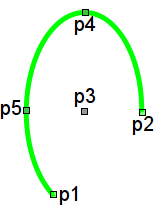
Elementary graphic figures (ElFigure)
Primitive is the basis for drawing basic graphic shapes with their possible combinations in a single object. Taking into account the wide range of various shapes, which must be maintained by the primitive, and at the same time the primitive must be simple enough for using and, if possible, for implementation, it was decided to limit the list of the basic figures used for the construction of the resulting graphics to these figures: line, arc, Bézier curve and fill of the enclosed spaces. Based at these basic figures, it is possible to construct derived figures by combining the basic. In the context of the primitive, there is possibility to set the transparency of the color in the range [0...255], where '0' — complete transparency.
Table. A list of additional properties/attributes of the primitive "ElFigure"
Element of the form (FormEl)
Primitive is intended to provide the standard form elements to the user. The general list of attributes depends on the type of element.
Table. A set of additional properties/attributes of the primitive "FormEl"
Text element (Text)
This primitive is designed to display the plain text used as labels, and different signatures. With the reason of creating a simple frequent decorations the primitive must support the surrounding of the text by frame.
Table. The list of additional properties/attributes of the primitive "Text"
Element of visualization of media materials (Media)
This primitive is designed to play different media materials, ranging from simple images to the full audio and video streams.
Table. A set of additional properties/attributes of primitive "Media"
Element of constructing diagrams/trends (Diagram)
This primitive targeted to construct various diagrams, including graphs/trends showing ongoing process and the archive data. Following types of the diagrams are implemented:
- "Graph" — builds a graph of the values of a parameter in time
- "Spectrum" — builds the frequency spectrum of values of a parameter. Window of the data of frequency spectrum is formed on the basis of the size of the widget horizontally, in pixels, and the available data of the parameters imposed on the horizontal grid size. In this regard, the minimum frequency is determined by the value of the attribute "tSize" — "1/tSize", and maximum frequency of allocated frequencies is determined by half-width of the graph in pixels multiplied by the minimum frequency "width/(2*tSize)".
- "XY" — builds the two-dimensional graph of values of a parameter, by pairs to one graphic, where paired by axis Y (0,2,4...) and unpaired by axis X (1,3,5...). Sets time of the data range uses for values of the parameter obtain by axis X and Y, with follow sorting by the axis X and the imaging.
For all the diagram types possible as the data source sets:
- parameter of the subsystem "DAQ";
- values archive;
- direct data block from user.
Supported tracing of the current values and the values from the archive, and also the possibility of building the graphs of the parameters which have no archive of values, by the current values accumulation into the diagram buffer and only at the diagram active visibility moment.
The process of access to the archive data is optimized, by means of an intermediate buffer for the display, as well as the package of traffic data in the query, by way the data lead to quality enough for display.
Table. A list of additional properties/attributes of the primitive "Diagram"
Element of building the protocols based on the archives of messages (Protocol)
This primitive is designed to visualize the data of the archive of messages through the formation of protocols with different ways of visualization, starting from a static scanning view and finishing with dynamic tracing of protocol of message.
Table. A list of additional properties/attributes of the primitive "Protocol"
Element of formation of documentation (Document)
The primitive is designed to creation report, operational and other documents based on templates of documents.
Table. A list of additional properties/attributes of the primitive "Document"
Features of the primitive "Document":
- Flexible formation of the structure of the document based on Hypertext Markup Language.
- Formation of the documents by a command or a plan into the archive with the subsequent viewing of the archive.
- Formation of the document in real-time mode, fully dynamic and based on the archives of the real-data for the specified time.
- Using the attributes of the widget to pass values and addresses to the archives of real-data in the document. Allows you to use the widget of document as the template for generating reports with other input data.
The basis of any document is XHTML-template. XHTML-template is the tag "body" of the WEB-page which contains the document's static in the standard XHTML 1.0 and elements of the executable instructions in one of the languages of the user programming of OpenSCADA in the form of <?dp {procedure} ?>. The resulting document is formed by the execution of procedures and insert of their result into the document.
The source for values of the executable instructions are the attributes of the widget of the primitive, as well as all the mechanisms of the user programming language. Attributes may be added by the user and they can be linked to the actual attributes or parameters or they can be autonomous, values of which will be formed in the script of the widget. In the case of linked attributes the values can be extracted from the history, archive.
Fig. 3.8.7.a shows a block diagram of the widget of the primitive "Document". According to this structure "Document" includes: XHTML-template, the resulting documents and the processing script. The data source for the script and for the resulting documents are the attributes of the widget.
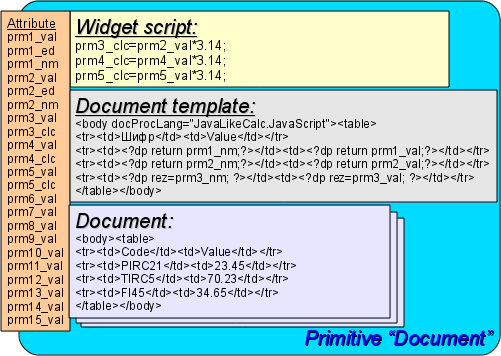
Fig. 3.8.7.a The block diagram of the primitive "Document".
It is provided the work of the widget in two modes: "Dynamic" and "Archive". The difference between archive mode is the availability of the archive of the specified depth and attributes which allow you to control the process of archiving and viewing of the document in the archive.
Generation of the document is always performed at the time of installation of the time attribute time relatively to the set start time of the document in the attribute bTime. With the archive turned off the resulting document is placed directly in the attribute doc. When the archive is turned on the resulting document is placed in the cell under the cursor, the attribute aCur, as well as in doc if the value of the archive cursor aCur and the cursor of visualized document vCur match. Attributes of the archival cursors provide several commands of values:
- "aCur < 0" — Moves the archiver cursor for the following position, thereby leaving the previous document in the archive and clearing the document under the cursor (at the circle archive short).
- "vCur == -1" — Select of the next document to be displayed, the selected document is copied to the attribute doc.
- "vCur==-2" — Select of the previous document to be displayed, the selected document is copied to the attribute doc.
As it was stated above dynamics of the document's template is defined by the inserts of executable instructions of the form "<?dp {procedure} ?>". The procedures may use the same attributes of the widget and functions of the user programming interface of OpenSCADA. In addition to the attributes of the widget special attributes (Table 3.8.7.a) are reserved.
Table 3.8.7.a. Special and reserved elements of the template.
| Name | Assignment |
| Attributes | |
| rez | Attribute of the results of the procedure execution, the contents of which is placed to the document tree. |
| lTime | Last formation time. If the document is formed for the first time, lTime is equal to the bTime. |
| rTime | Contains the time for the selected values in seconds, it is defined inside the tags with the attribute "docRept". |
| rTimeU | Contains the time for the selected values in microseconds, it is defined inside the tags with the attribute "docRept". |
| rPer | Contains the periodicity of the selection of values (the attribute "docRept"). |
| mTime, mTimeU, mLev, mCat, mVal | It is defined inside the tags with an attribute "docAMess" when parsing messages of the messages' archive: mTime — message time; mTimeU — message time, microseconds; mLev — message level; mCat — message category; mVal — message value. |
| Special tags | |
| Special attributes of the standard tags | |
| body.docProcLang | Language of executable procedures of the document. By defaults it is "JavaLikeCalc.JavaScript". |
| *.docRept="1s" | Tag with the specified attribute, while the formation it multiplies through the time offset in the attribute "rTime" to the value, specified in this attribute. |
| *.docAMess="1:PLC*" | Indicates the necessity of the tag multiplication with an attribute of message from the archive of messages for the specified interval of time, in accordance with the level of "1" and template of request "PLC*" by the messages category. The template request may specify a regular expression in the form of "/{re}/". For this tag in the process of multiplication the following attributes: mTime, mTimeU, mLev, mCat and mVal are defined. |
| *.docAMessArchs="ArchMod0.Archivator0[;ArchModN.ArchivatorN]" | The attribute "*.docAMess" appends by a list of archivators for messages reading. |
| *.docRevers="1" | Points to invert of the order of multiplication, the last from the top. |
| *.docAppend="1" | The sign of the necessity of addition of the procedure execution result in the tag of the procedure. Otherwise, the result of execution replaces the contents of the tag. |
| body.docTime | Time of formation of the document. It is used to set the attribute lTime in the time of the next formation of the document. It is not set by the user! |
| table.export="1" | Enable for selected table content allow for export to CSV-file and other table formats. |
Container (Box)
The primitive container is used to build composite widgets and/or the pages the user interface.
Table. A list of additional properties/attributes of the primitive Box
3.10. Database using to store libraries of widgets and projects
Storage of widgets, widgets libraries and projects are implemented into the databases accessible in the OpenSCADA system. The DB is structured on the data belonging to the library-project. Ie a separate library-project stores in a separate group of tables of one or of the different databases. The list of libraries of widgets is stored in the index table of the libraries with the name "VCALibs", with the structure "Libs", and the list of projects in the index table "VCAPrjs", with the structure "Projs". A copy of this table is created in each database, which stores data of the module with the list of libraries which are hold in a given database. To the list of the tables belonging to the library of widgets and projects, are included:
- "{DB_TBL}" — table of widgets belonging to the library (structure "LibWigets"), or pages belonging to the project (structure "ProjPages");
- "{DB_TBL}_io" — table with the working properties of the widget in this library and of the embedded widgets of the container ones (structure "LibWidgetIO"), or the properties of the pages (structure "ProjPageIO");
- "{DB_TBL}_uio" — table with the user properties of the widgets of this library and the embedded widgets of container ones (structure "LibWidgetUserIO"), or the user properties of the pages (structure "ProjPageUserIO");
- "{DB_TBL}_incl" — table of included widgets into the widgets-containers of the library (structure "LibWidgetIncl") or the project (structure "ProjPageWIncl");
- "{DB_TBL}_mime" — table with the resources of the library and it's widgets (structure "LibWidgetMime") or the project and it's pages (structure "ProjMime");
- "{DB_TBL}_stl" — table for store values of the stiled properties of a project (structure "PrjStlIO");
- "{DB_TBL}_ses" — table for store data of project's run mode, session (structure "PrjSesIO").
Projections (structures) of basic tables are as follows:
- Libs(ID, NAME, DSCR, DB_TBL, ICO) — Libraries of widgets ID.
ID — identifier;
NAME — name;
DSCR — description;
DB_TBL — root of the tables of DB with the widgets;
ICO — encoded (Base64) image of the icon of the library.
- LibWigets(__ID__, ICO, PARENT, PROC, PROC_PER, ATTRS, TIMESTAMP) — Widgets ID of the library.
ID — identifier;
ICO — encoded (Base64) image of the icon of the widget.
PARENT — address of the basic widget /wlb_originals/wdg_Box;
PROC — internal script and the script language of the widget;
PROC_PER — frequency of the computation of the script of the widget;
ATTRS — list of attributes of the widget, modified by the user.
TIMESTAMP — time-stamp of the last modification.
- LibWidgetIO(__IDW__, ID, IDC, IO_VAL, SELF_FLG, CFG_TMPL, CFG_VAL) — Work attributes ID of the widget IDW.
IDW — identifier of the widget;
ID — identifier of the IO;
IDC — child widget identifier;
IO_VAL — value of the attribute;
SELF_FLG — internal flags of the IO;
CFG_TMPL — template of the configuration element based on this attribute;
CFG_VAL — value of the configuration element (link, constant ...).
- LibWidgetUserIO(__IDW__, ID, IDC, NAME, IO_TP, IO_VAL, SELF_FLG, CFG_TMPL, CFG_VAL) — User attributes ID of the widget IDW.
IDW — identifier of the widget;
ID — identifier of the IO;
IDC — child widget identifier;
NAME — name of the IO;
IO_TP — type and main flags of the IO;
IO_VAL — value of the IO;
SELF_FLG — internal flags of the IO;
CFG_TMPL — template of the configuration element based on this attribute;
CFG_VAL — value of the configuration element (link, constant ...).
- LibWidgetIncl(__IDW__, ID, PARENT, ATTRS) — Included into the container IDW widgets ID.
IDW — identifier of the widget;
ID — identifier of the copy of the included widget;
PARENT — address of the basic widget /wlb_originals/wdg_Box;
ATTRS — list of attributes of the widget, modified by the user.
- LibWidgetMime(__ID__, MIME, DATA) — Audio, video, media and other resources of widgets of the library.
ID — identifier of the resource.
MIME — Mime data type of the resource (in the format — "{mimeType};{Size}").
DATA — Resource data encoded with Base64.
- Projs(ID, NAME, DSCR, DB_TBL, ICO, USER, GRP, PERMIT, PER, FLGS, STYLE) — Projects of visualization interfaces ID.
ID — identifier of the project;
NAME — name of the project;
DSCR — description of the project;
DB_TBL — root of the tables of DB with the pages;
ICO — encoded (Base64) image of the icon of the project;
USER — owner of the project;
GRP — users group of the project;
PERMIT — rights of access to the project;
PER — frequency of the computation of the project;
FLGS — flags of the project;
STYLE — typical style of the project.
- ProjPages(__OWNER__, ID, ICO, PARENT, PROC, PROC_PER, FLGS, ATTRS, TIMESTAMP) — The pages ID which are hold in the project/page OWNER.
OWNER — project/page — owner of the page (in the format — "/AGLKS/so/1/gcadr")
ID — identifier of the page;
ICO — encoded (Base64) image of the icon of the page;
PARENT — address of the basic widget of the page in the format: /wlb_originals/wdg_Box;
PROC — internal script and the script language of the page;
PROC_PER — frequency of the computation of the script of the widget;
FLGS — flags of the page;
ATTRS — list of attributes of the widget, modified by the user;
TIMESTAMP — time-stamp of the last modification.
- ProjPageIO(__IDW__, ID, IDC, IO_VAL, SELF_FLG, CFG_TMPL, CFG_VAL) — Working attributes of the pages. The structure actually corresponds to the table LibWidgetIO.
- ProjPageUserIO(__IDW__, ID, IDC, NAME, IO_TP, IO_VAL, SELF_FLG, CFG_TMPL, CFG_VAL) — User attributes of the pages. The structure actually corresponds to the table LibWidgetUserIO.
- ProjPageWIncl(__IDW__, ID, PARENT, ATTRS) — Included widgets on the page. The structure actually corresponds to the table LibWidgetIncl.
- ProjMime(__ID__, MIME, DATA) — Audio, video, media and other resources of the pages of the project. The structure actually corresponds to the table "LibWidgetMime".
- PrjStl(__ID__, V_0, V_1, V_2, V_3, V_4, V_5, V_6, V_7, V_8, V_9) — Value of the style's field ID of the project.
ID — style's field identifier;
V_{N} — value of the style's field for the style N.
- ProjSess(__IDW__, ID, IO_VAL) — Project table IDW for data storage of the sessions, performing project.
IDW — the full path of the element of the project;
ID — attribute of the element;
IO_VAL — value of the element.
3.11. API of the user programming and service interfaces of the OpenSCADA
API of the user programming
API of the user programming of API of the visualization engine are represented by the OpenSCADA objects directly, which build user interface, and same "Session" and "Widget/page". These objects provide the set of control functions for the user:
Object "Session" ( this.ownerSess() )
- string user( ) — current session user.
- int alrmQuittance( int quit_tmpl, string wpath = "", bool ret = false ) — violations quittance wpath with the template quit_tmpl. If wpath is empty string then make global quittance. Into the string wpath, by symbol ';', can be enumerated addresses of several widgets. The ret sets will cause the quittance return.
- int reqTm( ) — last request time.
- string reqUser( ) — last request user.
- string reqLang( ) — last request language.
- int userActTm( ) — last user action time.
Object "Widget" (this)
- TCntrNodeObj ownerSess( ) — the session's object is getting for current widget.
- TCntrNodeObj ownerPage( ) — the parent object's page is getting for current widget.
- TCntrNodeObj ownerWdg( bool base = false ) — the parent widget is getting for current widget. If set base then will return the parent pages' objects also.
- TCntrNodeObj wdgAdd( string wid, string wname, string parent ) — add new widget wid with the name wname and based on the library widget parent.
- bool wdgDel( string wid ) — delete the widget wid.
- TCntrNodeObj wdgAt( string wid, bool byPath = false ) — attach to child or global, by byPath, widget. In the case of global connection, you can use absolute or relative path to the widget. For starting point of the absolute address acts the root object of the module "VCAEngine", which means the first element of the absolute address is session identifier, which is omitted. The relative address takes the countdown from the current widget. Special element of the relative address is an element of parent node "..".
- bool attrPresent( string attr ) — the attribute attr of the widget checking to presence fact.
- ElTp attr( string attr, bool fromSess = false ) — value of the attribute attr of the widget getting or from the session fromSess. For missing attributes will return empty string.
- TCntrNodeObj attrSet( string attr, ElTp vl, bool toSess = false ) — value of the attribute attr of the widget setting to vl, or to the session toSess. The object is returned for the function concatenation.
- string link( string attr, bool prm = false ) — the link return for the widget's attribute attr. At set prm requests the link for the attributes block (parameter), represented by the attribute.
- string linkSet( string attr, string vl, bool prm = false ) — the link set for the widget's attribute attr. At set prm makes the link set for the attributes block (parameter), represented by the attribute.
- string mime( string addr, string type = "" ) — the "mime" object by the address addr (the direct link to the resource or the widget's attribute contained the link) getting with the type to type, from the session table or the source. It is designed for the "mime" objects edition and that substitution to this session's context, for example, images SVG.
- int mimeSet( string addr, string data, string type = "" ) — the "mime" object data with type type by address addr setting.
- int messDebug( string mess ); int messInfo( string mess ); int messNote( string mess ); int messWarning( string mess ); int messErr( string mess ); int messCrit( string mess ); int messAlert( string mess ); int messEmerg( string mess ); — formation of the system message mess with the category as the widget path.
Object "Widget" of the primitive "Document" (this)
- string getArhDoc( int nDoc) — getting the archive document's text to "nDoc" (0-{aSize-1}) depth.
The deprecated API of the user programming of the visualization engine are represented by the group of functions directly in the engine module of the VCA. Calling of these functions from the scripts of widgets can be performed directly by the ID of the function, since their area of names is indicated for the context of the scripts of widgets.
Widget list (WdgList)
Description: Returns a list of widgets in the container of widgets or a list of child widgets. If pg is set it returns a list of pages for the projects and sessions.
Parameters:
| ID | Name | Type | Mode | By default |
| list | List | String | Return | |
| addr | Address | String | Input | |
| pg | Pages | Bool | Input | 0 |
Presence of the node (NodePresent)
Description: Check for the presence of the node, including widgets, attributes and others.
Parameters:
| ID | Name | Type | Mode | By default |
| rez | Result | Bool | Return | |
| addr | Address | String | Input |
Attributes list (AttrList)
Description: Returns list of attributes of the widget. If noUser is set then only not user attributes are returned.
Parameters:
| ID | Name | Type | Mode | By default |
| list | List | String | Return | |
| addr | Address | String | Input | |
| noUser | Without user | Bool | Input | 1 |
Request of the attribute (AttrGet)
Description: Request of the value of the attribute of the widget. The request can be done as by indicating the full address of the attribute in addr, and by indicating separately the address of the widget in addr, and the ID of the attribute in the attr.
Parameters:
| ID | Name | Type | Mode | By default |
| val | Value | String | Return | |
| addr | Address | String | Input | |
| attr | Attribute | Bool | Input |
Setting of the attribute (AttrSet)
Description: Setting of the value of the attribute of the widget. Setting can be done as by the indicating the full address of the attribute in addr, and by indicating separately the address of the widget in addr, and the ID of the attribute in attr.
Parameters:
| ID | Name | Type | Mode | By default |
| addr | Address | String | Input | |
| val | Value | String | Input | |
| attr | Attribute | Bool | Input |
Session user (SesUser)
Description: Return the session user by the session's widget path.
Parameters:
| ID | Name | Type | Mode | By default |
| user | User | String | Return | |
| addr | Address | String | Input |
Service interfaces of OpenSCADA
Service interfaces are interfaces of access to the OpenSCADA system by means of OpenSCADA control interface from external systems. This mechanism — is the basis of all the mechanisms for interaction within OpenSCADA, implemented through the weak ties, and standard exchange protocol of OpenSCADA.
Access to the values of attributes of the visualization elements (widgets)
In order to provide unitized, grouping and relatively fast access to the values of attributes of the visual elements the service function of the visual element "/serv/attr" and get/set commands of the attributes' values are provided: <get path="/UI/VCAEngine/{wdg_addr}/%2fserv%2fattr"/> and <set path="/UI/VCAEngine/{wdg_addr}/%2fserv%2fattr"/>.
Table. Attributes of commands for get/set of the attributes of the visual elements
| Id | Name | Value |
| Requesting command of the visual attributes of the widget: <get path="/UI/VCAEngine/{wdg_addr}/%2fserv%2fattr"/> | ||
| tm | Time/counter of the changes | Time/counter of the changes set up for the query of the only changed attributes. |
| <el id="{attr}" p="{a_id}">{val}</el> | The formation of the child elements with the results of the attributes | In the child element are specified: string ID attr of the attribute, index a_id of the attribute and its value val. |
| Setting command of the visual attributes of the widget: <set path="/UI/VCAEngine/{wdg_addr}/%2fserv%2fattr"/> | ||
| <el id="{attr}">{val}</el> | Setting of the attributes | In the child elements the ID of the attribute attr and its value val are specified. |
| Activation-creation command of specific for the visualizer attribute: <activate path="/UI/VCAEngine/{wdg_addr}/%2fserv%2fattr/{attrId}" aNm="{Name}" aTp="{Type} aFlg="{Flags}"/> | ||
| attrId | Attribute identifier | |
| aNm | Attribute name | |
| aTp | Attribute type | |
| aFlg | Attribute flags | |
Group access to the values of the attributes of the visualization elements (widgets)
In order to optimize network traffic by eliminating the small queries, but use one, but a large the group query of the attributes' values of visual elements is made. Grouping of this query involves a request of attributes of the entire branch of the widget, including the embedded elements. For this request the service command "/serv/attrBr" provides. Request of this service command is equivalent to the service command "/serv/attr" and looks as follows: <get path="/UI/VCAEngine/{wdg_addr}/%2fserv%2fattrBr"/>
Result:
<w id="{wid}" lnkPath="{lnk_path}">{childs+attrs}</w> — elements with the child widgets and their attributes. The identifier of the child widget wid and the path to the widget on which the current widget links to, if its is the link lnk_path, are specified in the element.
Access to the pages of the session
In order to unify and optimize the access to the pages the service function of the session "/serv/pg" and commands of the query of the list of open pages <openlist path="/UI/VCAEngine/ses_{Session}/%2fserv%2fpg"/>; of opening the pages <open path="/UI/VCAEngine/ses_{Session}/%2fserv%2fpg"/>; and closing of the pages <close path="/UI/VCAEngine/ses_{Session}/%2fserv%2fpg"/> are provided.
The result of the query is child elements <el>{OpPage}</el> which contain the full path of the open page. In addition to the list of open pages, the query returns the value of the current counter for calculating the session in the attribute tm. If this attribute is set during the query, then for each open page it returns the list of changed, since the moment of the specified value of the counter, widgets of the open page.
Signaling (alarm) management
To provide a mechanism for global control of the signaling of the session the service function of the session "/serv/alarm" and commands of the query of the signals status <get path="/UI/VCAEngine/ses_{Session}/%2fserv%2falarm"/>; and of the quittance <quittance path="/UI/VCAEngine/ses_{Session}/%2fserv%2falarm"/> are provided.
Request for the status of signals returns generalized condition of the signals, as well as additional a notification resource by attribute "mode" sets to "resource". The notification resource request result is typically a sound file, for playback, and at that time it performs monitoring of the sequence of signaling and quittance of individual the notification resources of the messages.
Request for the quittance performs quittance of the specified widget, attribute wdg, in accordance with the template, attribute tmpl.
Manipulation with the sessions of the projects
To provide a unitize mechanism for manipulation of the sessions by the visualizers of VCA in the module of the VCA engine (VCAEngine) are provided the service function "/serv/sess" and the query commands of the list of open sessions, connection/creation of the new session and disconnection/deleting of the session: <list path="/UI/VCAEngine/%2fserv%2fsess"/>, <connect path="/UI/VCAEngine/%2fserv%2fsess"/> and <disconnect path="/UI/VCAEngine/%2fserv%2fsess"/> accordingly.
Table. Attributes of commands of the mechanism of manipulation with sessions
| Id | Name | Value |
| Command of requesting of a list of open sessions for the project: <list path="/UI/VCAEngine/%2fserv%2fsess"/> | ||
| prj | Indication of the project | Specifies the project for which to return the list of open sessions. |
| <el>{Session}</el> | Control of the sessions' list | In the child element the open for the requested project sessions are specified. |
| The command of the connection/opening of the session: <connect path="/UI/VCAEngine/%2fserv%2fsess"/> | ||
| sess | Installation and control of the session name | If the attribute is defined, then connecting to an existing session is to be made, else — creation of the new session is to be made. In the case of opening of the new session in this attribute its name is is placed. |
| prj | Setting the name of the project | It is used to open a new session for indicated project and when the attribute sess is not specified. |
| The command of disconnection/closing of the session: <disconnect path="/UI/VCAEngine/%2fserv%2fsess"/> | ||
| sess | Setting the name of the session | Specify the name of the session from that it is made the disconnection or closing. Sessions, not the background, and to which none of the visualizers is not connected, are automatically closed. |
Group request for the tree of widget libraries
In order to optimize the performance of local and especially network interaction the service function "/serv/wlbBr" and the command of the query of the tree of widget libraries: <get path="/UI/VCAEngine/%2fserv%2fwlbBr"/> are provided. The result of the query is a tree with the elements of the libraries of widgets, tags wlb. Inside the tags of libraries of widgets are included: icon tag ico and the widgets library tags w. The widgets tags, in their turn, contain the icon tag and tags of the child widgets cw.
4. Configuring the module via the control interface of OpenSCADA
Through the management interface of OpenSCADA, components that use it, can be configured from any system configurator OpenSCADA. This module provides an interface to access all the data object of the VCA. Main inset of the configuration page of the module provides access to widgets libraries and projects (Fig. 4.1). The tab "Sessions" provides access to opened sessions of projects (Fig. 4.2).
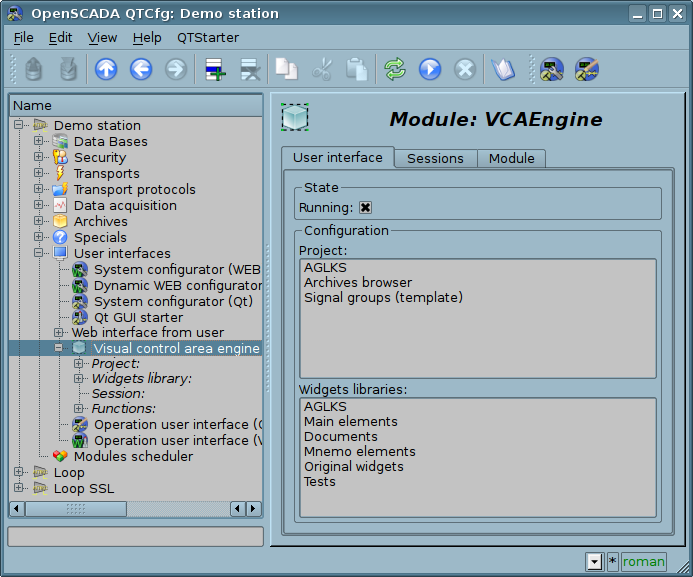
Fig.4.1 Main configuration page of the module.
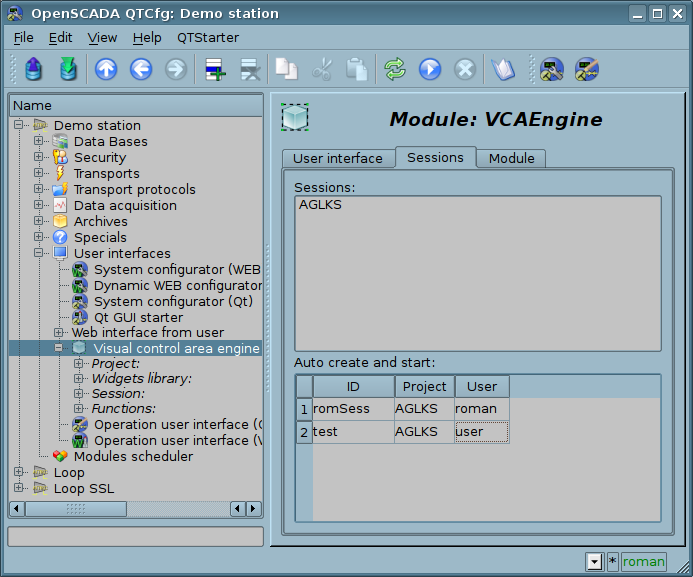
Fig.4.2 Tab "Sessions" of the configuration page of the module.
In addition to the list of open sessions the tab in Figure 4.2 contains a table with a list of sessions that must be created and run at boot time OpenSCADA. Creation of sessions through this tool can be useful for Web-based interface. In this case, when connecting Web-user data is ready and ensures the continuity of the formation of archival documents.
The configuration of container widgets in the face of libraries and widget projects is done through pages in Fig. 4.3 (a project) and Fig.4.5 (a library of widgets). Widgets library contains the widgets, and project — the pages. Both types contain a tab of configuration Mime-data used widgets (Fig.4.6). The project page also contains the tab "Diagnostics" (Fig.4.4) for debug and control all the page's executions by sessions.
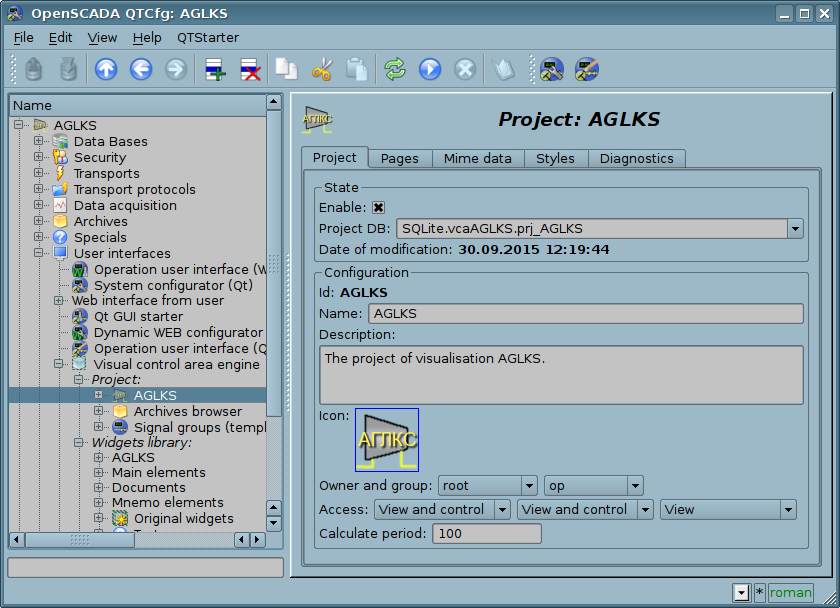
Fig.4.3 Configuration page of the projects.
From this page you can set:
- State of the container, same: "Enabled", the name of the database containing the configuration, date and time for last modification.
- Id, name, description and icon of the container.
- Owner, group and access rights to the container.
- Period for computing of the sessions based on the given project.
Fig.4.4 Tab "Diagnostics" of the projects.
From this tab you can select time, or refresh to current, and size for diagnostic messages obtain of the sessions of running the project.
Fig.4.5 Configuration page of the widgets libraries.
From this page you can set:
- State of the container, same: "Enabled", the name of the database containing the configuration, date and time for last modification.
- Id, name, description and icon of the container.
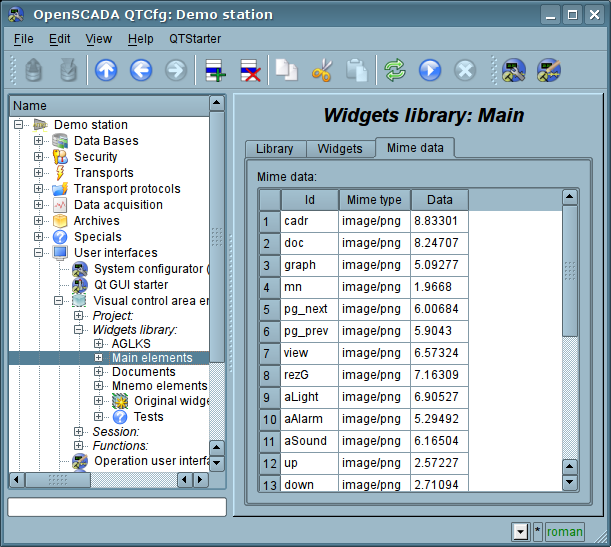
Fig.4.6 Configuration tab of the Mime-data of the container.
Configuration of the project's session differs significantly from configuration of the project (Fig. 4.8), but also contains pages of the project.
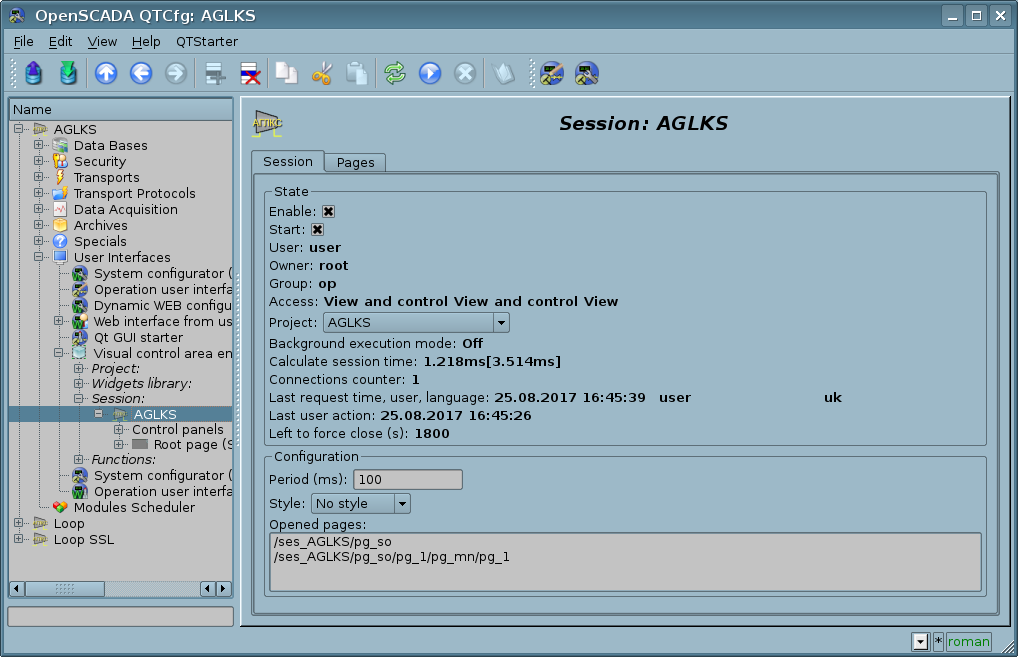
Fig.4.7 Configuration page of the sessions of the projects.
From this page you can set:
- State of the session, same: "Enabled"; "Started"; user; owner; users group; access; source project; mode of execution in the background; execution time of the session; the counter of client connections; last request time, user and language; last user action and left time to its force closing.
- Period of calculation of the session.
- Current style of the session.
- List of opened pages.
The configuration pages of visual elements, placed in different containers, may be very different, but this difference is the presence or absence of individual tabs. The main tab of visual elements in fact is the same everywhere, differing in one configuration field and three into the session (Fig. 4.8). The pages contains the tabs of the child pages and embedded widgets. The container widgets contains the tab of the embedded widgets. All visual elements contain attributes tab (Fig. 4.9), except the logical containers of the projects. Elements, at the level of which it is possible to build the user procedure and to determine the links, contain the tabs "Process" (Fig. 4.10) and "Links" (Fig.4.11).
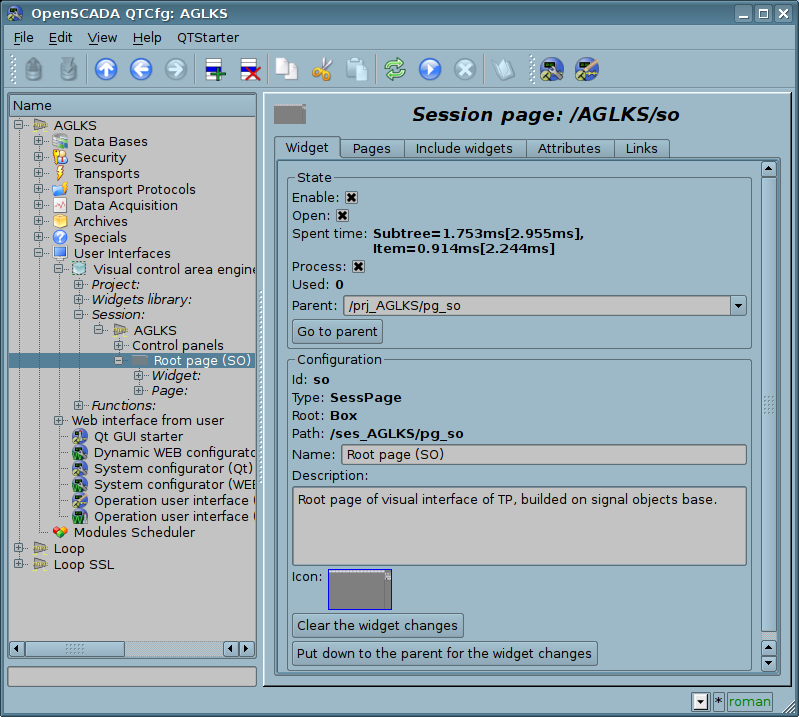
Fig.4.8 Main tab of configuration of the visual elements.
From this page you can set:
- States of the element, same: "Enabled", counting of using, parent element and jump to it, date and time for last modification.
- States of the runtime session's mode: "Open", "Process" and spent time on execution of the subtree and item, into the debug mode.
- Id, type, root, path, name, description and icon of the element.
- Command for the widget's changes clear.
- Command for the widget's changes put down to the parent.
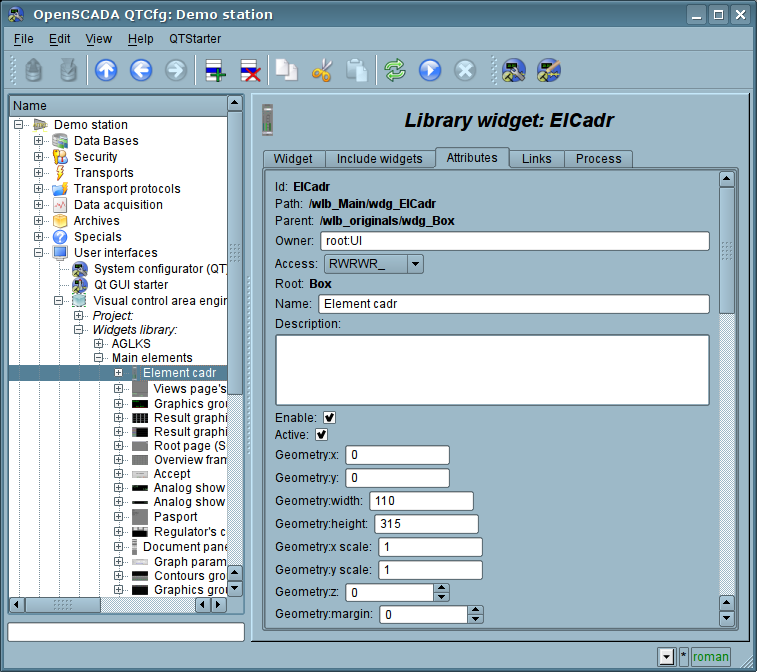
Fig.4.9 Tab of the attributes of visual elements.
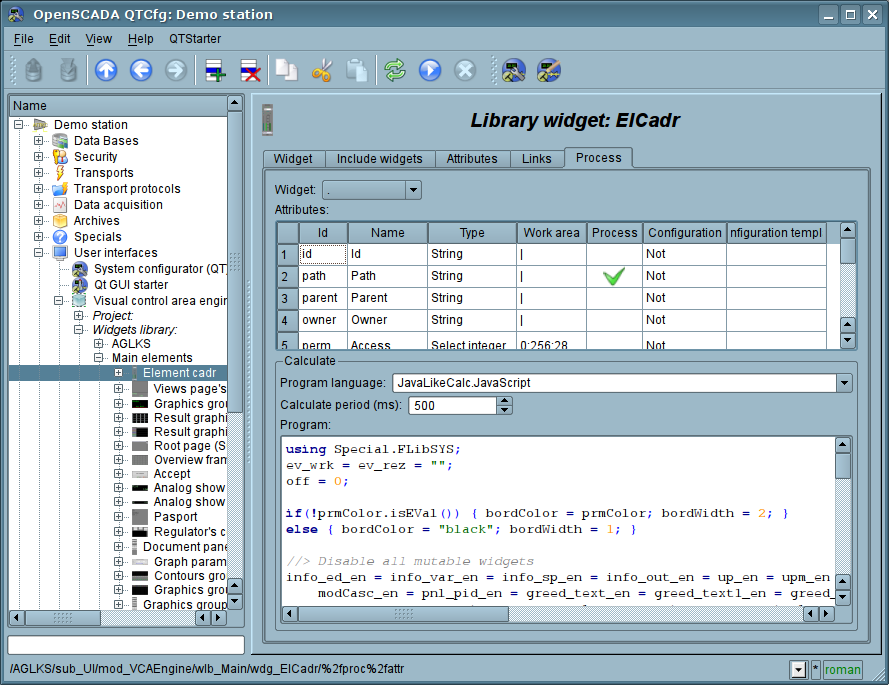
Fig.4.10 Tab of the processing of visual elements.
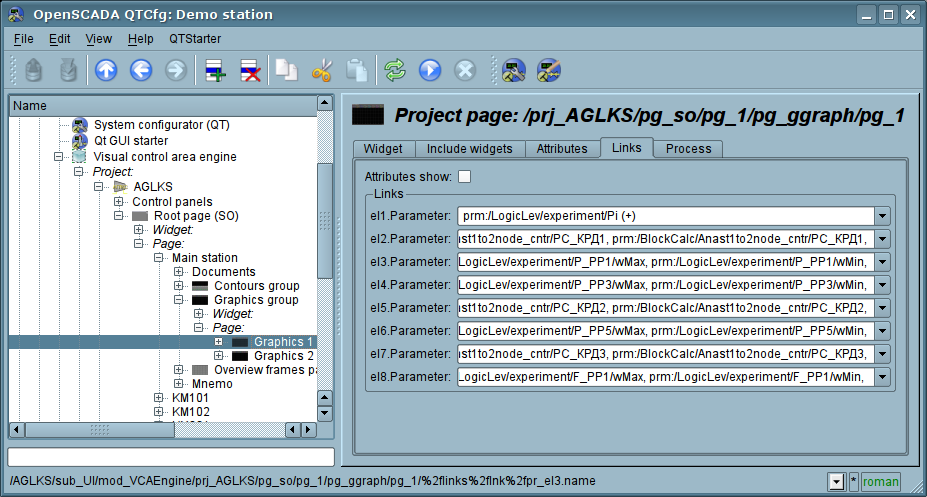
Fig.4.11 Tab of the links of the visual elements.