The module <WebVision> of subsystems “User Interfaces”
 Ðóññêàÿ âåðñèÿ
 Óêðà¿íñüêà âåðñ³ÿ?
| Module: | WebVision |
| Name: | Operation user interface (WEB) |
| Type: | User interfaces |
| Source: | ui_WebVision.so |
| Version: | 0.6.10 |
| Author: | Roman Savochenko |
| Developers: | Roman Savochenko, Maxim Lysenko, Ksenia Yashina |
| Translated: | Maxim Lysenko |
| Description: | Web visual user interface for the project execution of visual control area (VCA). |
| License: | GPL |
Introduction
WebVision module provides a mechanism of the final visualization of the visual control area (VCA) in the OpenSCADA system. The module is based on WEB technologies (XHTML, JavaScript, CSS, AJAX). In its work, the module uses the data from the VCA engine ( module VCAEngine ).
Visual control area (VCA) is an integral part of the SCADA system. It applies to the client stations with a view to providing accessible information about the object and to for the the issuance of the control actions to the object. In various practical situations and conditions the VCA, based on different principles of visualization may by applied. For example, this may be the library of widgets QT, GTK+, ~ wxWidgets or hypertext mechanisms based technologies HTML, XHTML, XML, CSS, and JavaScript, or third-party applications of visualization, realized in various programming languages Java, Python, etc. Any of these principles has its advantages and disadvantages, the combination of which could become an insurmountable obstacle to the use of VCA in a practical case. For example, technologies like the QT library can create highly-reactive VCA, which will undoubtedly important for the operator station for control of technological processes (TP). However, the need for installation of that client software in some cases may make using of it impossible. On the other hand, Web-technology does not require installation on client systems and is extremely multi-platform (it is enough to create a link to the Web-server at any Web-browser) that is most important for various engineering and administrative stations, but the responsiveness and reliability of such interfaces is lower that actually eliminates the using of them at the operator of the TP stations.
OpenSCADA system has extremely flexible architecture that allows you to create external interfaces, including user and in any manner and for any taste. For example, the system configuration OpenSCADA as now available as by means of the QT library, and also the Web-based.
At the same time creation of an independent implementation of the VCA in different basis may cause the inability to use the configuration of one VCA into another one. That is inconvenient and limited from the user side, as well as costly in terms of implementation and follow-up support. In order to avoid these problems, as well as to create as soon as possible the full spectrum of different types of VCA ïðîåêò ñîçäàíèÿ êîíöåïöèè ÑÂÓ? is established. The result of this project - the direct visualization module based on the WEB technologies, the direct visualization module Vision and VCA engine VCAEngine.
1. Purpose
This module of the direct visualization of the VCA serves only for the execution of interfaces of the VCA in the area of WEB-technologies.
The user interface is formed in the WEB-browser, by reference to the WEB-server and receiving from it XHTML-document over HTTP. In this case, the WEB-server - OpenSCADA system, which supports standard communication mechanisms of the TCP-networks (module Transport.Sockets), hypertext transfer protocol (module Protocol.HTTP), as well as encryption of traffic between the browser and the server (Transport.SSL). On this basis, to gain access to the user interface provided by this module, you need to configure the transport in the OpenSCADA (Transport.Sockets or Transport.SSL) in conjunction with the protocol HTTP (Protocol.HTTP). In the delivery of the OpenSCADA system there are configuration files containing settings of the Transport.Sockets for ports 10002 and 10004. Consequently, the interface of the module in the default configuration of the OpenSCADA will be available at URL:  http://localhost:10002 or http://localhost:10004.
The final version of the VCA module, built on the basis of this module, will provide:
- three levels of complexity in the formation of visualization interface which let organically to develop and apply the tools of the methodology from simple to complex:
- formation from the template frames through the appointment of the dynamics (without the graphical configuration);
- graphical formation of new frames through the use of already made visualization elements from the library (mimic panel);
- formation of new frames, template frames of the visualization elements in the libraries.
- building of the visualization interfaces of various complexity, ranging from simple flat interfaces of the monitoring and finishing with the full-fledged hierarchical interface used in SCADA systems;
- providing of the different ways of formation and configuration of the user interface, based on different graphical interfaces (QT, Web, Java ...) and also through the standard management interface of OpenSCADA system;
- change of dynamics in the process of execution;
- building of the new template frames on the user level and the formation of the frames libraries, specialized for the area of application (eg the inclusion of frames of parameters, graphs and other items linking them to each other) in accordance with the theory of secondary using and accumulation;
- building of the new user elements of the visualization and the formation of the libraries of frames,specialized for the area of application in accordance with the theory of secondary using and accumulation;
- description of the logic of new template frames and user visualization elements as with the simple links, and also with the laconic, a full-fledged programming language;
- the possibility of the inclusion of the functions(or frames of computing of the functions) of the object model of OpenSCADA to the user elements of the visualization, actually linking the presentation of the algorithm of computing (for example, by visualizing the library of models of devices of TP for following visual modeling TP);
- separation of user interfaces and interfaces of visualization of data provides building the user interface in a single environment, and performance of it in many others (QT, Web, Java ...);
- the possibility to connect to the performing interface for monitoring and corrective actions (for example, while operator training and control in real time for his actions);
- Visual building of various schemes with the superposition of the logical links and the subsequent centralized execution in the background (visual construction and performance of mathematical models, logic circuits, relay circuits and other proceedings);
- providing of the the functions of the object API to the OpenSCADA system, it can be used to control the properties of the visualization interface from the user procedures;
- building of the servers of frames, of elements of the visualization and of the project of the interfaces of the visualization with the possibility to serve the great number of the client connections;
- simple organization of client stations in different basis (QT, Web, Java ...) with the connection to the central server;
- full mechanism of separation of privileges between the users which allows to create and execute projects with the various rights of access to its components;
- adaptive formation of alarms and notifications, with the support of different ways of notification;
- support of the user formation of the palettes and font preferences for the visualization of the interface;
- support of the user formation of maps of the events under the various items of equipment management and user preferences;
- support for user profiles, allowing to define various properties of the visualization interface (colors, font characteristics, the preferred maps of events);
- flexible storage and distribution of libraries of widgets, frames, and projects of the visualization interfaces in the databases, supported by OpenSCADA; actually users need only to register the database with data.
2. Execution of the VCA interfaces
Execution of the VCA interface is to run a new project session or connect to the existing one on the level of VCA engine (Fig.2). Before the connection request to the session the authentication of the user request is done . Then the module of direct visualization represents and manages the data of the session. The main window of the execution mode of this module has the form presented at Fig.3.
The interface of the execution window is fully dynamically built by the JavaScript script on the basis of the contents of the session of the project through direct XML requests to the server.
Update of the contents of the open pages of the visualization interface with the frequency of 1 second. In the updating process it is performed:
- request a list of opened pages, with a sign of page modification, at the model and consistency checking of the actually opened pages to that list;
- request of the branch of the modified pages;
- update of the contents of the modified pages and their widgets, in accordance with the received modified data.
The mechanism of the request of the only modified data is based on an absolute counter of the session execution. If you want to make real changes in the attributes of widgets the memorizing of the value of this counter is done, which allows the identification of modified attributes. This approach can increase productivity and reduce the load on network sharing in the case of access to the VCA engine via network.
Hierarchically the module provides an opportunity to accommodate the project pages in the main execution window of the WEB-browser (Fig.3), as well as putting them inside of the container widgets.
Fig.1.Authentication page.
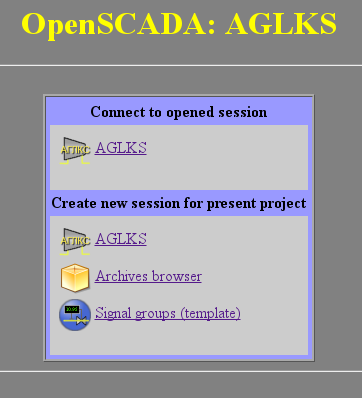
Fig.2. Connection or the creation of a new session of the project's execution of the VCA.
Fig.3. The main execution window.
3. Ïðåäñòàâëåíèå áàçîâûõ ýëåìåíòîâ (ïðèìèòèâîâ)
 äàííîé âåðñèè ýòîãî ìîäóëÿ ðåàëèçîâàíû íå âñå îáðàçû ïðèìèòèâîâ çàëîæåííûå ýòèì ïðîåêòîì.  îáùåì æå ïðîåêòîì çàëîæåíû ïðèìèòèâû:
Áîëåå äåòàëüíî ðàññìîòðèì ðåàëèçàöèþ êàæäîãî ïðèìèòèâà.
3.1. Ïðèìèòèâ ýëåìåíòàðíàÿ ôèãóðà (ElFigure)
Ðåàëèçîâàíà ïîääåðæêà ýëåìåíòàðíûõ ôèãóð: ëèíèè, ýëëèïòè÷åñêîé äóãè, êðèâîé Áåçüå è çàëèâêà çàìêíóòûõ êîíòóðîâ öâåòîì è èçîáðàæåíèåì. Äëÿ ýëåìåíòàðíûõ ôèãóð ðåàëèçîâàíû ñëåäóþùèå îïåðàöèè:
- ñîçäàíèå/óäàëåíèå ôèãóð;
- êîïèðîâàíèå ôèãóð;
- ïåðåìåùåíèå è èçìåíåíèå ðàçìåðîâ ôèãóð ñ ïîìîùüþ ìûøè è êëàâèàòóðû;
- âîçìîæíîñòü ñâÿçûâàòü ýëåìåíòàðíûå ôèãóðû äðóã ñ äðóãîì, ïîëó÷àÿ áîëåå ñëîæíûå, äëÿ êîòîðûõ äîñòóïíû âñå ñâîéñòâà èñõîäíûõ ýëåìåíòàðíûõ ôèãóð;
- âîçìîæíîñòü îäíîâðåìåííîãî ïåðåìåùåíèÿ íåñêîëüêèõ ôèãóð;
- çàëèâêà çàìêíóòîãî êîíòóðà öâåòîì è/èëè èçîáðàæåíèåì;
- ãåíåðàöèÿ ñîáûòèé êëàâèø ìûøè, â ìîìåíò êëèêà ìûøüþ íà çàëèòûå êîíòóðà;
- ìàñøòàáèðîâàíèå;
- ïîâîðîò.
Íà ðèñ. 4 ïðåäñòàâëåíà ÷àñòü ýêðàíà ñ êàäðîì, ñîäåðæàùèì âûøåïåðå÷èñëåííûå ýëåìåíòàðíûå ôèãóðû.
Ðèñ.4 Ðåàëèçàöèÿ ýëåìåíòàðíûõ ôèãóð â WebVision.
3.2. Ïðèìèòèâ òåêñòà (Text)
Ðåàëèçîâàíà ïîääåðæêà ýëåìåíòà òåêñòà ñî ñâîéñòâàìè:
- Øðèôò ñî ñâîéñòâàìè: òèïà/êëàññà øðèôòà, ðàçìåðà, óñèëåíèÿ, íàêëîííîñòè, ïîä÷¸ðêèâàíèÿ è ïåðå÷¸ðêèâàíèÿ.
- Öâåò òåêñòà.
- Îðèåíòàöèÿ òåêñòà.
- Àâòîìàòè÷åñêèé ïåðåíîñ ïî ñëîâàì.
- Âûðàâíèâàíèå òåêñòà ïî ãîðèçîíòàëè è âåðòèêàëè ñî âñåìè âàðèàíòàìè.
- Îòîáðàæåíèå ôîíà â âèäå öâåòà è/èëè èçîáðàæåíèÿ.
- Îòîáðàæåíèå áîðäþðà âîêðóã òåêñòà, ñ óêàçàííûì öâåòîì, øèðèíîé è ñòèëåì.
- Ôîðìèðîâàíèå òåêñòà èç àòðèáóòîâ ðàçëè÷íîãî òèïà è ñâîéñòâ.
Íà ðèñ. 5 ïðåäñòàâëåíà ÷àñòü ýêðàíà ñ êàäðîì, ñîäåðæàùèì ïðèìåðû òåêñòà ñ èñïîëüçîâàíèåì ðàçëè÷íûõ ïàðàìåòðîâ.
Ðèñ.5. Ðåàëèçàöèÿ áàçîâîãî ýëåìåíòà òåêñòà â WebVision.
3.3. Ïðèìèòèâ ýëåìåíòîâ ôîðìû (FormEl)
Ðåàëèçîâàíà ïîääåðæêà ýëåìåíòîâ ôîðìû íà êàäðàõ ÑÂÓ. Ðåàëèçîâàíû çàëîæåííûå ñâîéñòâà, âêëþ÷àÿ ñëåäóþùèå ýëåìåíòû ôîðìû:
Ðåäàêòîð òåêñòà -- Ïðåäñòàâëÿåò ðåäàêòîð ïëîñêîãî òåêñòà ñ ïîäòâåðæäåíèåì èëè îòêàçîì îò ââîäà.
Ïîëå ôëàæêà -- Ïðåäîñòàâëÿåò ïîëå áèíàðíîãî ôëàæêà.
Êíîïêà -- Ïðåäîñòàâëÿåò êíîïêó ñ ïîääåðæêîé: öâåòà êíîïêè, èçîáðàæåíèÿ â êíîïêå è ðåæèìà ôèêñàöèè.
Âûáîð èç ñïèñêà -- Ïðåäîñòàâëÿåò ïîëå âûáîðà ýëåìåíòà, ñî ñïèñêà óêàçàííûõ ýëåìåíòîâ.
Ñïèñîê -- Ïðåäîñòàâëÿåò ïîëå ñïèñêà ñ êîíòðîëåì çà òåêóùèì ýëåìåíòîì.
Ñëàéäåð -- Ýëåìåíò ñëàéäåðà (íå ðåàëèçîâàí).
Ïðîãðåñ-áàð -- Ïîëîñêà ïðîãðåññ-áàðà (íå ðåàëèçîâàí).
Ðåàëèçîâàíû ðåæèìû: «Âêëþ÷åí» è «Àêòèâåí», à òàêæå ïåðåäà÷à èçìåíåíèé è ñîáûòèé â ìîäåëü äàííûõ ÑÂÓ (äâèæîê). Äëÿ âñåõ ðåàëèçîâàííûõ ïðåäñòàâëåíèé ïîääåðæèâàåòñÿ àêòèâíûé ðåæèì, ò.å. ýëåìåíòû ìîãóò áûòü èñïîëüçîâàíû äëÿ ñîçäàíèÿ ôîðì ïîëüçîâàòåëüñêîãî ââîäà.
Íà ðèñ. 6 ïðåäñòàâëåíà ÷àñòü ýêðàíà ñ êàäðîì, ñîäåðæàùèì âûøåïåðå÷èñëåííûå ýëåìåíòû ôîðìû.
Ðèñ.6. Ðåàëèçàöèÿ ýëåìåíòîâ ôîðìû â WebVision.
3.4. Ïðèìèòèâ îòîáðàæåíèÿ ìåäèà-ìàòåðèàëîâ (Media)
Ðåàëèçîâàíà ïîääåðæêà ýëåìåíòà îòîáðàæåíèÿ ìåäèà-ìàòåðèàëîâ ñî ñâîéñòâàìè:
- Óêàçàíèÿ èñòî÷íèêà ìåäèà äàííûõ (èçîáðàæåíèÿ èëè âèäåî-ìàòåðèàëà).
- Ïðîñìîòðà èçîáðàæåíèé áîëüøèíñòâà èçâåñòíûõ ôîðìàòîâ ñ âîçìîæíîñòüþ èõ âïèñûâàíèÿ â ðàçìåð âèäæåòà.
- Ïðîèãðûâàíèÿ ïðîñòûõ àíèìèðîâàííûõ ôîðìàòîâ èçîáðàæåíèé è âèäåî.
- Îòîáðàæåíèå ôîíà â âèäå öâåòà è/èëè èçîáðàæåíèÿ.
- Îòîáðàæåíèå áîðäþðà âîêðóã òåêñòà, ñ óêàçàííûì öâåòîì, øèðèíîé è ñòèëåì.
- Ôîðìèðîâàíèÿ àêòèâíûõ îáëàñòåé è ãåíåðàöèÿ ñîáûòèé ïðè èõ àêòèâàöèè.
Íà ðèñ. 7 ïðåäñòàâëåíà ÷àñòü ýêðàíà ñ êàäðîì, ñîäåðæàùèì ïðèìåðû ïðîñìîòðà/ïðîèãðûâàíèÿ ìåäèà-äàííûõ.
Ðèñ.7. Ðåàëèçàöèÿ áàçîâîãî ýëåìåíòà îòîáðàæåíèÿ ìåäèà-ìàòåðèàëîâ â WebVision.
3.5. Ïðèìèòèâ ïîñòðîåíèÿ äèàãðàìì/ãðàôèêîâ (Diagram)
Ðåàëèçîâàíà ïîääåðæêà ýëåìåíòà ïîñòðîåíèÿ äèàãðàìì/òðåíäîâ ñî ñâîéñòâàìè:
- Ïîñòðîåíèå ãðàôèêîâ/òðåíäîâ:
- Ïîñòðîåíèÿ ãðàôèêà äëÿ: àðõèâíûõ äàííûõ, òåêóùèõ äàííûõ è ôîðìèðîâàíèÿ ïðîìåæóòî÷íîãî áóôåðà îòîáðàæåíèÿ äëÿ ïàðàìåòðîâ áåç àðõèâà.
- Ïîñòðîåíèå êàê îäèíî÷íûõ ãðàôèêîâ ñî çíà÷åíèåì ïàðàìåòðà ïî îñè îðäèíàò, òàê è ñâîäíûõ ãðàôèêîâ, âêëþ÷àþùèõ äî 10 ïàðàìåòðîâ, ñ ïðîöåíòíîé øêàëîé.
- Âîçìîæíîñòü àäàïòàöèè ãðàôèêà ïàðàìåòðà ê çíà÷åíèÿì äàííûì, ïîäãîí øêàëû.
- Øèðîêèé äèàïàçîí ìàñøòàáèðîâàíèÿ è àäàïòàöèè ãîðèçîíòàëüíîé øêàëû, ñ àâòîìàòè÷åñêèì óñðåäíåíèåì íà óðîâíå ñåðâåðà è ñàìîãî ïðèìèòèâà.
- Âîçìîæíîñòü îòîáðàæåíèå ðàçìåðíîé ñåòêè è ìàðêåðîâ ïî ãîðèçîíòàëè è âåðòèêàëè, ñ àäàïòàöèåé ê äèàïàçîíó îòîáðàæåíèÿ.
- Âîçìîæíîñòü óñòàíîâêè êóðñîðà òðåíäà ìûøüþ.
Íà ðèñ. 8 ïðåäñòàâëåíà ÷àñòü ýêðàíà ñ êàäðîì, ñîäåðæàùèì ïðèìåðû äèàãðàììû-òðåíäà.
Ðèñ.8. Ðåàëèçàöèÿ áàçîâîãî ýëåìåíòà îòîáðàæåíèÿ äèàãðàììû-òðåíäà â WebVision.
3.6. Ïðèìèòèâ ôîðìèðîâàíèÿ ïðîòîêîëà (Protocol)
Ðåàëèçîâàíà ïîääåðæêà ýëåìåíòà ôîðìèðîâàíèÿ ïðîòîêîëà ñî ñâîéñòâàìè:
- Ôîðìèðîâàíèå ïðîòîêîëà èç àðõèâà ñîîáùåíèé çà óêàçàííîå âðåìÿ è ãëóáèíó.
- Çàïðîñ äàííûõ èç óêàçàííûõ àðõèâàòîðîâ ñîîáùåíèé.
- Âûáîðêà äàííûõ èç àðõèâîâ ïî óðîâíþ âàæíîñòè è øàáëîíó êàòåãîðèè ñîîáùåíèé.
- Ïîääåðæêà ðåæèìà ñëåæåíèå çà ïîÿâëåíèåì ñîîáùåíèé â àðõèâå ñîîáùåíèé.
Íà ðèñ. 9 ïðåäñòàâëåíà ÷àñòü ýêðàíà ñ êàäðîì, ñîäåðæàùèì ïðèìåð ïðîòîêîëà.
Ðèñ.9 Ðåàëèçàöèÿ áàçîâîãî ýëåìåíòà îòîáðàæåíèÿ ïðîòîêîëîâ â WebVision.
3.7. Ïðèìèòèâ ôîðìèðîâàíèÿ îò÷¸òíîé äîêóìåíòàöèè (Document)
Ðåàëèçîâàíà ïîääåðæêà ýëåìåíòà ôîðìèðîâàíèÿ îò÷¸òíîé äîêóìåíòàöèè ñî ñâîéñòâàìè:
- Ãèáêîå ôîðìèðîâàíèå ñòðóêòóðû äîêóìåíòà íà îñíîâå ÿçûêà ãèïåðòåêñòîâîé ðàçìåòêè. Ýòî ïðåäîñòàâëÿåò ïîääåðæêó øèðîêèõ âîçìîæíîñòåé ôîðìàòèðîâàíèÿ äîêóìåíòîâ.
- Ôîðìèðîâàíèå äîêóìåíòîâ ïî êîìàíäå èëè ïî ãðàôèêó. Íåîáõîäèìî äëÿ ôîðìèðîâàíèÿ îò÷¸òíîé äîêóìåíòàöèè â àðõèâ ñ ïîñëåäóþùèì ïðîñìîòðîì àðõèâà.
- Ôîðìèðîâàíèå äîêóìåíòà â ðåæèìå ðåàëüíîãî âðåìåíè. Äëÿ ôîðìèðîâàíèÿ äîêóìåíòîâ ïîëíîñòüþ äèíàìè÷åñêè è íà îñíîâå àðõèâîâ çà óêàçàííîå âðåìÿ.
- Èñïîëüçîâàíèå àòðèáóòîâ âèäæåòà äëÿ ïåðåäà÷è çíà÷åíèé è àäðåñîâ íà àðõèâû â äîêóìåíò. Ïîçâîëÿåò èñïîëüçîâàòü âèäæåò äîêóìåíòà êàê øàáëîí ïðè ôîðìèðîâàíèÿ îò÷¸òîâ ñ äðóãèìè âõîäíûìè äàííûìè.
 îñíîâå ëþáîãî äîêóìåíòà ëåæèò XHTML-øàáëîí. XHTML-øàáëîí ýòî òåã 'body', WEB-ñòðàíèöû, ñîäåðæàùèé ñòàòèêó äîêóìåíòà â ñòàíäàðòå XHTML 1.0 è ýëåìåíòû èñïîëíÿåìûõ èíñòðóêöèé íà îäíîì èç ÿçûêîâ ïîëüçîâàòåëüñêîãî ïðîãðàììèðîâàíèÿ OpenSCADA â âèäå <?dp <procedure> ?>. Ðåçóëüòèðóþùèé äîêóìåíò ôîðìèðóåòñÿ ïóò¸ì èñïîëíåíèÿ ïðîöåäóð è âñòàâêè èõ ðåçóëüòàòà â äîêóìåíò.
Èñòî÷íèêîì çíà÷åíèé èñïîëíÿåìûõ èíñòðóêöèé ÿâëÿþòñÿ àòðèáóòû âèäæåòà ýòîãî ïðèìèòèâà, à òàêæå âñå ìåõàíèçìû ÿçûêà ïîëüçîâàòåëüñêîãî ïðîãðàììèðîâàíèÿ. Àòðèáóòû ìîãóò äîáàâëÿòüñÿ ïîëüçîâàòåëåì è ëèíêîâàòüñÿ íà ðåàëüíûå àòðèáóòû ïàðàìåòðîâ èëè-æå ÿâëÿòüñÿ àâòîíîìíûìè, çíà÷åíèÿ êîòîðûõ áóäóò ôîðìèðîâàòüñÿ â ñêðèïòå âèäæåòà.  ñëó÷àå ñî ñëèíêîâàííûìè àòðèáóòàìè ìîãóò èçâëåêàòüñÿ çíà÷åíèÿ èç èñòîðèè, àðõèâà.
Íà ðèñ. 10 ïðåäñòàâëåí êàäð, ñîäåðæàùèé ïðèìåð äîêóìåíòà.
Ðèñ.10 Ðåàëèçàöèÿ áàçîâîãî ýëåìåíòà îòîáðàæåíèÿ îò÷¸òíîé äîêóìåíòàöèè â WebVision.
3.8. Ïðèìèòèâ êîíòåéíåðà (Box)
Ðåàëèçîâàíà ïîääåðæêà ïðèìèòèâà êîíòåéíåðà, ïî ñîâìåñòèòåëüñòâó âûïîëíÿþùåãî ðîëü ñòðàíèö ïðîåêòîâ. Äàííûé ïðèìèòèâ ÿâëÿåòñÿ åäèíñòâåííûì ýëåìåíòîì-êîíòåéíåðîì, êîòîðûé ìîæåò âêëþ÷àòü â ñåáÿ ññûëêè íà êàäðû èç áèáëèîòåêè, ôîðìèðóÿ òåì ñàìûì ïîëüçîâàòåëüñêèå ýëåìåíòû íóæíîé êîíôèãóðàöèè. Ïðèìèòèâ ðåàëèçóåò ïðåäóñìîòðåííûå ïðîåêòîì ñâîéñòâà. Ïåðå÷èñëèì ïî ïóíêòàì ñâîéñòâà äàííîãî ïðèìèòèâà:
Ñòðàíèöà -- Ýëåìåíòû ïîñòðîåííûå íà äàííîì ïðèìèòèâå ìîãóò âûïîëíÿòü ðîëü ñòðàíèöû ïîëüçîâàòåëüñêîãî èíòåðôåéñà.
Êîíòåéíåð ñòðàíèö -- Ñâîéñòâî çàìåùåíèÿ ñîáñòâåííîãî ñîäåðæèìîãî äðóãîé ñòðàíèöåé, â ïðîöåññå èñïîëíåíèÿ. Èñïîëüçóåòñÿ äëÿ ôîðìèðîâàíèÿ ôðåéìîâ íà ñòðàíèöàõ ïîëüçîâàòåëüñêîãî èíòåðôåéñà. Íàïðèìåð, ãëàâíàÿ ñòðàíèöà òðàäèöèîííîé SCADA ñèñòåìû ñ îáúåêòàìè ñèãíàëèçàöèè ñòðîèòñÿ èìåííî òàêèì îáðàçîì.
Ôîí -- Ïîääåðæèâàåò âîçìîæíîñòü óêàçàíèÿ ôîíà â âèäå öâåòà èëè èçîáðàæåíèÿ.
Áîðäþð -- Ïîääåðæèâàåò âîçìîæíîñòü èçîáðàæåíèÿ áîðäþðà ñ óêàçàííûì öâåòîì, òîëùèíîé è ñòèëåì.
4. Îáùàÿ êîíôèãóðàöèÿ ìîäóëÿ
Äëÿ íàñòðîéêè ñîáñòâåííîãî ïîâåäåíèÿ, â íå î÷åâèäíûõ ñèòóàöèÿõ, ìîäóëåì ïðåäîñòàâëÿåòñÿ âîçìîæíîñòü íàñòðîéêè îòäåëüíûõ ïàðàìåòðîâ ïîñðåäñòâîì èíòåðôåéñà óïðàâëåíèÿ OpenSCADA (ðèñ. 11). Òàêîâûìè ïàðàìåòðàìè ÿâëÿþòñÿ:
- Âðåìÿ æèçíè ñåññèè àóòåíòèôèêàöèè.
Ðèñ.11. Ñòðàíèöà êîíôèãóðàöèè ìîäóëÿ.
Çàêëþ÷åíèå
Íà äàííîì ýòàïå ìîäóëü óæå ìîæåò áûòü èñïîëüçîâàí äëÿ ïîñòðîåíèÿ ðåàëüíûõ èíòåðôåéñîâ ïîëüçîâàòåëÿ ñ ïîääåðæêîé îñíîâíûõ ôóíêöèé. Îäíàêî îòäåëüíûå ïðîáëåìû ìîãóò âîçíèêàòü êàê ïî ïðè÷èíå íåäîðàáîòàííîñòè, òàê è ðàçëè÷èÿ áðàóçåðîâ. Ñåé÷àñ äîñòàòî÷íî êà÷åñòâåííî îáåñïå÷åíà ðàáîòîñïîñîáíîñòü íà áðàóçåðàõ: FireFox, Konqueror è Opera.