 Ðóññêàÿ âåðñèÿ
 Óêðà¿íñüêà âåðñ³ÿ
Module <SSL> of subsystem “Transports”
| Module: | SSL |
| Name: | SSL |
| Type: | Òðàíñïîðò |
| Source: | tr_SSL.so |
| Version: | 0.8.0 |
| Author: | Roman Savochenko |
| Description: | Provides transport based on the secure sockets' layer. OpenSSL is used and SSLv2, SSLv3 and TLSv1 are supported. |
| License: | GPL |
Introduction
The module SSL of the transport provides the support of transport based on secure sockets layer (SSL) into the system. In the basis of the module there is the library  OpenSSL. Incoming and outgoing transports of protocols SSLv2, SSLv3 and TLSv1 are supported.
It is possible to add new incoming and outgoing transports through the transport subsystem configuration in any configurator of OpenSCADA system.
1. Incoming transports
The configured and runnig incoming transport opens server SSL-socket for the expectation of connection of the clients. SSL-socket is a multi-stream, ie when the client connects, the client SSL-connection and a new stream in which the client is served are created. Server SSL-socket in this moment switches to the waiting for the request from the new client. Thus the parallel service of the clients is achieved.
Each incoming transport is necessarily associated with one of the available transport protocols, to which incoming messages are transmitted. In conjunction with the transport protocol is supported by a mechanism of the combining of pieces of requests, disparate while transferring.
Configuration dialog of the incoming SSL-transport is depicted in Figure 1.
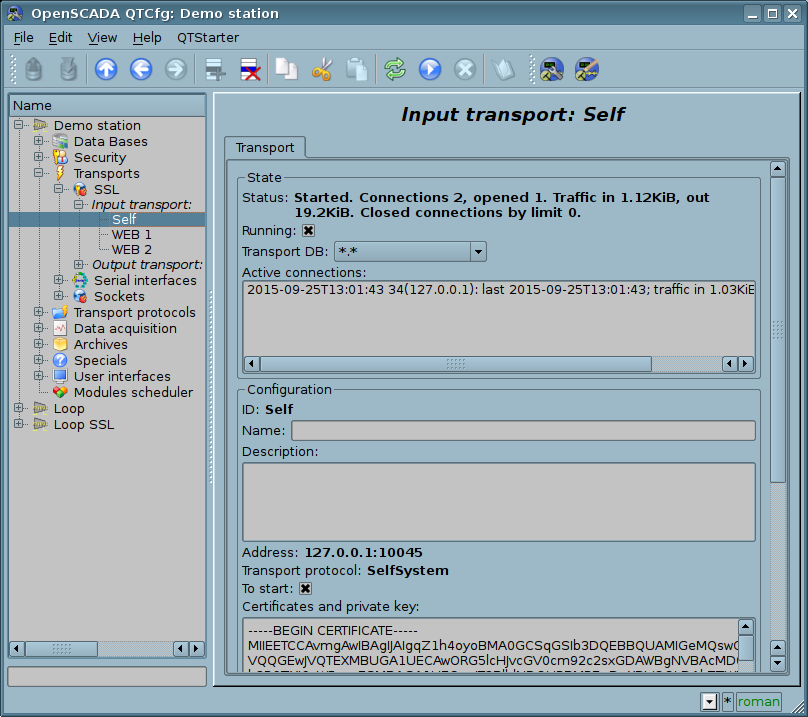
Fig.1. Configuration dialog of the incoming SSL-transport.
Using this dialog you can set:
- The state of transport, namely: "Status", "Running" and the name of the database, containing the configuration.
- Id, name and description of transport.
- Address of the transport in the format "[address]:[port]:[mode]", where:
- address – Address, on which the SSL is opened. It must be one of the addresses of the host. If the "*" is indicated then SSL will be available in all the host's interfaces. There may be as the symbolic representation as well as IP one of the address.
- port – Network port, on which the SSL is opened. Indication of the character name of the port (according to /etc/services) is available.
- mode – SSL-mode and version (SSLv2, SSLv3, SSLv23, TLSv1). By default and in case of error the SSLv23 is used.
- The choice of transport protocol.
- The state, in which the controller must be translated at boot: «Running».
- Certificates, private SSL key and password of private SSL key.
- The maximum number of clients to serve and the size of the input buffer.
2. Outgoing transports
Ñêîíôèãóðèðîâàííûé è çàïóùåííûé èñõîäÿùèé òðàíñïîðò îòêðûâàåò SSL ñîåäèíåíèå ñ óêàçàííûì ñåðâåðîì. Ïðè ðàçðûâå ñîåäèíåíèÿ, èñõîäÿùèé òðàíñïîðò îòêëþ÷àåòñÿ. Äëÿ âîçîáíîâëåíèÿ ñîåäèíåíèÿ òðàíñïîðò íóæíî îïÿòü çàïóñòèòü.
Ãëàâíàÿ âêëàäêà ñòðàíèöû êîíôèãóðàöèè èñõîäÿùåãî SSL-òðàíñïîðòà èçîáðàæ¸íà íà ðèñ.2.
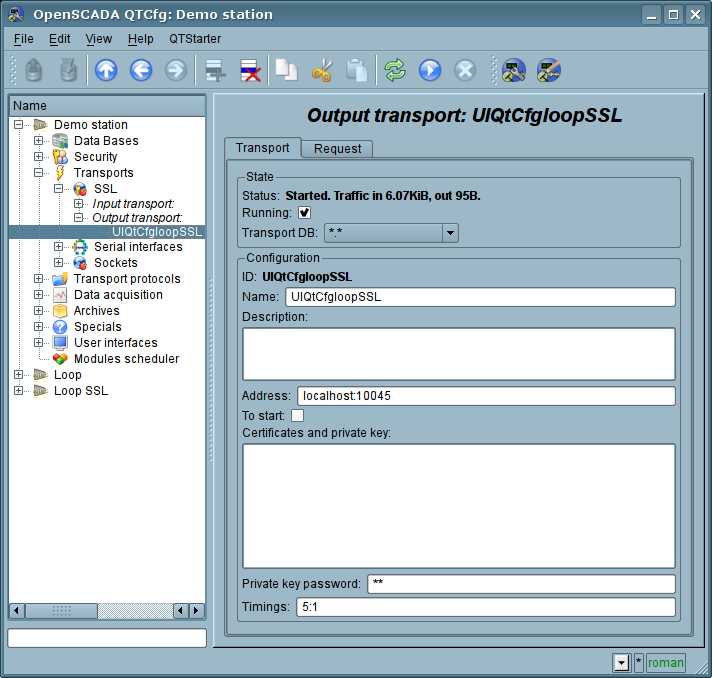
Ðèñ.2. Ãëàâíàÿ âêëàäêà ñòðàíèöû êîíôèãóðàöèè èñõîäÿùåãî SSL-òðàíñïîðòà.
Ñ ïîìîùüþ ýòîãî äèàëîãà ìîæíî óñòàíîâèòü:
- Ñîñòîÿíèå òðàíñïîðòà, à èìåííî: "Ñòàòóñ", "Çàïóùåí" è èìÿ ÁÄ ñîäåðæàùåé êîíôèãóðàöèþ.
- Èäåíòèôèêàòîð, èìÿ è îïèñàíèå òðàíñïîðòà.
- Àäðåñ òðàíñïîðòà â ôîðìàòå "[àäðåñ]:[ïîðò]:[ðåæèì]" ãäå:
- àäðåñ – Àäðåñ, ñ êîòîðûì âûïîëíÿåòñÿ ñîåäèíåíèå. Äîïóñêàþòñÿ êàê ñèìâîëüíîå òàê è IP ïðåäñòàâëåíèå àäðåñà.
- ïîðò – Ñåòåâîé ïîðò, ñ êîòîðûì âûïîëíÿåòñÿ ñîåäèíåíèå. Âîçìîæíî óêàçàíèå ñèìâîëüíîãî èìåíè ïîðòà (â ñîîòâåòñòâèè ñ /etc/services).
- ðåæèì – SSL-ðåæèì è âåðñèÿ (SSLv2, SSLv3, SSLv23, TLSv1). Ïî óìîë÷àíèþ è ïðè îøèáêå èñïîëüçóåòñÿ SSLv23
- Ñîñòîÿíèå, â êîòîðîå ïåðåâîäèòü êîíòðîëëåð ïðè çàãðóçêå: "Çàïóùåí".
- Ñåðòèôèêàòû, ïðèâàòíûé êëþ÷ SSL è ïàðîëü ïðèâàòíîãî êëþ÷à SSL.
3. Ñåðòèôèêàòû è êëþ÷è
Äëÿ ïîëíîöåííîé ðàáîòû ìîäóëÿ íåîáõîäèìû ñåðòèôèêàòû è ïðèâàòíûå êëþ÷è.  ñëó÷àå ñ âõîäÿùèì SSL-òðàíñïîðòîì (ñåðâåðîì) îíè îáÿçàòåëüíû.  ñëó÷àå ñ èñõîäÿùèì SSL-òðàíñïîðòîì îíè ìîãóò è íå óñòàíàâëèâàòüñÿ õîòÿ èõ èñïîëüçîâàíèå æåëàòåëüíî.
Ïðîñòåéøåé êîíôèãóðàöèåé ñåðòèôèêàòà ÿâëÿåòñÿ ñàìîïîäïèñíîé ñåðòèôèêàò è ïðèâàòíûé êëþ÷. Íèæå îïèñàíà ïðîöåäóðà èõ ñîçäàíèÿ ñ ïîìîùüþ óòèëèòû openssl:
# Ãåíåðàöèÿ ñåêðåòíîãî êëþ÷à
$ openssl genrsa -out ./key.pem -des3 -rand /var/log/messages 2048
# Ãåíåðàöèÿ ñàìîïîäïèñàííîãî ñåðòèôèêàòà
$ openssl req -x509 -new -key ./key.pem -out ./selfcert.pem -days 365
Äàëåå ñîäåðæèìîå ôàéëîâ selfcert.pem è key.pem êîïèðóåòñÿ â òåêñòîâîå ïîëå ñåðòèôèêàòà è êëþ÷à. Ïàðîëü ïðèâàòíîãî êëþ÷à óñòàíàâëèâàåòñÿ â ñîîòâåòñòâóþùåì ïîëå.
Ññûëêè