

The module <ICP_DAS> of subsystem "Data Acquisition"
| Module: | ICP_DAS |
| Name: | ICP DAS hardware |
| Type: | DAQ |
| Source: | daq_ICP_DAS.so |
| Version: | 1.8 |
| Author: | Roman Savochenko |
| Description: | Provides implementation for "ICP DAS" hardware support. Includes main I-87xxx DCON modules, I-8xxx fast modules and boards on ISA bus. |
| License: | GPL |
Introduction
The module provides the OpenSCADA system with the support of various equipment of "ICP DAS" company ( http://www.icpdas.com) through the API library libi8k.a from the company, for modules I-87xxx and I-8xxx, and direct ioctl calls to Linux kernel modules for boards on bus ISA.
Most of the equipment of the "ICP DAS" company is working under the DCON protocol, but some new equipment such as I-8xxx Series operates on a parallel bus, while another part is set into the parallel bus slots (I-87xxx) which are available under the serial interface and DCON protocol, they are not addressed directly and require call of the specialized command of the slot selection. Access to equipment that uses direct requests under the DCON protocol, can be implemented by the module DAQ.DCON. Support for the rest of the equipment is not added to the module DAQ.DCON, but it was implemented in this module due to the availability of API library of the "ICP DAS" company only for the x86_32 and ARM(OABI, HardFloatFPA) platform, which brings restrictions on access to the equipment of the ICP DAS company and other equipment under the DCON protocol on the other hardware platforms.
The reason for creating this module was the works with the controller LP-8781 of "LinPAC" series of "ICP DAS" company with the purpose to implement runtime PLC based on the OpenSCADA system.
API library of the "ICP DAS" company for platform x86_32 -> libi8k.a and ARM(OABI, HardFloatFPA) -> libi8k_arm.a is available with source code of the module and does not require separate installation.
1. Data controller
To add the "ICP DAS" data source the controller is created and configured in the OpenSCADA system. Example of the configuration tab of the controller of this type is shown in Figure 1.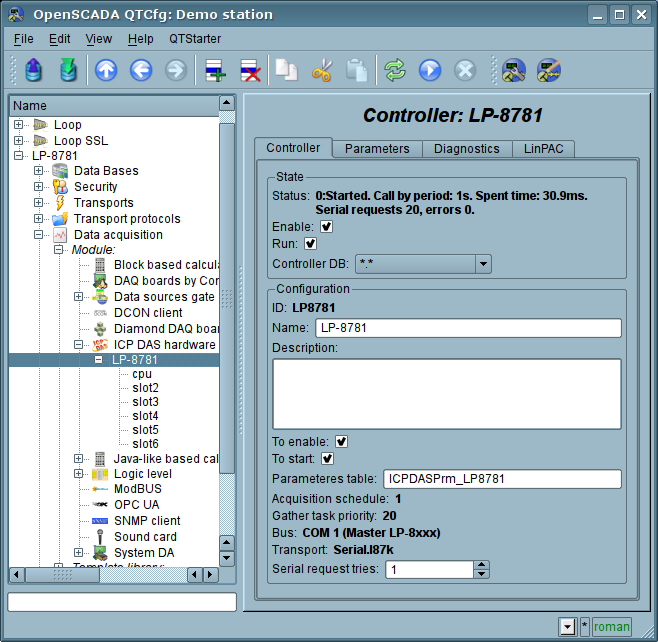
Fig.1. Configuration tab of the controller.
From this tab you can set:
- State of the controller, namely: the status, "Enable" and "Run" and the name of the database containing the configuration.
- Id, name and description of the controller.
- The state, in which the controller must be translated at boot: «To enable» and «To start».
- Name of table to store the configuration of the parameters of the controller.
- The calls planing policy and the priority of the task of data acquisition.
- Bus, on which the modules/boards are placed. If you specify a serial interface (COM {X}), then access is made under the protocol DCON. If the main controller bus is LP-8xxx the access is made through the parallel bus API or mixed. Bus ISA set allow select boards for bus ISA, from configured boards list.
- Transport through which requests to the serial bus performed. It's allowed on field "Bus" set to "COM {X}". If set "<ICP DAS>" then used the serial requests API from "ICP DAS", by default.
- Data transfer rate for the serial interface. It is indicated for the not main bus and transport "<ICP DAS>".
- Serial request tries.
2. Parameters
The module provides only one type of parameters — "Standard" and three groups of modules/boards, accessable dependent from selected bus:- ISA — boards on ISA;
- I-87xxx — modules on serial bus and with protocol DCON, for example into LinPAC;
- I-8xxx — modules on parallel bus, for example into LinPAC.
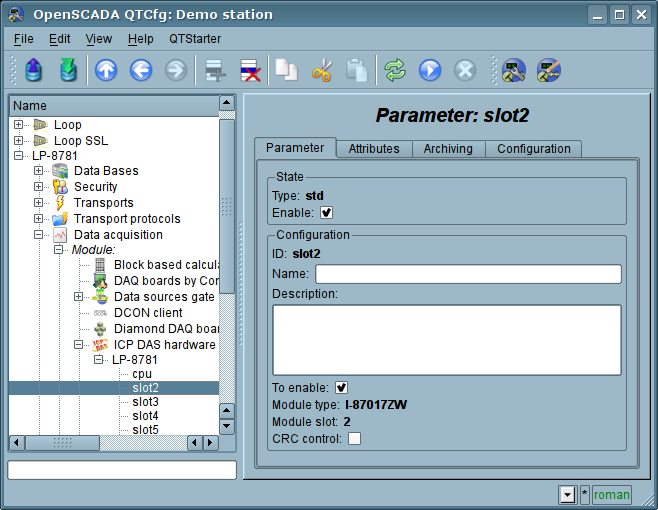
Fig.2. Configuration tab of the parameter.
The configuration tab of parameter (fig.2) generally equal for all modules/boards groups and contain:
- The state of the parameter, namely the type and the status "Enable"
- Id, name and description of the parameter.
- The state, in which the parameter must be translated at boot: "To enable".
- Type of the module/board.
- Address of the module/board. In the case of work not on the main bus (in the decimal value from 0 to 255) or on bus ISA.
- Slot of the module in the case of work with a series of devices I-8xxx and I-87xxx, which set into PLC rack.
- More options of the module, dependent from bus or specific board/module.
- CRC control for the modules series I-87xxx on serial bus.
In accordance with the parameter settings the poll and the creation of attributes is made (Fig. 3).
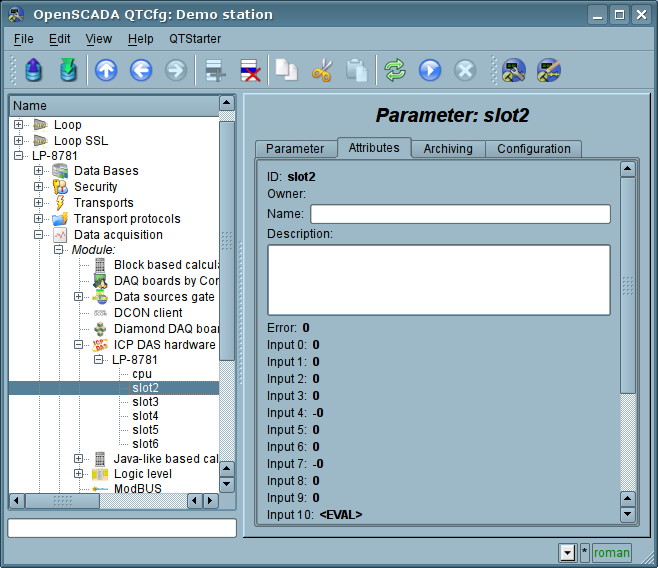
Fig.3. Tab of the attributes of the parameter.
2.1 The modules I-8xxx series
The modules I-8xxx series inserting on parallel bus slot of controller, for example LinPAC series. Into table 1 listed properties modules "ICP DAS" of I-8xxx series, which implemented into OpenSCADA.Table 1 Properties of modules I-8xxx series
| Module | AI | AO | DI | DO | Notes |
| I-8014 | i8014W_ReadAI() or i8014W_ReadFIFO() for mode FIFO(Magic) | Tested! | |||
| I-8017 | I8017_GetCurAdChannel_Float_Cal() | Tested! | |||
| I-8024 | I8024_VoltageOut | ||||
| I-8037 | DO_16, DO_16_RB | ||||
| I-8040 | DI_32 | ||||
| I-8041 | DO_32, DO_32_RB | ||||
| I-8042 | DI_16 | DO_16, DO_16_RB | Tested! | ||
| I-8046 | DI_16 | ||||
| I-8048 | DI_8 | ||||
| I-8050 | DIO_DI_16 | DIO_DO_16 | |||
| I-8051 | DI_16 | ||||
| I-8052 | DI_8 | ||||
| I-8053 | DI_16 | ||||
| I-8054 | DI_8 | DO_8, DO_8_RB | |||
| I-8055 | DI_8 | DO_8, DO_8_RB | |||
| I-8056 | DO_16, DO_16_RB | ||||
| I-8057 | DO_16, DO_16_RB | ||||
| I-8058 | DI_8 | ||||
| I-8060 | DO_8 (6), DO_8_RB | ||||
| I-8063 | DI_8 (4) | DO_8 (4), DO_8_RB | |||
| I-8064 | DO_8, DO_8_RB | ||||
| I-8065 | DO_8, DO_8_RB | ||||
| I-8066 | DO_8, DO_8_RB | ||||
| I-8068 | DO_8, DO_8_RB | ||||
| I-8069 | DO_8, DO_8_RB | ||||
| I-8077 | DIO_DI_16 | DIO_DO_16 |
2.1.1 Controllers LP-8xxx series configuration
For common properties the controllers series LP-8xxx configuration allowed accordingly "LinPAC" tab on controller's page (Fig.4), and also by parameter "LP-8xxx" (Fig.5). Into parameter "LP-8xxx" you can get information about controller's serial number, SDK version, DIP and Rotary switch value. Into tab "LinPAC" you can set value for controller's watchdog timer. The watchdog timer is disabled by set it to zero value. Watchdog timer's value updated into controller's task and with it period, then the acquisition task hang consequently follow controller's restart! The watchdog value must be greater to the system full loading time, up to OpenSCADA loading, wherein OpenSCADA must be loaded after time sync start.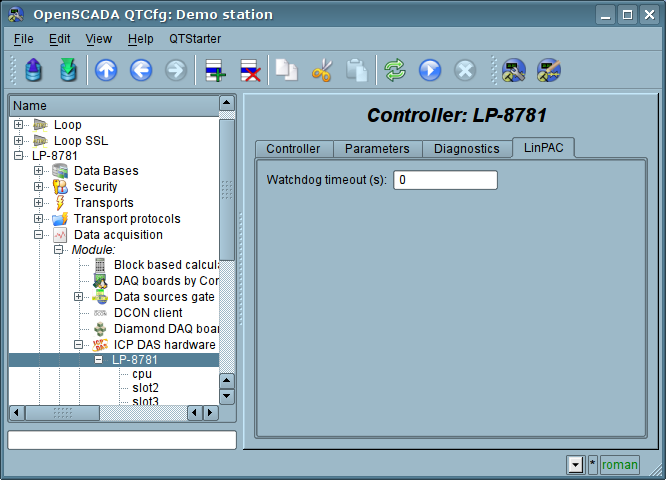
Fig.4. "LinPAC" tab for controllers LP-8xxx series configuration
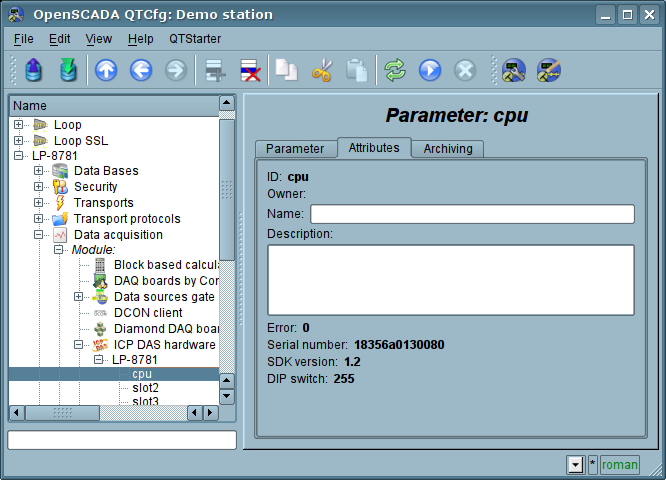
Fig.5. Parameter "LP-8xxx" attributes.
2.1.2 Module I-8014 and I-8017
Fast analog input modules that runs on a parallel bus.The module I-8014 formal provides speed access to data on one channel at 250 kHz by FIFO, however, because of the pledged hardware-program limitations it does not allow to reach speed over 100 kHz per channel when scanning into real-time, by low reading speed from FIFO. In that time the data reading causes the main CPU high load, that is 9.5 microseconds per sample.
The module I-8017 formal provides speed access to data on one channel at 130 kHz, however, because of the pledged hardware-program limitations it does not allow to reach speed over 33 kHz per channel when scanning multiple channels into real-time (by switching). Data expectation is in the blind cycle, which leads to great losses of the CPU at high frequencies of the acquisition.
The modules provides sixteen analog input attributes ai{x} and eight signs of violation of the upper ha{x} and the lower la{x} boundaries, for I-8017. Also "Configuration" tab is available with advanced configuration (Fig.6):
- Number of processed parameters — indicates how many inputs to process. It is characteristic for the mode of fast data acquisition and used to limit the number of processed channels, commensurate with used resources of the CPU.
- Frequency of the fast data acquisition (seconds) — indicates how often to carry out fast data acquisition for the number of channels listed above. Fast mode of data acquisition is turned off by indicating zero period.
- Modes of the gain for each input define a the following gains: +-1.25V, +-2.5V, +-5V, +-10V and +-20mA.
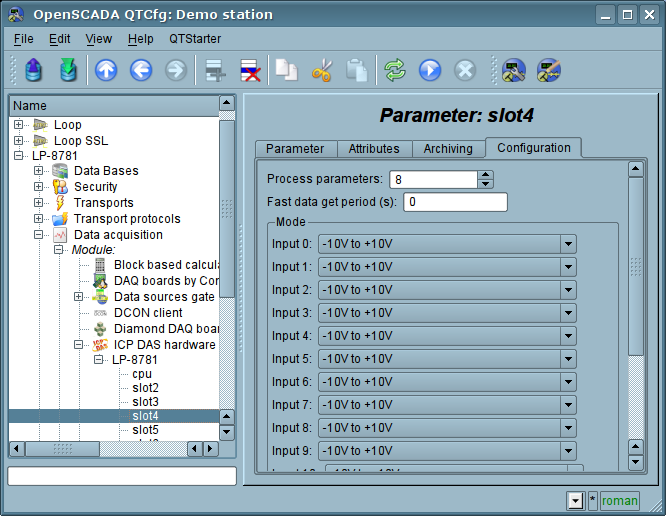
Fig.6. Tab "Configuration" of modules I-8014 and I-8017
2.1.3 Digital input and output values inversion
For digital input and output modules, into tab "Configuration" (Fig.7), proposed selectable channel inversion function, that is too comfortably for next work with the channel.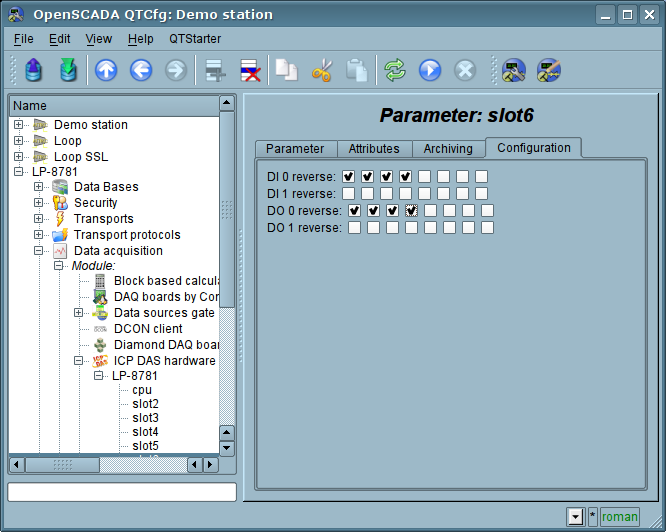
Fig.7. Tab "Configuration" of module digital input and output
2.2 Module I-87xxx series
The modules I-87xxx series inserting on serial bus slot of controller, for example LinPAC series. Into table 2 listed properties modules "ICP DAS" of I-87xxx series, which implemented into OpenSCADA.Table 2 Properties of modules I-87xxx series
| Module | AI | AO | DI | DO | Counters | Notes |
| I-87005 | #AA (8); TP: $AA7CiRrr ($AA8Ci) | @AADODD (8), @AADI | ||||
| I-87013 | #AA (4); TP: $AA7CiRrr ($AA8Ci) | |||||
| I-87015 | #AA (7); TP: $AA7CiRrr ($AA8Ci) | |||||
| I-87016 | #AA (2); TP: $AA7CiRrr ($AA8Ci) | |||||
| I-87017 | #AA (8); TP: $AA7CiRrr ($AA8Ci) | |||||
| I-87017DW | #AA (16); TP: $AA7CiRrr ($AA8Ci) | |||||
| I-87017ZW | #AA (20); TP: $AA7CiRrr ($AA8Ci) | Tested! | ||||
| I-87018 | $AA3; #AA (8); TP: $AA7CiRrr ($AA8Ci) | |||||
| I-87018ZW | $AA3; #AA (10); TP: $AA7CiRrr ($AA8Ci) | |||||
| I-87019RW | $AA3; #AA (8); TP: $AA7CiRrr ($AA8Ci) | Tested! | ||||
| I-87019ZW | $AA3; #AA (10); TP: $AA7CiRrr ($AA8Ci) | |||||
| I-87022 | #AAN(Data) (2), $AA8N; W: ~AA0-5 | |||||
| I-87024 | #AAN(Data) (4), $AA8N; W: ~AA0-5 | Tested! | ||||
| I-87026 | #AAN(Data) (2), $AA8N; W: ~AA0-5 | |||||
| I-87026PW | #AA (6); TP: $AA7CiRrr ($AA8Ci) | #AAN(Data) (2), $AA8N; W: ~AA0-5 | @AADI (2) | @AADODD (2), @AADI | ||
| I-87028 | #AAN(Data) (8), $AA8N; W: ~AA0-5 | |||||
| I-87037 | @AA(Data) (16), @AA; W: ~AA0-5 | |||||
| I-87040 | @AA (32) | #AAN (32) | Tested! | |||
| I-87041 | @AA(Data) (32), @AA; W: ~AA0-5 | Tested! | ||||
| I-87042 | @AA (16) | @AA(Data) (16), @AA; W: ~AA0-5 | ||||
| I-87046 | @AA (16) | #AAN (16) | ||||
| I-87051 | @AA (16) | #AAN (16) | ||||
| I-87052 | @AA (8) | #AAN (8) | ||||
| I-87053 | @AA (16) | #AAN (16) | ||||
| I-87054 | @AA (8) | @AA(Data) (8), @AA; W: ~AA0-5 | #AAN (8) | |||
| I-87055 | @AA (8) | @AA(Data) (8), @AA; W: ~AA0-5 | #AAN (8) | |||
| I-87057 | @AA(Data) (16), @AA; W: ~AA0-5 | |||||
| I-87058 | @AA (8) | #AAN (8) | ||||
| I-87059 | @AA (8) | #AAN (8) | ||||
| I-87061 | @AA(Data) (16), @AA; W: ~AA0-5 | |||||
| I-87063 | @AA (16) | @AA(Data) (16), @AA; W: ~AA0-5 | #AAN (16) | |||
| I-87064 | @AA(Data) (8), @AA; W: ~AA0-5 | |||||
| I-87065 | @AA(Data) (8), @AA; W: ~AA0-5 | |||||
| I-87066 | @AA(Data) (8), @AA; W: ~AA0-5 | |||||
| I-87068 | @AA(Data) (8), @AA; W: ~AA0-5 | |||||
| I-87069 | @AA(Data) (8), @AA; W: ~AA0-5 |
2.2.1 Abstract module I-87xxx series
Besides support for modules into table 2 this modules group provide abstract module "I-87xxx" implementation, on select which to user will possible set quantity and types for generic connected module's signals: AI, AO, DI, DO and Counters. The function also selectable accessed for modules which containing signals AO and Counters and allows to limit processed channels quantity, for traffic decrease on the serial interface.This abstract module "I-87xxx" you can use for modules "ICP DAS" I-7xxx series on "pure" serial bus.
Fields for signals quantity and types set provided into main tab of the parameter object configuration page (Fig.8).
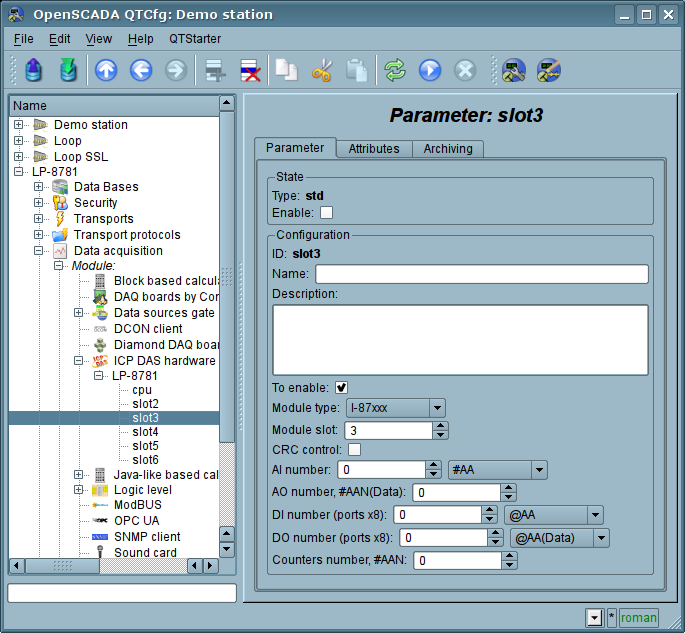
Fig.8. Main tab of parameter of abstract module "I-87xxx"
2.2.2 Channel type select for AI
For analog input modules possible to select mode/gain, which doing from list (Fig.9), if it specified for the module, or direct by mode's code set. The modes saved and stored into the module.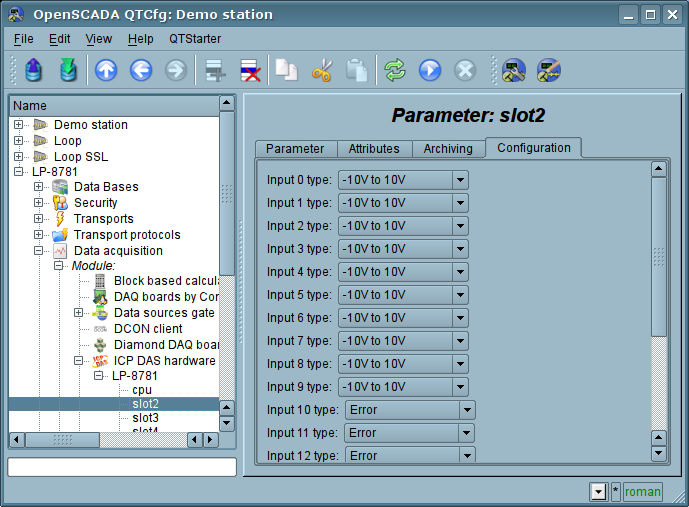
Fig.9. Tab "Configuration" of analog inputs module
2.2.3 Host watchdog and default values for power on and by watchdog event
Modules with analog or digital outputs typical provide host watchdog function. And its sets safe outputs values on host activity miss for specified time. Also the modules allow specify outputs values for power on.On Figure 10 presented tab for module with analog outputs and functions:
- set and control for state the watchdog timer of the module;
- set and control outputs values for power on of the module;
- set and control outputs values for watchdog event of the module;.
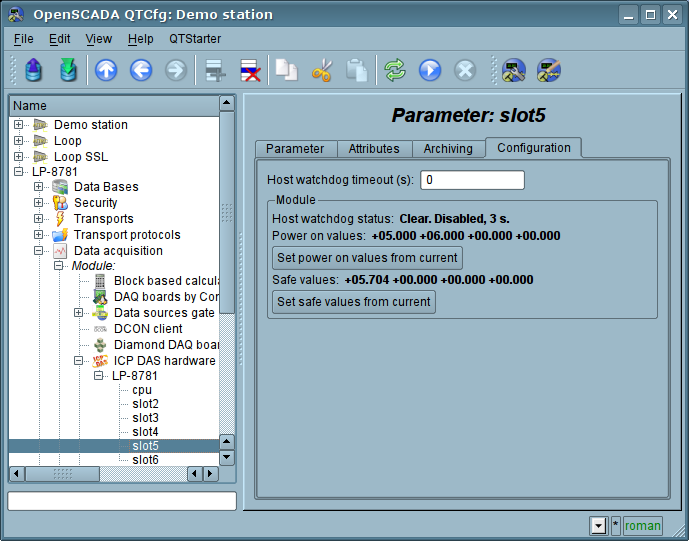
Fig.10. Tab "Configuration" of analog outputs module
2.3 Boards on bus ISA
The type boards installed on bus ISA of personal computer. For work with this boards you need build and start drivers-modules for Linux kernel. Into table 3 listed properties boards "ICP DAS" on bus ISA, which implemented into OpenSCADA. Counters function is not currently implemented into OpenSCADA.
Table 3 Properties of boards on bus ISA
| Module | AI | AO | DI | DO | DIO | Counters | Notes |
| A-626 | IXISA_AO{0...5} | IXISA_DI_{A...B} | IXISA_DO_{A...B} | ||||
| A-628 | IXISA_AO{0...7} | IXISA_DIO_{A...B} | IXISA_DIO_{A...B} | ||||
| A-8111 | IXISA_AI (8,12) IXISA_ADGCR IXISA_ADMXCR IXISA_ADMCR IXISA_ADSTCR | IXISA_AO{0...1} | IXISA_DI{L,H} | IXISA_DO{L,H} | IXISA_8254C{0...2} IXISA_8254CR | ||
| A-812 | IXISA_AI (16,12) IXISA_ADGCR IXISA_ADMXCR IXISA_ADMCR IXISA_ADSTCR | IXISA_AO{0...1} | IXISA_DI{L,H} | IXISA_DO{L,H} | IXISA_8254C{0...2} IXISA_8254CR | ||
| A-821 | IXISA_AI (16,12) IXISA_ADGCR IXISA_ADMXCR IXISA_ADMCR IXISA_ADSTCR | IXISA_AO | IXISA_DI{L,H} | IXISA_DO{L,H} | IXISA_8254C{0...2} IXISA_8254CR | ||
| A-822 | IXISA_AI (16,12) IXISA_ADGCR IXISA_ADMXCR IXISA_ADMCR IXISA_ADSTCR | IXISA_AO{0...1} | IXISA_DI{L,H} | IXISA_DO{L,H} | IXISA_8254C{0...2} IXISA_8254CR | ||
| A-823 | IXISA_AI (16,12) IXISA_ADGCR IXISA_ADMXCR IXISA_ADMCR IXISA_ADSTCR | IXISA_AO{0...1} | IXISA_DI{L,H} | IXISA_DO{L,H} | IXISA_8254C{0...2} IXISA_8254CR | ||
| A-826 | IXISA_AI (16,16) IXISA_ADGCR IXISA_ADMXCR IXISA_ADMCR IXISA_ADSTCR | IXISA_AO{0...1} | IXISA_DI{L,H} | IXISA_DO{L,H} | IXISA_8254C{0...2} IXISA_8254CR | ||
| DIO-144 | IXISA_CN{0...5}P{A...C} IXISA_CN{0...5}CR | Tested! | |||||
| DIO-24 | IXISA_P{A...C} IXISA_CR | ||||||
| DIO-48 | IXISA_CN{1...2}P{A...C} | IXISA_CN{1...2}CR IXISA_8254C{0...2} IXISA_8254CR | |||||
| DIO-64 | IXISA_DIO_{A...D} | IXISA_DIO_{A...D} | IXISA_8254C{0...5} IXISA_8254CR IXISA_8254CR1 | ||||
| DIO-96 | IXISA_CN{0...3}P{A...C} IXISA_CN{0...3}CR | ||||||
| ISO-730 | IXISA_IDIO_{A...B} IXISA_DIO_{A...B} | IXISA_IDIO_{A...B} IXISA_DIO_{A...B} | |||||
| ISO-813 | IXISA_AI (32) IXISA_ADGCR IXISA_ADMXCR IXISA_ADSTCR | ||||||
| ISO-AD32 | ==FIFO== | ||||||
| ISO-C64 | IXISA_DO_{A...H} | ||||||
| ISO-DA16 | ? | ||||||
| ISO-P32C32 | IXISA_DIO_{A...D} | IXISA_DIO_{A...D} | |||||
| ISO-P64 | IXISA_DI_{A...H} | ||||||
| P16R16DIO | IXISA_DI_{A...B} | IXISA_DO_{A...B} | |||||
| P8R8DIO | IXISA_DI (8) | IXISA_DO (8) | |||||
| TMC-10 | IXISA_DI_{A...B} | IXISA_DO_A | IXISA_8254C{0...2} IXISA_8254CR IXISA_8254CS | ||||
Links
Special modules for Linux kernel 2.6.29-rt-up for controllers LP-8x81: lp8x81_2629rt_up.tgz
Special modules for Linux kernel 2.6.29-rt1-up for controllers LP-8x81:
lp8x81_2629rt1_up.tgzThe driver from VIA for controllers LP-8x81 network:
rhinefet20070212111037.tgzThe patch for build network driver "rhinefet" for Linux 2.6.29:
rhinefet_build_to_2.6.29.patchThe patch for build network driver "rhinefet" for Linux 2.6.29-rt1:
rhinefet_build_to_2.6.29rt1.patch.gzDrivers set for Linux for ISA boards:
ixisa0.17.0.1.tgz