

 This page is frozen,
  actual one here
The module <HTTP> of subsystem "Protocols"
| Module: | HTTP |
| Name: | HTTP-realization |
| Type: | Protocol |
| Source: | prot_HTTP.so |
| Version: | 3.1 |
| Author: | Roman Savochenko, Maxim Lysenko (2009) |
| Description: | Provides support for the HTTP protocol for WWW-based user interfaces. |
| License: | GPL |
Introduction
Module of the transport protocol HTTP is designed to support the implementation of network protocol HTTP (Hypertext Transfer Protocol) in the system OpenSCADA.
HTTP Protocol is used to transfer the WWW contents. For example, via HTTP the following types of documents are transmitted: html, xhtml, png, java, and many others. Adding the HTTP support in OpenSCADA system together with the Sockets transport allows to implement various user functions based on the WWW interface. The module implements two main methods of the HTTP protocol: "GET" and "POST". "HTTP" module provides control of the integrity of HTTP-queries and, jointly with "Sockets" transport, allows to "collect" holistic requests of their fragments, as well as maintain the keeping of the connection alive (Keep-Alive).
For flexible connection of the user interfaces to the module the modular mechanism within the module HTTP is used. In the role of modules the modules of subsystem the "User interfaces" are used with the additional information field "SubType" with the value of "WWW".
In the requests for the Web resources the URL(Universal Resource Locator) are commonly used, hence the URL is passed as the main parameter via HTTP. The first element of the requested URL is used to identify the module UI. For example URL "http://localhost:10002/WebCfg" means — address to module WebCfg on the host "http://localhost:10002". In the case of an incorrect indication of the module ID, or when you address without identifier of the module at all, HTTP module generates the dialogue of the information on the input and with the choice of one of the available user interfaces. Example of a dialogue is shown in Figure 1.
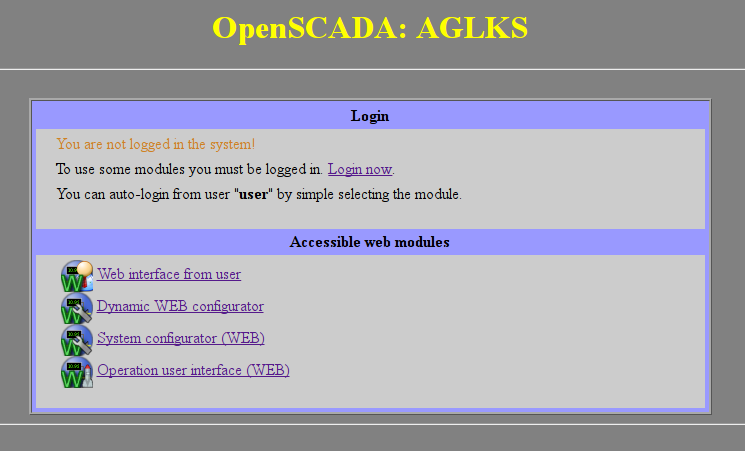
Fig.1. Dialog of the choice of WWW-interface module.
The module supports multi-language which one enabled by the dynamic messages translation of OpenSCADA.
A language of the end-user interface detects in way and by order:
- URL's parameter "lang".
- Authenticated user's language.
- Web browser's preferred language from HTTP property "Accept-Language".
- Generic language of the process of OpenSCADA.
Gotten in the way language used for interfaces of the module building and passes to WWW sub-modules into HTTP property "oscd_lang" of the argument "vars" of the "GET" and "POST" functions.
To configure and control of the module there allowed a configuration page of the control interface of OpenSCADA (Fig.3) where you can:
- Control for active sessions of authentication.
- Configuring:
- Access rules for deny and allow. Any line of the access rules is a different rule and you can use here templates (like "*/WebVision/*") or regular expressions (like "/[^/]+/WebVision/.+/").
- HTML-template of custom interface and custom main-page. In the HTML-template's fields you must specify an address of the file HTML/XHTML, which will be used for formation of the internal/service and main-page interfaces. Internal/service interfaces for example, it's the WEB-modules selection, the login page and like ones of the WEB-modules. From the template required correct XHTML, allowing parse the file by XML-parser, and the presence of tags "#####CONTEXT#####" at the location of the dynamic content, for internal/service interfaces it's necessarily. Resource files of the templates represented by images, CSS and JavaScript files and its are searching from the directory in which located the specified file template and from the current directory. If errors are found in the template there will be use a standard builtin interface. For different template file to the language you can add the language suffix to the file end like "{My template}_{lang}.html" but select the generic-base template file "{My template}.html" into these configuration fields. For the templates example you can see to the most used templates:
-
 Internal/service and main-page (includes the modules index) interfaces template.
- Main-page's template with a direct link to the AGLKS main interface by UI.WebVision and without the WEB-modules index.
- Main-page's template with a strong redirection to the AGLKS main interface by UI.WebVision.
-
- The lifetime of the authentication, list of users allowed for authentication and set up automatic login.
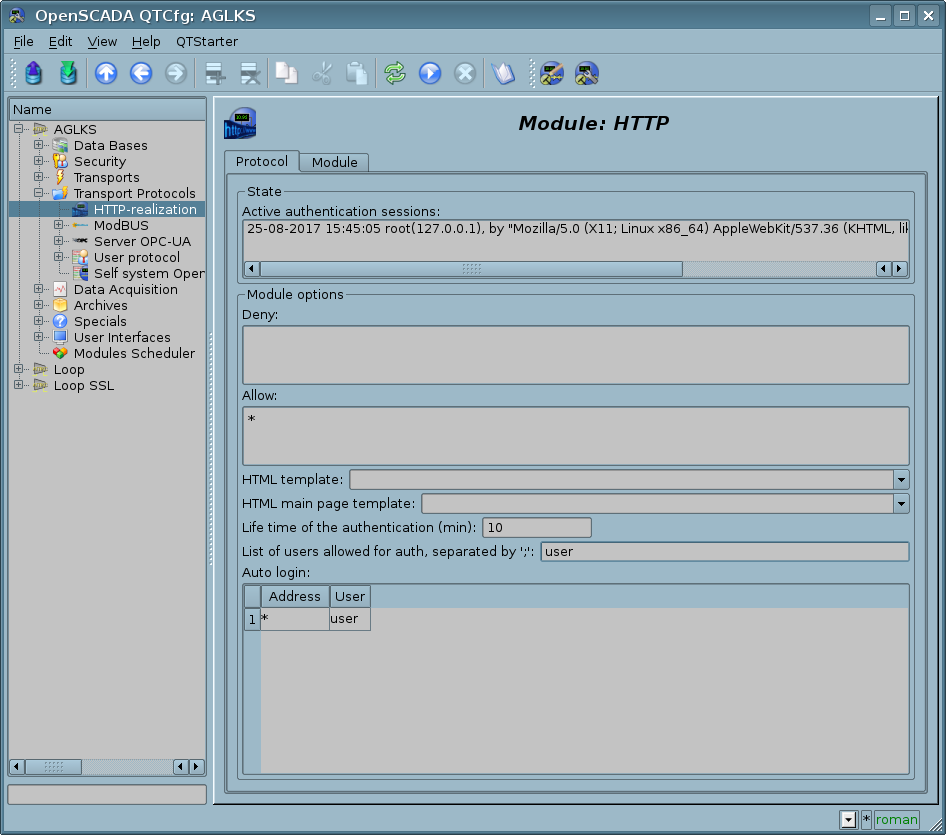
Fig.3. The module configuring page.
1. Authentication
Module supports authentication in the system OpenSCADA while providing access to the WEB-interface modules (Fig.2).
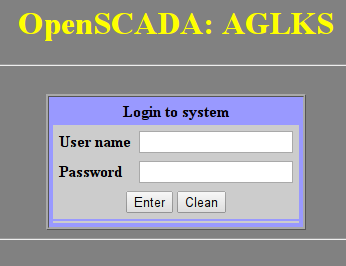
Fig.2. Authentication dialogue in the system OpenSCADA.
For ease of working with Web-based interfaces the module provides an ability to automatically log on from name of the specified user. Configuring for the automatic login makes by the module settings page (Fig.3). Automatic login performs by matching the address indicated in the column "Address", on behalf of the user specified in the column "User".
For more security you can set only Web users into the list of users allowed for authentication.
2. Modules of the user WEB-interface
Modules of the user interface (UI) designed to work with HTTP module, should indicate an information field "SubType" with the value "WWW" and "Auth" field with the value "1" if the module requires an authentication at login. For communication of HTTP module and UI modules an advanced communication mechanism is used. This mechanism involves the export of interface functions. In this case the UI modules must export the following function:
- void HTTP_GET(const string &url, string &page, vector<string> &vars, const string &user, TProtocolIn *iprt); OR
page — page with the answer;
sender — address of the sender;
vars — request variables;
user — user of the system;
iprt — pointer to an input part object of the protocol.
- void HTTP_POST(const string &url, string &page, vector<string> &vars, const string &user, TProtocolIn *iprt); OR
page — page with the answer and with the contents of the body of the POST request;
sender — address of the sender;
vars — request variables;
user — user of the system;
iprt — pointer to an input part object of the protocol.
Then, in the case of a HTTP GET request, the function HTTP_GET or HttpGet will be called, and in the case of the POST request, the function HTTP_POST or HttpPost will be called in the appropriate UI module.
3. Outgoing requests function's API
The outgoing function (messIO()) of API operate by HTTP-request's content which wrapped to XML-packages. The request structure is:
<req Host="host" URI="uri">
  <prm id="pId">pVal</prm>
  <cnt name="cName" filename="cFileName">
    <prm id="cpId">cpVal</prm>
    cVal
  </cnt>
  reqVal
</req>
- req — request method, supported methods "GET" and "POST".
- host — http-server address into format [HostAddr]:[HostIp]. If that field have been passed then used node address which set into address field of the transport.
- uri — resource address, file or direcory, at http-server.
- pId, pVal — identifier and value of addition http-parameters. You can set multiply http-parameters by different prm tags set.
- cName, cFileName, cVal — name, file-name and value of content-element of POST-request. You can set multiply content-elements by different cnt tags set.
- cpId, cpVal — identifier and value of addition content-parameters. You can set multiply content-parameters by different prm tags set;
- reqVal — POST request's single content.
Request result's structure is:
<req Host="host" URI="uri" err="err" Protocol="prt" RezCod="rCod" RezStr="rStr">
  <prm id="pId">pVal</prm>
  respVal
</req>
- req — request method.
- host — http-server address.
- uri — resource address.
- err — the error wich appear in request time. For successed requests the field is empty.
- RezCod, RezStr — request result into view code and text.
- pId, pVal — identifier and value of addition http-parameters. Respond can set multiply http-parameters by different prm tags set.
- respVal — respond's content.
Into example role we accord using the function into users procedures for GET and POST requests making by language JavaLikeCalc.JavaScript:
//GET request for HTML-page
req = SYS.XMLNode("GET");
req.setAttr("URI","/");
SYS.Transport.Sockets.out_testHTTP.messIO(req,"HTTP");
test = req.text();

//GET request for file
req = SYS.XMLNode("GET");
req.setAttr("URI","/oscadaArch/Work/openscada-0.9-r2188.tar.lzma");
SYS.Transport.Sockets.out_testHTTP.messIO(req,"HTTP");
if(!req.attr("err").length) SYS.fileWrite("/var/tmp/recvFile.tmp", req.text());

//POST request
req = SYS.XMLNode("POST");
req.setAttr("URI","/WebUser/FlowTec.txt");
cntNode = req.childAdd("cnt").setAttr("name","pole0").setAttr("filename","Object2-k001-100309-17.txt");
cntNode.childAdd("prm").setAttr("id","Content-Type").setText("text/plain");
cntText = "Object2-k001\r\n";
cntText += "\r\n";
cntText += "v002\r\n";
cntText += " n1\r\n";
cntText += "  09.03.10 16   Polnyj    7155.25    216.0  32.000  17.5\r\n";
cntText += "v005\r\n";
cntText += " n1\r\n";
cntText += "  09.03.10 16   Polnyj     188.81    350.0   4.000  40.0\r\n";
cntText += "\r\n";
cntNode.setText(cntText);
SYS.Transport.Sockets.out_testHTTP.messIO(req,"HTTP");
4. User programming API
The same module's object "Protocol.HTTP" [SYS.Protocol.HTTP.pgCreator()]
- bool pgAccess(string URL) — checking for page access pointed by the URL.
- URL — URL of the checking page.
- string pgCreator(string cnt, string rcode = "200 OK", string httpattrs = "Content-Type: text/html;charset={SYS}", string htmlHeadEls = "", string forceTmplFile = "", string lang = "" ) — forming page or resource from content cnt, wrapped to HTTP result rcode, with HTTP additional attributes httpattrs, HTML additional head's element htmlHeadEls, forced to template file forceTmplFile and language lang.
- cnt — a page or a resource (images, XML, CSS, JavaScript, ...) content;
- rcode — HTTP result code, like to "200 OK"; empty value there disables addition of the HTTP header;
- httpattrs — additional HTTP-attributes, mostly this is "Content-Type" which by default sets to "text/html;charset={SYS}"; only for "Content-Type: text/html" will do wrapping to internal/service or force forceTmplFile HTML-template;
- htmlHeadEls — an additional HTML-header's tag, it's mostly META with "Refresh" to pointed URL;
- forceTmplFile — force template file for override the internal/service template by the main-page template or other.
- lang — forming interface's language.
Links