Module <Serial> of subsystem “Transports”
 Ðóññêàÿ âåðñèÿ
 Óêðà¿íñüêà âåðñ³ÿ
| Module: | Serial |
| Name: | Serial Interface |
| Type: | Transport |
| Source: | tr_Serial.so |
| Version: | 0.6.0 |
| Author: | Roman Savochenko |
| Translated: | Maxim Lysenko |
| Description: | Provides a serial interface. It is used to data exchange via the serial interfaces of type RS232, RS485, GSM and more. |
| License: | GPL |
Introduction
Module of transport Serial provides support of transports based on the type of serial interfaces RS232, RS485, GSM, and others to the system. Incoming and outgoing transports are supported. To add new incoming and outgoing interfaces is possible by means of configuration of the transport subsystem in the system configurator of OpenSCADA.
Into modem mode by the module support misc work mode. Misc mode mean an input transport allow, which wait ingoing connections, and also an output transport allow at idem device. That is the input transport will ignore all requests while the output transport's established connection allow, in idem time the output transport will not try make connection while the input transport have connection or other an output transport connected to other telephone, for example.
1. Incoming transports
The configured and runnig incoming transport opens port of serial interface for the expectation of the requests of the clients. Each incoming interface is necessarily associated with one of the available transport protocols, to which the incoming messages are transmitted.
Configuration dialog of the incoming serial interface is depicted in Figure 1.
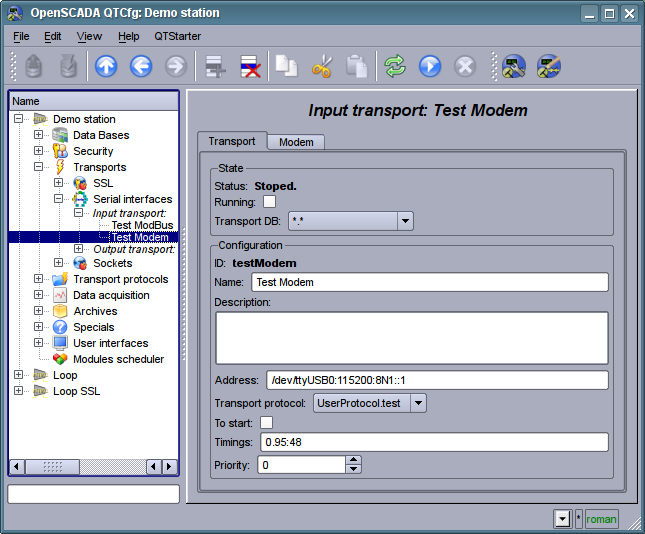
Fig.1. Configuration dialog of the incoming serial interface.
Using this dialog you can set:
- The state of transport, namely: "Status", "Running" and the name of the database, containing the configuration.
- Id, name and description of transport.
- Address of the transport in the format: "[dev]:[spd]:[format]:[fc]:[mdm]". Where:
- dev - address of the serial device (/dev/ttyS0);
- spd - speed of the serial devices from a number of: 300, 600, 1200, 2400, 4800, 9600, 19200, 38400, 57600, 115200, 230400, 460800, 500000, 576000 or 921600;
- format - asynchronous data format "<size><parity><stop>" (8N1, 7E1, 5O2, ...);
- fc - flow control: 'h' - hardware (CRTSCTS), 's' - software (IXON|IXOFF);
- mdm - modem mode, listen for 'RING'.
- The choice of transport protocol.
- The state, in which the transport must be translated at boot: "To start".
- Time intervals of the interface in the format of string: "[symbol]:[frm]". Where:
- symbol - symbol time, in milliseconds. Used for control of the end of the frame;
- frm - the maximum time of the frame in milliseconds. Used to limit the maximum size of the package of the request (frame).
Transport supports the ability to work as a modem. This mode is activated by the fifth parameter of the addresse and includes call waiting from the remote modem (request "RING"), answering the call (command "ATA") and the subsequent transfer the requests from the remote station to the transport's protocol. Turning off the communication session is made by the initiator of the connection and leads to the reconnect of the modem-receiver for the waiting for new calls.
To configure the modem of the incoming transport the special tab "Modem" is provided (Fig. 2).
Fig.2. "Modem" tab of the modem's configuration of the incoming serial interface.
With this dialog you can set the following properties of working with modem:
- Requests timeout of the modem in seconds.
- The time delay before initializing the modem in seconds.
- The time delay after initializing the modem in seconds.
- The first initialization string typically contains the reset command of the modem "ATZ".
- The second initialization string.
- The result string of the modem's initialization, usually "OK", with which the modem answers for initializing and which must be expected.
- The call's request, usually is "RING", which is sent by the modem in the case of an outgoing call.
- The answer to the call, usually is "ATA", which is sent to the modem to answer the call.
- String result of the answer the call, usually is "CONNECT", with which the modem answers to the answer command, and that is to be expected.
2. Outgoing transports
Configured and running outgoing transport opens port of the serial interface for the sending the requests through it.
Main tab of the configuration page of outgoing serial interface is shown in Fig.2.
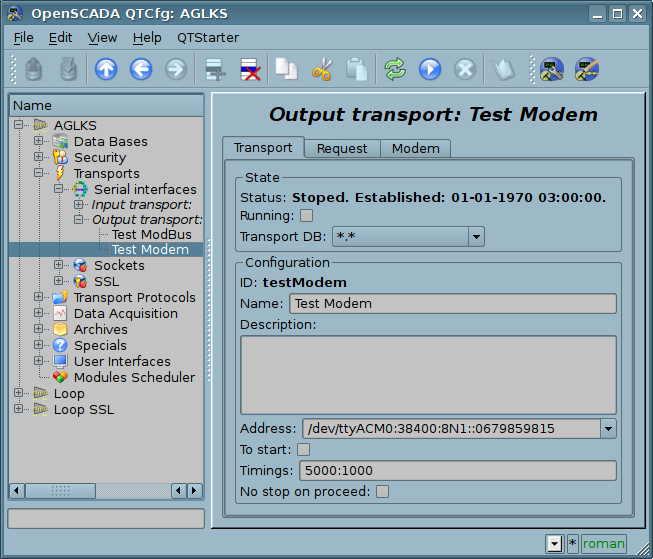
Fig.2. Main tab of the configuration page of outgoing serial interface.
Using this dialog you can set:
- The state of transport, namely: "Status", "Running" and the name of the database, containing the configuration.
- Id, name and description of transport.
- Address of the transport in the format: "[dev]:[spd]:[format]:[fc]:[modTel]". Where:
- dev - address of the serial device (/dev/ttyS0);
- spd - speed of the serial devices from a number of: 300, 600, 1200, 2400, 4800, 9600, 19200, 38400, 57600, 115200, 230400, 460800, 500000, 576000 or 921600;
- format - asynchronous data format "<size><parity><stop>" (8N1, 7E1, 5O2, ...);
- fc - flow control: 'h' - hardware (CRTSCTS), 's' - software (IXON|IXOFF);
- modTel - modem telephone, the field presence do switch transport to work with modem mode.
- The state, in which the transport must be translated at boot: "To start".
- Time intervals of the interface in the format of string: "[conn]:[symbol]". Where:
- conn - waiting time of the connection i.e. response from the remote device.
- symbol - symbol time, in milliseconds. Used for control of the end of the frame.
Transport supports the ability to work as a modem. This mode is activated by the fifth parameter of the addresse, and implies the phone call making at the number, specified in the fifth parameter, at the moment of transport's start. After installation the connection with the remote modem all requests are sent to the station behind the remote modem. Turning off the communication session at the transport's stop is made using the activity timeout.
To configure the modem of the outgoing transport the special tab "Modem" is provided (Fig. 4).
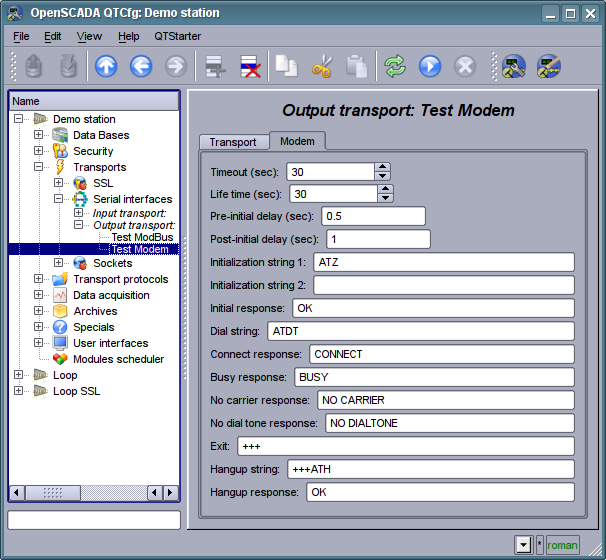
Fig.4. "Modem" tab of the configuration of modem of outgoing serial interface.
With this dialog you can set the following properties of working with modem:
- Requests timeout of the modem in seconds.
- Lifetime of the connection in seconds. If during this time there will be no data transmission over the transport the connection will be aborted.
- The time delay before initializing the modem in seconds.
- The time delay after initializing the modem in seconds.
- The first initialization string typically contains the reset command of the modem "ATZ".
- The second initialization string.
- The result string of the modem's initialization, usually "OK", with which the modem answers for initializing and which must be expected.
- Dialing string to the remote modem, usually is "ATDT". When you dial the phone number is appended to this prefix.
- The string result of the successful connection, typically is "CONNECT".
- The string result of the busy line, usually is "BUSY".
- The string result of the absence of the carrier in line, usually is "NO CARRIER".
- The string result of the lack of dial tone in the line, typically is "NO DIALTONE".
- The command hang up, is usually "+++ATH". This command is called whenever there is need to break the connection.
- The string result of the hang up command, usually is "OK", with which the modem answers to the command and which must be expected.
Links