The module <WebUser> of subsystems "User Interfaces"
 Ðóññêàÿ âåðñèÿ
 Óêðà¿íñüêà âåðñ³ÿ
| Module: | WebUser |
| Name: | Web-interface from the user |
| Type: | User Interfaces |
| Source: | ui_WebUser.so |
| Version: | 0.5.0 |
| Author: | Roman Savochenko |
| Translated: | Maxim Lysenko |
| Description: | Allows you to create your own user web-interfaces in any language of OpenSCADA. |
| License: | GPL |
Introduction
WebUser module provides the user with a mechanism to create Web-pages, and can process other Web-requests with the help of the internal language of OpenSCADA, usually JavaLikeCalc, without necessity of low-level programming of OpenSCADA.
Except of the module's belonging to the system OpenSCADA it also belongs and is the module of the <HTTP> transport protocol module. Actually, the WebUser call is made from Protocol.HTTP. The call is made through enhanced communication mechanism through the exported to the WebUser module functions: HttpGet() and HttpSet().
Addressing of the pages begins with the second element of the URI. It is connected with the fact that the first element of the URI is used to identify the module of user Web-interface. For example URL: http://localhost.localdomain:10002/WebUser/UserPage can be deciphered as a call of the user page "UserPage" of the Web module WebUser on the host localhost.localdomain on port 10002. In the case of absence of the second element of URI and instruction to display an index of user pages in the configuration the index of the page is generated (Figure 1).
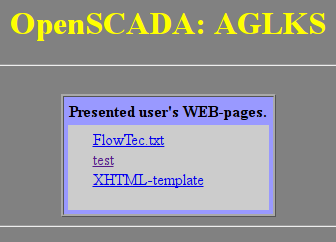
Fig.1. Index of user pages.
The main tab of the module configuration (Fig. 2) contains the state of the module, provides the ability to select the default page and allows you to make the list of user pages.
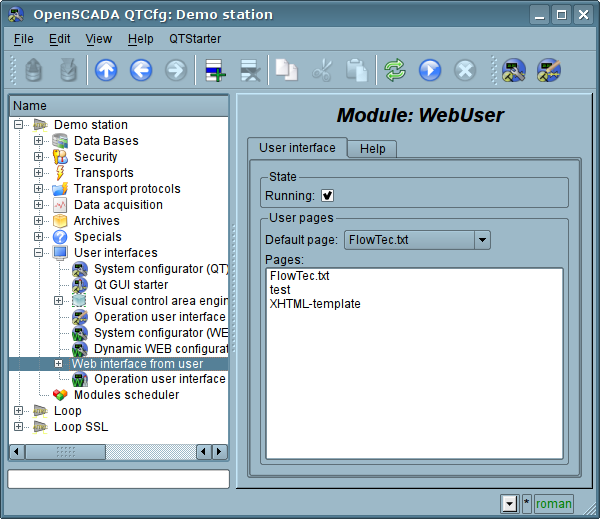
Fig.2. Main tab of the module's configuration.
1. WEB - pages
The module provides the ability to create multiple implementations of Web-pages in the object "User page" (Fig. 3).
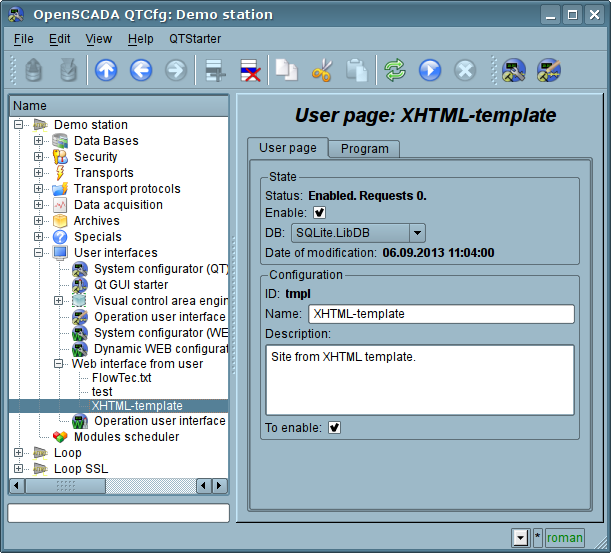
Fig.3. The main configuration page of the user page.
The main tab contains the basic settings of the user protocol:
- Section "Status" - contains properties that characterize the status of the user page:
- Enable - the page status "Enabled".
- DB - DB that stores configuration.
- Section "Config" - directly contains the configuration fields:
- ID - information on the page's identifier.
- Name - specifies the name of the page.
- Description - brief description of the page and its purpose.
- To enable - indicates the status "Enable", in which to transfer the page at startup.
All requests to the user pages are sent to the procedure of the processing of the requests of the user page, which is represented on the "Program" tab of the user page object (Figure 4).
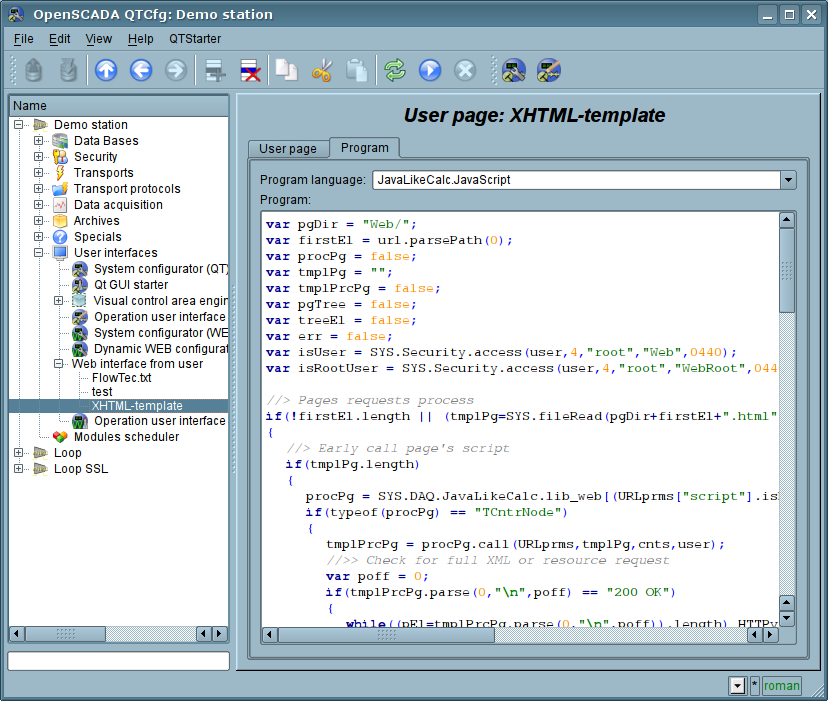
Fig.4. "Program" tab of the user page object.
Tab procedure's tab for processing the requests to the user's page contains the field for selecting the internal programming language of OpenSCADA and the text entry field for the processing procedure typing.
For the processing procedure the following exchange variables are predetermined:
- rez - processing result (by defaults - "200 OK");
- HTTPreq - the HTTP request method (GET,POST);
- url - URI of the request;
- page - contents of the Get/Post page for the request and respond as well;
- sender - request sender;
- user - authenticated user;
- HTTPvars - HTTP variables in the Object;
- URLprms - URL parameters in the Object;
- cnts - content items for POST in the Array<XMLNodeObj>.
The overall scenario of the user's page request:
- Âíåøíÿÿ ñåòåâàÿ ñòàíöèÿ ôîðìèðóåò HTTP çàïðîñ ñ URI âèäà "/WebUser/<UserPage>" êîòîðûé ïîïàäàåò íà òðàíñïîðò OpenSCADA ñ çíà÷åíèåì ïîëÿ êîíôèãóðàöèè "Ïðîòîêîë" ðàâíîãî "HTTP".
- Òðàíñïîðò íàïðàâëÿåò çàïðîñ íà ìîäóëü òðàíñïîðòíîãî ïðîòîêîëà Protocol.HTTP.
- Ìîäóëü òðàíñïîðòíîãî ïðîòîêîëà, â ñîîòâåòñòâèè ñ ïåðâûì ýëåìåíòîì URI, íàïðàâëÿåò çàïðîñ äàííîìó ìîäóëü.
- Äàííûé ìîäóëü âûáèðàåò îáúåêò ñòðàíèöû ïîëüçîâàòåëÿ, êîòîðàÿ óêàçàíà âî âòîðîì ýëåìåíòå URI.
- Âûïîëíÿåòñÿ èíèöèàëèçàöèÿ ïåðåìåííûõ HTTP-ïðîòîêîëà äëÿ ïðîöåäóðû ñòðàíèöû:
- HTTPreq - óñòàíàâëèâàåòñÿ â çíà÷åíèå ñòðîêè "GET" èëè "POST", â çàâèñèìîñòè îò òèïà çàïðîñà;
- url - àäðåñ çàïðàøèâàåìîãî ðåñóðñà (URI);
- page - ñîäåðæèìîå ïåðåäàâàåìîé ñòðàíèöû äëÿ ìåòîäà "POST";
- sender - àäðåñ îòïðàâèòåëÿ çàïðîñà;
- user - àäðåñ àóòåíòèôèöèðîâàííîãî ïîëüçîâàòåëÿ, åñëè àóòåíòèôèêàöèÿ èìåëà ìåñòî;
- HTTPvars - ðàçîáðàííûé ïåðå÷åíü ïåðåìåííûõ ïðîòîêîëà HTTP â âèäå ñâîéñòâ îáúåêòà;
- URLprms - ðàçîáðàííûé ïåðå÷åíü ïàðàìåòðîâ URL â âèäå ñâîéñòâ îáúåêòà;
- cnts - ðàçîáðàííûå ýëåìåíòû ñîäåðæèìîãî äëÿ POST â Array<XMLNodeObj>, ñ ñîäåðæèìûì ýëåìåíòîâ â òåêñòå è ñâîéñòâàìè â àòðèáóòàõ XMLNodeObj.
- Âûçîâ ïðîöåäóðû íà èñïîëíåíèå, êîòîðàÿ îáðàáîòàâ çàïðîñ ôîðìèðóåò ñîäåðæèìîå ñòðàíèöû â "page" è ðåçóëüòàò çàïðîñà â "rez".
- Â çàâåðøåíèè ôîðìèðóåòñÿ îòâåò ñ êîäîì âîçâðàòà HTTP èç "rez" è ñîäåðæèìûì èç "page".
Ññûëêè