14. The control interface of the system and the dynamic tree of the system objects (TCntrNode)
For complete coverage of the key components of the system by the network of the same structure objects the object of the dynamic tree node TCntrNode is provided. This objects provides the following functions:
- providing of the uniform access to system components, including the blocks of the dynamic access;
- building the distributed control interface.
Any object that has the need to provide dynamic access to itself or its components must be inherited from the object of the dynamic tree node TCntrNode. This relationship is automatically includes the node into the dynamic tree of objects covered by both: the direct and the reverse links, and also provides an opportunity to create containers for its own child nodes. In addition to this node is able to preact the inclusion and exclusion/remove of the node from the tree with the possibility of reject from the exclusion/removal.
The control interface of the system is included into the TCntrNode object and, accordingly, covers all the nodes of the dynamic tree of the system, allowing you to consistently manage the system regardless of the client tool used. The control interface of the system is based on the markup language XML. You can think of many ways to use control interface of system, as an example, we'll note the following most meaningful solutions:
- Web interface of the configuration ;
- GUI configuration interface (QT, GTK+, ...);
- reflection of the configuration in the network for distributed management of multiple OpenSCADA-stations from the single management area;
- using as the protocol for objects' data access from the network;
- provision of service functions to access of the exterior application and the single OpenSCADA components to the internal data.
The control interface of the system is implemented by the following components:
- information structure of the user configuration page;
- dynamic part in the form of requests for getting, modification of data and service requests;
- container or group of the above elements.
Information hierarchical structure contains information about public control elements and can be used to build custom dialogs for the node's control of the system.
The dynamic part contains the scripts of requests' to the control elements service which are described in the information structure; as well as hidden control elements in the form of service functions used for unified access to the node.
The container can also gather into the single request several information structures and dynamic parts, thereby optimizing the time of the request especially on the high latency network interfaces.
Overall control interface is built from individual components of the dynamic tree. Hierarchical inheritance from the TCntrNode object allows to realize multi-level addition of the configuration of the control interface. General view of the dynamic node tree is shown in Fig. 8.
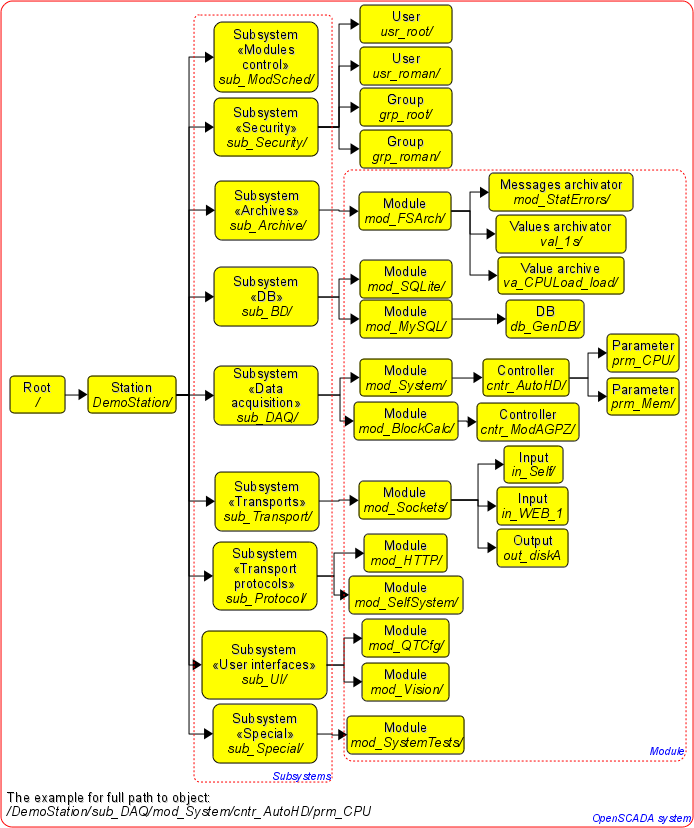
Fig. 8. Example of dynamic tree of the node in the OpenSCADA system.
System's nodes, containing data for the control interface of the system must also be connected to the dynamic tree of objects.
Connection of the node to the dynamic tree is done as follows:
- inheritance of the TCntrNode object or its child;
- information structure formation;
- service of the requests to dynamic data.
14.1. The syntax of the request and response of the control interface
Whole exchange with the control interface is done through the XML language. The internal exchange is done through the parsed structure of XML language (DOM), and external - through the transformation in the stream the characters of continuous XML-file and vice versa.
Request is executed by sending a container with some parameters in the attributes. The result is placed in the resulting container with the changes in certain attributes of the root container. In general, the request container can be written as follows:
<cmd path="/TreePath" user="user" force="1"/>
Where:
path - path to the node or to the branch of the tree;
user - user of the system on behalf of which the request is sent;
force - the sign: to execute the request without warning.
As the confirmation of the request's result it is set the result's attribute <rez> in values: 0-request succeeds, 1-warning (with the possibility of execution), 2-error. In the case of error and warning the messages are written in the text of the container and in the attribute mcat (message category): <cmd path = "/TreePath" user="user" force="1" rez="2" mcat="sub_DAQ/mod_BlockCalc>; Unable to delete the node </cmd>
Grouping request <CntrReqs> is processed at the API level of the node and does not require separate processing in the user code. In fact, into the tag <CntrReqs> may be placed any other requests with the possibility of hierarchical grouping by including of the internal tags <CntrReqs>. The only attribute of this tag is an attribute path, which indicates the path to the node and is the basis for internal requests.
<CntrReqs path="/sub_DAQ/cntr_gate">
  <get path="/%2fprm%2fcfg%2fNAME"/>
  <get path="/%2fprm%2fcfg%2fDESCR"/>
  <list path="/%2fserv%2fattr"/>
</CntrReqs>
14.2. Tag of the information structure for describing the groups of child branches of the page
Each page can contain groups of child branches. For descriptions of groups of branches there is the tag <branches>. Tag contains the description of groups of branches through embedded tags <grp>. The group tag can be accessed as for the "read" (visibility) and for modification ( the execution of commands for adding and removing the elements of the group), hence the element of the triad of access may be:
04 - there is an access only for reading;
02 - there is only access fro the writing, usually this value has no meaning because the write access means access for reading;
06 - there is an access to read, and to write.
Actions over the group of elements coincide with the actions over the list of visual elements "list", which is described below.
14.3. Tags of the description of the information structure of the control interface
Information tags for the XML form the alphabet of the formation of the description the configuration dialogs. Request command of the information part is: <info path="/TreePath" user="user"/>
As the result of the request it will be received the information structure of the page in accordance with the privileges of the specified user.
14.3.1. Area tag <area>
Areas are described with <area> tag and are intended to group the elements on different features. Area may include other elements and areas. The root ones form the bookmarks in the presentation of the user interface. To tag, you can access only to <read> or visibility, hence the element of the triad of access can be set to 00, if access is absent, or 04, if it is present.
<area id="base" dscr="Base information">
  <fld id="host" dscr="Host name" tp="str"/>
  <fld id="user" dscr="Operated user" tp="str"/>
  <fld id="sys" dscr="Station system" tp="str"/>
  <area id="other" dscr="Other options">
     <fld id="val" dscr="Value" tp="real"/>
  </area>
</area>
14.3.2. Data tags
Tags, which describe data, are shown in the table 1.
Table 1. Tags, which describe data
| Tag | Description |
| <fld> | The simplest data of the string, integer, real or boolean types. |
| <list> | Lists with data of string, real and boolean types. |
| <table> | Tables with the data in cells of string, integer, real, boolean types. |
| <img> | Images. |
a) Tag <fld>
<fld id="host" dscr="Host name" tp="str"/>
<fld id="user" dscr="Operated user" tp="str"/>
<fld id="sys" dscr="Station system" tp="str"/>
The tag can be accessed as to "read" and also to "write", therefore an element of the triad of access may be:
04 - there is an access only for reading;
02 - there is only access fro the writing, usually this value has no meaning because the write access means access for reading;
06 - there is an access to read, and to write.
Type of the element, discribed by the <fld> tag, is specified by the <tp> attribute (table 2).
Table 2. Attribute's <tp> values of the <fld> tag.
| Tag <tp> | Description |
| str | String type. <fld id="host" dscr="Host name" tp="str"/> |
| dec | Integer in decimal representation. <fld id="debug" dscr="Debug level" tp="dec"/> |
| oct | Integer in octal representation. <fld id="cr_file_perm" dscr="Make files permissions(default 0644)" tp="oct" len="3"/> |
| hex | Integer in hexadecimal representation. |
| real | Real value. |
| bool | Boolean sign ("false"|"true"). <fld id="log_sysl" dscr="Direct messages to syslog" tp="bool"/> |
| time | Time in seconds (from 01/01/1970). <fld id="v_beg" dscr="Start time" tp="time"/> |
Table 3. Actions over the element, described by the <fld> tag.